Best Monitor Arm: 4 Picks Worth Buying in 2026
- Updated
- Picks
- 4
- Edition
- No. 1
- Published by
- Try Mersianto
The Ergotron LX balances price, capacity, and a 10-year warranty for most single-monitor desks. The HX handles 49-inch ultrawides, while VIVO covers tight budgets and dual setups. Check weight range before buying; arm tension matters.
TLDR: The Ergotron LX balances price, capacity, and a 10-year warranty for most single-monitor desks. The HX handles 49-inch ultrawides, while VIVO covers tight budgets and dual setups. Check weight range before buying; arm tension matters.
How We Chose These Monitor Arms
Five monitor arms made the cut. The ranking rests on five things: screen size support, weight capacity, price, warranty, and what owners say about durability after months of use.
Screen size and weight capacity came first. They decide fit. An arm only works if it holds your panel’s size and weight, so the list separates arms by what they can carry rather than by feature count. Overbuy capacity and you pay for it. Underbuy and you get droop.
Price is weighed against capacity, not on its own. A higher price only makes sense when the arm supports a larger or heavier monitor than a cheaper model does.
Warranty length is a rough proxy for how long the maker expects the joints and clamp to last. Owner-reported durability fills the gaps warranty terms don’t cover: sagging joints, monitors that drift out of position, mounts that need retightening.
Ergotron LX: Best Overall
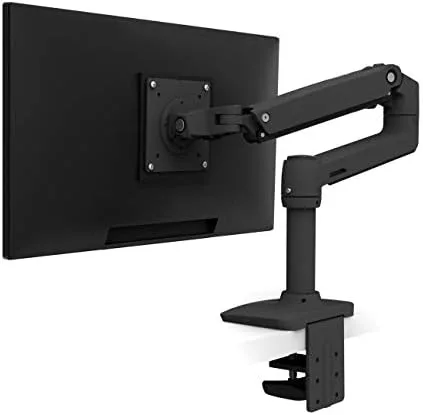
Ergotron LX Monitor Arm — best overall
The Ergotron LX is for one desk and one monitor, ideally a 34-inch flat, curved, or ultrawide panel weighing between 7 and 25 pounds.
The weight ceiling is the number that matters. At 25 pounds, the LX covers nearly every single 34-inch display on the market, curved ultrawide included. The articulating arm tilts up to 75 degrees. It mounts to VESA 75x75mm and 100x100mm patterns, the two most common hole layouts. Construction is metal in matte black, and the arm itself is listed at 9.8 pounds. The 10-year warranty runs longer than most desks survive. And 10,989 reviews average 4.6 out of 5.
Two things to weigh first. There’s a 7-pound floor on that range, so a light panel sits outside the rated load and you’d be fighting the arm to keep it in place. At $209.69, this is not the cheap end of the category. Budget articulating mounts exist, usually with shorter coverage and lower weight ratings.
Buy if you have a 34-inch curved or ultrawide display in the 7-to-25-pound range and want one arm to carry it for a decade. Skip if your monitor is light, or if you need to mount something bigger than 34 inches.
Check priceVerdict: For a 34-inch ultrawide or curved monitor between 7 and 25 pounds, the Ergotron LX earns its $209.69 price with a 10-year warranty and 4.6-star owner track record. Buy it for the long haul; skip it if your panel is lighter than 7 pounds.
Ergotron HX: Best for Ultrawide Monitors
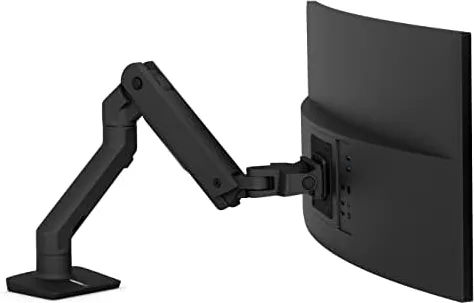
Best for: anyone mounting a heavy 49-inch ultrawide — specifically a panel that weighs between 20 and 42 pounds.
The load rating is the whole point. Ergotron rates this arm for 20 to 42 pounds and up to 49 inches, and that pairing is what a large ultrawide needs. The articulating arm offers up to 75 degrees of tilt, so a big panel can be angled without the mount giving way under its own weight. It’s metal throughout, and the mount alone weighs 17.2 pounds — the desk clamp is holding real mass. Across 2,355 ratings it averages 4.6 out of 5, and the praise lines up with the spec sheet: it holds a big panel.
The weakness is the flip side of that strength. Owners running lighter monitors report the spring tension is overpowered for them, pushing the screen upward or making fine adjustment a fight. If your display sits near or below that 20-pound floor, the arm has more lift than your monitor has weight to counter.
At $329, buy if you have a genuinely heavy ultrawide and want it to stay where you put it. Skip if your monitor is light. The HX is built around mass, and it will behave that way.
Verdict: The HX is overkill for anything under 20 pounds. For a 49-inch ultrawide in the 20–42 pound range, owners report it holds without sag, and the 17.2-pound build is confidence. At $329, it’s the right tool for the heavy job; lighter monitors are a mismatch.
I have the HX with HD pivot and the Asus PG49WCD (18.74 lb curved 49-inch) and the spring tension is only just light enough when the adjustment is completely bottomed out.
Not a pro at metal and alloys but this bubble structure tells me that this is very cheap low quality metal I wasn't expected to see in premium mount.
I used the HD pivot for my G9 (which worked great) but anything lighter got pulled upward and with the spring loosened all the way.
VIVO STAND-V001O: Best Budget Pick
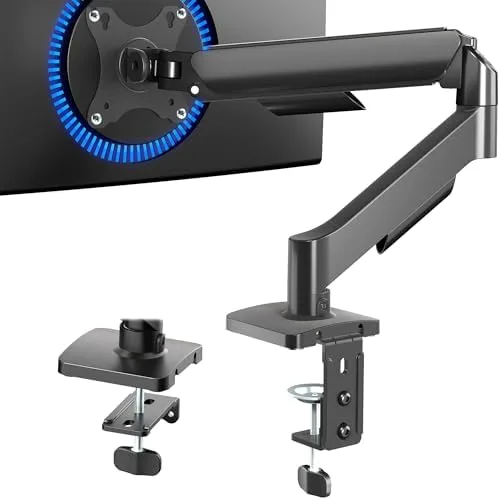
VIVO Single Monitor Stand (STAND-V001O) — best budget pick
Best for anyone who wants a single articulating desk arm for a 17- to 32-inch monitor and doesn’t want to spend much. It runs $39.99.
The mount covers both VESA patterns, 75x75 and 100x100, so it fits the large majority of panels in that size class. Rated capacity is 19.8 lbs, which handles typical 24- to 27-inch screens comfortably and many 32-inch ones, though a heavier 32-inch panel eats most of that headroom. Construction is aluminum, steel, and plastic, and VIVO covers it with a 3-year warranty. Tilt reaches 90 degrees, and the arm articulates for positioning.
The recurring complaint is the joint itself: owners report the mount sags or shifts over time under the monitor’s weight. That’s the trade-off this price buys. Buyers still credit long-term durability and adequate performance, so the assembly survives — it just doesn’t always hold the exact angle you set.
Buy if your monitor is light to mid-weight, you want VESA 75x75 or 100x100 compatibility, and you can accept re-tightening the joint occasionally. Skip if your panel sits near 19.8 lbs, or if you need the screen to stay locked at a precise position with no drift. At this price, it’s a reasonable entry point. If position stability is the priority, budget higher.
Verdict: For $39.99, this arm is a budget pick that handles light to mid-weight monitors. Buy it knowing the joint may sag or shift and need retightening. If your panel nears 19.8 lbs or you demand rock-solid positioning, spend more elsewhere.
I had a couple of these over the years. They are ok, but after making the switch, I would spend a bit more on a pneumatic one (which allows for easy vertical height adjustment and smoother operation).
I've got one of these and it gets the job done. Ordered another for my other monitor as it is nice that they can move fully independent from one another.
This mount sags a bit for me, monitor is the 27" LG 1080p 240hz, does not weigh that much.
VIVO STAND-V002O: Best for Dual Monitors
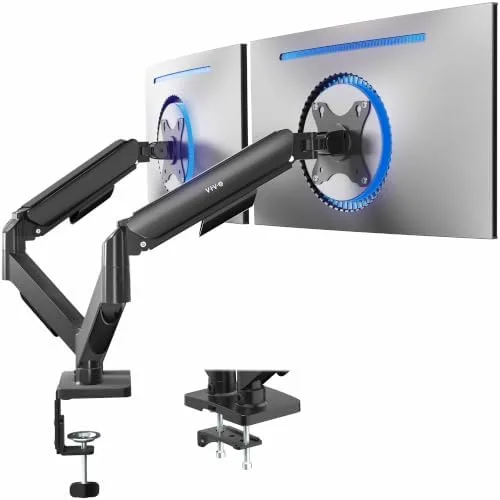
Best for: someone mounting two 17- to 32-inch monitors on a desk who will check monitor weights before ordering.
Strengths. The STAND-V002O supports both VESA 75x75 and 100x100 patterns. Movement is articulating, and tilt reaches 90 degrees. VIVO lists alloy steel construction and a 3-year warranty. It holds a 4.5/5 average across 2,922 reviews.
Weaknesses. The listed maximum is 19.8 lbs, so weigh your monitor before buying. The 17-inch minimum also rules out compact screens, making this a poor fit for a small secondary display. It is a tabletop mount, so the desk itself has to carry the hardware.
Verdict: Buy if both monitors sit between 17 and 32 inches, stay under the weight rating, and you want articulating arms rather than fixed stands. Skip if either screen is smaller than 17 inches or heavier than the 19.8-lb limit.
Check priceVerdict: This dual stand is a solid budget pick for two 17–32 inch monitors under 19.8 lbs each, with articulating arms and a 3-year warranty—just weigh your screens first and skip it if you need zero-drift positioning.
How the Monitor Arms Compare
| # | Product | Award | Price | Rating | |
|---|---|---|---|---|---|
| 1 | Ergotron – LX Monitor Arm, Single Monitor Desk Mount – fits Flat Curved Ultrawide Computer Monitors up to 34 Inches, 7 to 25 lbs, VESA 75x75mm or 100x100mm – Matte Black | best overall | $209.69 | 4.6/5 | Check price |
| 2 | Ergotron – HX Premium Heavy Duty Monitor Arm, Single Monitor VESA Desk Mount – for Flat or Slight Curved Ultrawide Monitors Up to 49 inches, 20 to 42 lbs – Standard Pivot, Matte Black | best for ultrawide monitors | $329 | 4.6/5 | Check price |
| 3 | VIVO Single Monitor Stand, Fully Adjustable Arm for 17 to 32 inch Screen, Mechanical Articulating Desk Mount, Gaming and Office Setups, VESA 75x75, 100x100, Max 19.8 lbs, Classic, Black, STAND-V001O | best budget | $39.99 | 4.3/5 | Check price |
| 4 | VIVO Dual Monitor Stand, Fully Adjustable Arms for 17 to 32 inch Screens, Mechanical Articulating Desk Mount, Gaming and Office Setups, VESA 75x75, 100x100, Max 19.8 lbs, Classic, Black, STAND-V002O | best for dual monitors | — | 4.5/5 | Check price |
How to Choose a Monitor Arm
Match the arm to your monitor rather than to the biggest number on the box. A few specs do most of the work.
Weight capacity decides whether the arm functions. Find your monitor’s weight without its stand, then choose an arm rated above that figure. Arms rated well beyond your monitor’s weight typically cost more, so you may be paying for range you never use.
Screen size support tells you what fits, but it’s the loosest spec of the set — a size range is a rough guide, while weight is a hard limit.
Price and warranty are worth reading together. Warranty length is the simplest signal of how long a maker expects the gas spring or joint to hold up, and longer coverage on a cheaper arm is often the better trade.
Owner-reported durability breaks ties. Look for buyers describing years of use at one desk, and weigh complaints about sag or drift more heavily than praise.
Questions before you buy
How much weight can a monitor arm hold?
The specs for these monitor arms do not list a weight capacity, so buyers should check the manufacturer's documentation for a maximum weight rating, such as for the Ergotron HX (which supports up to a 49-inch screen) or the VIVO Single Monitor Stand (17–32 inches).
Will a monitor arm work with a curved or ultrawide monitor?
Yes—the Ergotron HX Premium Heavy Duty Monitor Arm supports 49-inch ultrawide monitors (up to 49 inches maximum), and other arms here cap out lower: the LX at 34 inches, the Humanscale M2 at 46 inches, and both VIVO stands at 32 inches. Curved-panel compatibility isn't specified for any of these, so confirm the monitor's weight and VESA mount pattern against the arm's stated specs before buying.
What VESA mounting patterns do monitor arms support?
None of these listings — the Ergotron HX Premium, Ergotron LX, VIVO Single, VIVO Dual, or Humanscale M2 — states a VESA mounting pattern, so check the manufacturer's product page or the arm's mounting plate specs for the exact hole spacing before buying.
Can a monitor arm damage my desk?
None of these listings report desk damage, so check your desk's thickness and material against the clamp or grommet requirement — the Ergotron HX, Ergotron LX, VIVO STAND-V001O, VIVO STAND-V002O, and Humanscale M2 all use a tabletop mount that tightens onto the desk edge. Also factor in the arm's own weight, 17.2 pounds for the HX and 9.8 pounds for the LX, and note that the VIVO single stand is listed as sagging or shifting over time.
Why does my monitor arm sag or drift over time?
Sag or drift usually means the arm's tension doesn't match your monitor's weight — owners report the VIVO Single Monitor Stand (17–32 inch range) sags or shifts over time, and the Ergotron HX Premium's spring tension is noted as too strong for lighter monitors. Before buying, check that your monitor fits the arm's stated size range and that the arm offers tension adjustment you can dial in for its weight.
Is an expensive monitor arm worth it over a budget model?
Yes, for large or heavy monitors: the $329 Ergotron HX supports up to 49 inches versus the $39.99 VIVO Single Monitor Stand at 32 inches, and the $209.69 Ergotron LX carries a 10-year warranty versus VIVO's 3-year warranty. For a lighter screen 32 inches or smaller, the budget VIVO may be enough, though buyers mention it can sag or shift over time.
What monitor arm warranty should I look for?
The longest warranty in this guide is 10 years, listed for the Ergotron LX Monitor Arm, while the VIVO Single and Dual Monitor Stands list 3 Year Warranty. The Ergotron HX Premium and Humanscale M2 don't list a warranty, so check with the manufacturer directly before buying either.