All guides / Monitor Light Bars
Best Monitor Light Bar for Curved Monitors: 2 Options in 2026
- Updated
- Picks
- 2
- Edition
- No. 1
- Published by
- Try Mersianto
Only BenQ ScreenBar Pro and ScreenBar Halo 2 explicitly list curved-monitor fit in the data. Pro is the premium ultrawide pick; Halo 2 adds backlight and a wireless dial for less. Other listed bars lack curved-fit claims.
Best Monitor Light Bar for Curved Monitors: Start With Explicit Fit
A curved panel isn’t flat, so a clamp built for a flat monitor can’t sit flush. The more the screen bends, the more the bar rocks on its outer edges, tips forward, or throws light off to one side. The clamp might still grip. But an angled bar means glare on the screen and light landing where you don’t want it.
That’s why the shortlist for curved monitors starts smaller than the flat-screen list. Only bars that state curved-screen fit in the listing make the cut. “Fits most monitors” doesn’t. Silence about curvature doesn’t either.
After that, compare what you’d expect: price, rear backlight, and controls. Touch buttons, a dial, or a remote. A curved-fit claim settles positioning first. It tells you nothing about whether you can adjust the beam angle once the bar is mounted.
BenQ ScreenBar Pro — Best Overall for Curved Monitors
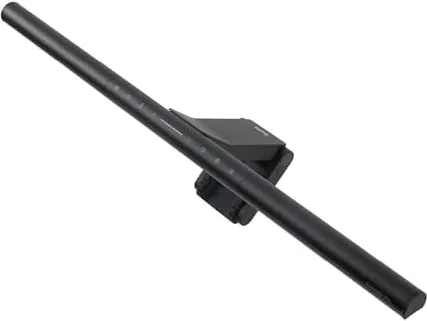
Best for a wide ultrawide or a multi-screen desk when you need task light and want to keep the desk clear.
Width leads. At 19.68 inches across, it covers screens that narrower bars leave half-lit. You get adjustable brightness and color temperature. A touch switch sits on the housing. A motion sensor handles on/off when you sit down. Owners say light quality is why they keep it. The rating: 4.8/5 across 1,342 reviews. The $199 build uses aluminum and zinc, weighs 1.76 pounds, and has a patented clamp that keeps the fixture above the panel, not on the desk.
Two honest limits. It’s corded only. Power is 5 volts DC over USB-C, transformer included, so you need a free port or wall adapter plus a cable run to the monitor. It’s also rated not water resistant. Keep it away from kitchen counters or anywhere splashes reach.
Verdict: get it for an ultrawide, a spare USB-C power source, and a monitor the clamp fits. Skip it if you need battery power, a freestanding lamp, or you’re lighting a narrow single screen where the extra width buys nothing.
Verdict: Buy it for ultrawide or multi-screen setups with a spare USB-C power source. The $199 aluminum-zinc build and light quality earn the price, but corded-only and no water resistance keep it desk-bound. Skip narrow monitors—you’d pay for width you won’t use.
The best thing is that the light comes from above the very center of the desk and is not covered by anything.
The BenQ is FAR superior. It's more stable, as in it grips better to the monitor (I have a curved one).
The dial for the the benQ is much premium as well, in terms of functions and engineering.
BenQ ScreenBar Halo 2 — Best for Backlight and Wireless Control
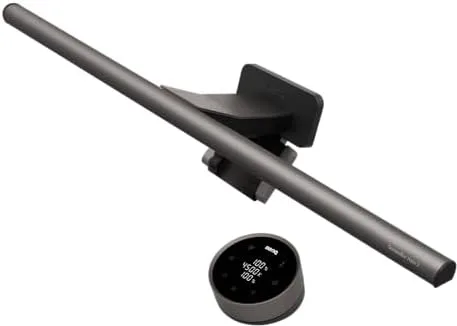
Best for desk workers who want backlighting, hands-off control, and room above the monitor.
This $139 bar is aimed at people who work late in a dark room. You want the wall behind the screen lit, not just the desk. Owners give it 4.7/5 across 1,387 reviews.
The backlight is the reason to pick this over a cheaper bar. It has two light sources. A downward-facing LED bar handles the desk, and a rear-facing light throws a soft glow on the wall behind the monitor. Brightness and color temperature are adjustable. The touch dial controller sits on the desk, not the lamp, so you don’t stretch to reach it. A motion sensor handles on/off automatically, bringing the light up when you sit down and dropping when you leave. It draws 5 watts over USB, ships with a webcam accessory, and includes a 1-year warranty.
The recurring complaint is bulk. The rear block behind the screen is large. Buyers mention it adds visible clutter, especially on thinner panels or against a wall where the assembly is noticeable from the side.
Buy it if you want wall backlighting, dial control, and motion sensing on a curved or flat monitor. Skip it if you want a low-profile bar or a minimal footprint behind the screen.
Verdict: Buy the Halo 2 if you want curved-monitor backlighting and motion-sensing control without a remote and can ignore the bulky rear block. At $139, owners rate it 4.7/5 for a reason: it lights desk and wall well. Skip if you need a low-profile bar or have a flat monitor.
I just want to give my short review about this light bar because honestly I love it, ive been eyeing on this for awhile now but I just never thought I will need the upgrade.
I mainly use it when I get in the dark which I prefer, I love the look of warm lighting during night and minimal lighting.
I use it both during the day and in low light, and honestly I'm so used to it that it's hard to do without.
ScreenBar Pro vs. ScreenBar Halo 2: Which Curved-Monitor Bar Fits Your Desk?
| # | Product | Award | Price | Rating | |
|---|---|---|---|---|---|
| 1 | BenQ ScreenBar Pro LED Monitor Light Bar (Black) - Ultrawide Lighting, Motion Sensor, Adjustable Brightness/Color Temperature, Eye-Care USB-C Monitor lamp, No Glare, Curved Monitors, Monitor accessory | best overall | $199 | 4.8/5 | Check price |
| 2 | BenQ ScreenBar Halo 2 LED Monitor Light Bar - Wireless Controller, Backlight, Motion Sensor, Adjustable Brightness/Color Temperature, Eye-Care, No Screen Glare, Fits Curved Monitor, Monitor Accessory | best for backlight | $139 | 4.7/5 | Check price |
How to Choose a Monitor Light Bar for a Curved Screen
The curved panel is the trap. A light bar’s clamp is built to grip a flat top edge. On a curved monitor, the surface angles away from the clamp. A bar that fits “most monitors” can tip, sit at an uneven distance from the screen, or hang over the display. So the first filter isn’t price. It’s the spec sheet. Shortlist only bars whose listings state curved-screen fit explicitly. “Fits most monitors” leaves the geometry unverified.
Once you have that shortlist, compare three things.
Price. Curved-compatible bars cluster in a tighter range than flat-panel models. The spread is smaller than it looks.
Backlight. Check whether the bar also throws light behind the monitor, not just down onto the desk.
Controls. Dial or touch? Do brightness and color temperature adjust separately? Owners report controls are the part they interact with every day. Weigh them alongside output.
Questions before you buy
Do monitor light bars fit curved monitors?
None of these light bars list curved-monitor compatibility—the BenQ ScreenBar Pro and ScreenBar Halo 2 use a clamp mount, and the Quntis uses a clip-on mount, with no curve specs given. Buyers should check the manufacturer's stated monitor thickness and curvature limits, since a clamp bar may sit unevenly or cast uneven light on a curved panel.
What makes the BenQ ScreenBar Pro and ScreenBar Halo 2 curved-monitor compatible?
The listed specs for both the ScreenBar Pro ($199) and ScreenBar Halo 2 ($139) don't mention curved-monitor compatibility—both simply show clamp-mounted, desktop installation with a patented clamp on the Pro. Buyers should check BenQ's own product page or the clamp's stated monitor-thickness and curvature range before assuming fit.
Is the ScreenBar Pro worth the higher price than the Halo 2?
The ScreenBar Pro costs $199 versus $139 for the Halo 2, and its owners highlight premium build, light quality, and ultra-wide illumination, while Halo 2 buyers mention the wireless dial controller, motion-sensor on/off, and adjustable brightness and color temperature. Since both score similarly (4.8 versus 4.7), the $60 difference comes down to whether you want the Pro's wider light spread and build or the Halo 2's wireless controller and motion sensor, though some Halo 2 owners note its bulky rear block adds visual clutter.
Does the Halo 2's backlight help with eye strain?
The product listing for the BenQ ScreenBar Halo 2 doesn't mention eye strain, so there's nothing to confirm whether its second light source (the rear backlight) reduces it. Buyers concerned about eye strain should check BenQ's own specifications or owner reviews for backlight-related eye comfort claims.
Can a curved monitor light bar cause glare on the screen?
Yes — buyers of the YEELIGHT Monitor Light Bar RGB Backlight report that light spills onto the monitor and face, which is the kind of spill that shows up as glare. For a curved screen specifically, check the product listing's stated curvature compatibility and mounting method, since none of these specs address curved displays.
How do these light bars attach to a curved monitor?
None of these light bars are listed as curved-monitor specific; they attach with a clamp or clip over the top bezel — the BenQ ScreenBar Pro uses a patented clamp, the ScreenBar Plus includes a clip, and the Quntis uses a clip-on mount. Before buying, check the clamp's maximum bezel thickness and its clearance for your monitor's curve with the seller or your monitor's specs.
What warranty comes with the BenQ ScreenBar Pro and Halo 2?
Both the BenQ ScreenBar Pro and the ScreenBar Halo 2 come with a 1-year warranty.
Are there cheaper curved-monitor light bars in this list?
Yes — the Xiaomi Mi Computer Monitor Light Bar and the YEELIGHT Monitor Light Bar RGB Backlight are both $39.95, and the Quntis Computer Monitor Lamp is $49.99, all well under the $139–$199 BenQ models. None of these listings state curved-monitor compatibility, though, so check the clamp and mounting spec with the seller before buying for a curved screen.