All guides / Monitor Light Bars
Best Budget Monitor Light Bar in 2026: 4 Picks Ranked
- Updated
- Picks
- 4
- Edition
- No. 1
- Published by
- Try Mersianto
The Xiaomi Mi Computer Monitor Light Bar is the best overall budget pick for its 500-lumen output, CRI 95, and wireless remote; the Monster Duo is the lowest-cost option, while the YEELIGHT adds Matter and Alexa control.
Why a Budget Monitor Light Bar Can Still Be Worth It
A monitor light bar sits above your screen. It throws light down onto the desk instead of across it. That’s the whole point. It lights the keyboard, papers, whatever you’re working on. And it cuts the glare you get when a desk lamp or ceiling fixture aims straight at a glossy panel.
Under $40, this category gets interesting. Spend more, and you’re mostly buying extras—color temperature presets, ambient backlighting, app control, automatic dimming. Not a different beam. Stay under $40, and you can still find bars with asymmetric optics, stepless or multi-step brightness control, and controls you don’t need to reach behind the monitor to use.
What changes with price is the trade-off list. Owners are unusually blunt about it. At this end, you’ll see complaints about weak clamps, narrow dimming ranges, and warmth or flicker at low settings.
This guide ranks sub-$40 light bars. It uses published specs, current price, and the trade-offs buyers report after living with them.
Xiaomi Mi Computer Monitor Light Bar — Best Overall
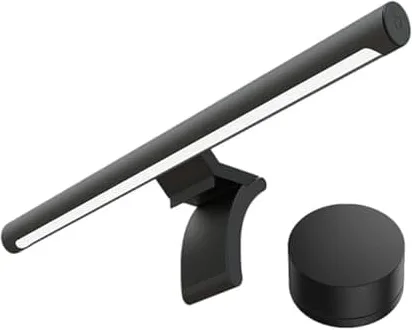
Best for a cramped desk. No floor lamp or clamp light will fit, and the light needs to come from above the keyboard, not from behind the screen.
What it gets right. The 25-degree beam angle does the real work. It aims a narrow band at the desk surface instead of washing across the screen. Max output is 500 lumens at 5 watts with a 95 CRI rating, so colors in documents and sketches read accurately, not flat. The aluminum body has a matte black finish. It mounts to the table—no arm, no clamp, no desktop footprint—at about 1.4 pounds. The wireless remote handles brightness and color temperature without reaching for the bar. Xiaomi also builds in Bluetooth with Mijia app support.
Where it falls short. Reliability is the recurring complaint. Owners report the bar shuts off suddenly and won’t power back on. That’s a hard failure with no user fix. Buyers mention the same symptom across multiple reviews. It turns a $39.95 accessory into e-waste. The remote also runs on two AAA batteries. One more thing to keep stocked.
Verdict. Buy if you want a slim, high-CRI bar with a remote and you’re okay with the gamble. Skip if you need desk lighting you can depend on daily. The dead-unit reports matter at 4.4 stars and 6,315 reviews.
Verdict: Buy it for the 500-lumen, 95 CRI beam and the remote. But treat the sudden power-failure reports as a real risk. At this price, you’re gambling on longevity. If you need dependable daily desk lighting, skip it.
I tried using a different cable, plugging to a different usb port/power source, replacing remote battery, and holding the remote down for a few seconds to no avail.
I was not convinced about its benefits initially, but after one day of using it, I'm starting to feel less eye strain and love the ambient light.
My monitor’s bezels are really thin so the mount is resting pretty much on the screen and there’s a slight white glare behind it.
YEELIGHT Monitor Light Bar — Best for Smart Home Control
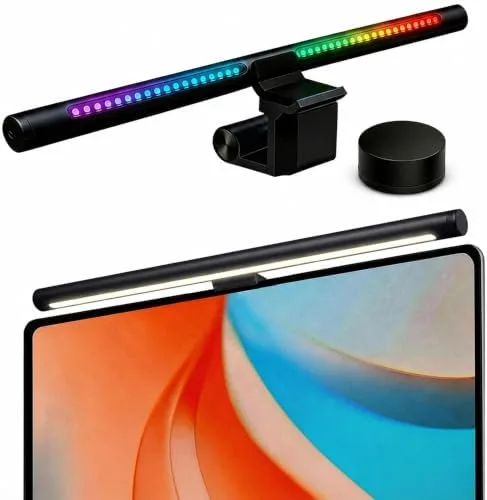
Best for a desk setup where app control and rear RGB glow matter more than a tightly focused beam—particularly a wide monitor at this price.
At 17.6 inches wide, it spans most large displays. The aluminum body and polished finish look more like the $39.95 price than the plastic housings common at this end. Output is 350 lumens with stepless dimming and a Ra98 color rating. Owners mention skin tones and paper look natural under it, not washed out. Matter support means it pairs with Alexa and other Matter controllers. There’s a touch surface and a remote, so you aren’t locked into the phone app for basic brightness changes. A 2-year warranty is included. The 4.5/5 average across 497 reviews fits a product that does the core job acceptably.
But the core job comes with spill. Owners report the beam scatters upward and sideways. It lights the monitor and your own face—the opposite of what a screen bar should do. The Yeelight app often fails to find the device and needs a 2.4 GHz network. Google Home users report trouble controlling white balance and the rear RGB. The Ambilight backlight shows one color at a time, not a gradient.
Buy if you want cheap Matter-connected desk lighting and can tolerate some glare. Skip if you need a clean cutoff or gradient RGB.
Verdict: This $39.95 screen bar fails the one job a screen bar must do: keep light off the monitor. Matter and Ra98 don’t matter when it scatters onto your screen and face. Skip it. Buy a bar with clean cutoff.
Hi, I recently just got one of these, and I set it up through the xiaomi home app, that way I can access it from both my Mac and Android device...
Also on the second photo it's aiming straight into my face and even then monitor's frame (which is behing lighbar) is illuminated.
I combined it with my Google Home and the problem unfortunately arises when controlling white balance and RGB rear lighting.
Mount-It! Monitor Light Bar — Best for Warranty Coverage
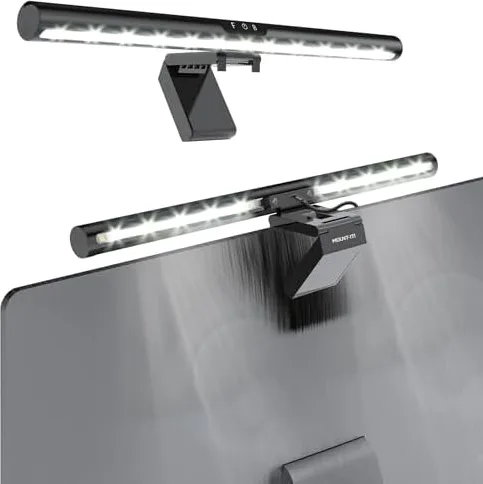
Best for: a desk or home-office setup where you want light over the monitor without giving up desk surface, and you care more about warranty length than a perfect review record.
At $32.99, the Mount-It! TS-7010 spans 16.5 inches and runs 80 LEDs. You get stepless brightness and adjustable color temperature, not a couple of fixed presets. It clamps to the desktop instead of sitting on a base, leaving the footprint under the monitor clear. The 5-year manufacturer warranty is the standout number. Most light bars in this price band carry one year or none. The body mixes aluminum and plastic and weighs about 1.3 lbs. That’s light enough that the clamp isn’t fighting the panel.
The catch: 39 reviews average 3.7 out of 5. That’s a mixed record, not a reassuring one. The spec sheet also contradicts itself on controls. The switch type is listed as push button, while the control method says touch. So what your finger does on top of the bar is genuinely unclear before it arrives. It is explicitly not water resistant. The shade is plastic, so keep it away from beverages and humid spots.
Buy if you want a cheap, wide USB light bar and the 5-year warranty is the deciding factor. Skip if you need splash resistance or want to know exactly how the controls work before ordering.
Check priceVerdict: The 5-year warranty is the standout. But 3.7 stars from 39 reviews and conflicting control specs make this a gamble. Buy only for warranty-backed basic light. Skip if you expect predictable controls or splash resistance.
Monster Duo Monitor Light Bar — Best Budget Pick
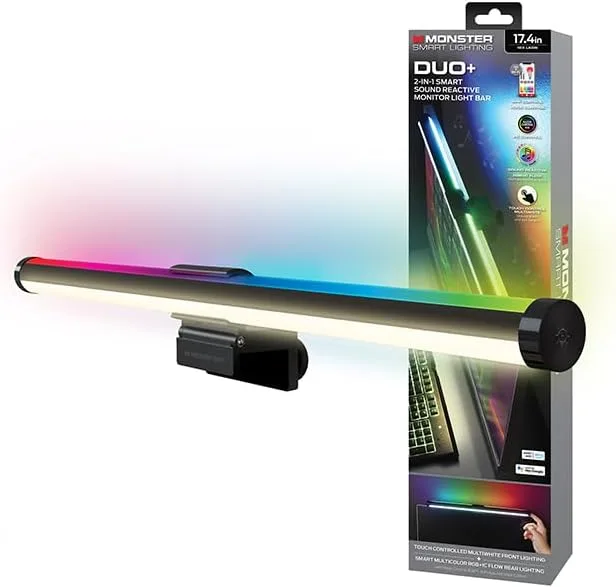
Best for a gamer who wants a $16.99 light bar to pull double duty: white light over the monitor for reading and RGBIC color for atmosphere in a game room.
On paper, the feature set is dense for $16.99. One LED source covers both RGBIC color and multiwhite tones. Control paths are broad for a budget bar—touch, app, voice via Alexa or Google, plus Razer Chroma sync. Music sync and sound reactivity are listed, so the light can follow audio rather than sit at a fixed color. Connectivity is Wi-Fi and USB power. The mount is tabletop. The body mixes metal and plastic with a matte or polished finish. Monster backs it with a limited one-year warranty.
The weakness is the review record. A 3.6 out of 5 average across just 8 reviews is a thin sample. Not damning, but not a track record either. Treat that rating as a rough signal, not a settled verdict. It’s also explicitly not water resistant. That rules out humid rooms, kitchen counters, and anywhere a drink might tip.
Buy if you want cheap, controllable RGB and white light from one bar, and you accept an unproven reliability record. Skip if you need moisture resistance or want a product with a deep base of owner feedback.
Check priceVerdict: At $16.99, it’s a gamble worth taking only for RGB-curious buyers who accept an unproven 3.6-star record and no water resistance. The feature list overpromises. Real-world reliability is unknown. Skip it as a daily desk light.
Budget Monitor Light Bar Comparison
| # | Product | Award | Price | Rating | |
|---|---|---|---|---|---|
| 1 | Xiaomi Mi Computer Monitor Light Bar - Easy Installation, Extra Computer Lighting w/o Taking Desktop Space, w/Wireless Remote Control Adjusting Lights Easily | best overall | $39.95 | 4.4/5 | Check price |
| 2 | YEELIGHT Monitor Light Bar RGB Backlight, Ra98 Computer Lamp Works with Matter & Alexa for Home Office Gaming, 350LM Dimmable No Glare Eye-Care LED Screen Light Bar, USB Desk Lamp Stepless Dimming | best for smart home | $39.95 | 4.5/5 | Check price |
| 3 | Mount-It! Monitor Light Bar, USB-Powered LED Lamp with Stepless Dimming and Adjustable Color Temperature, Eye-Caring Desk Light for Home, Office, and Gaming, Dual Light Modes, Space-Saving Design | best for warranty | $32.99 | 3.7/5 | Check price |
| 4 | Monster Duo Monitor Light Bar: Reduce Glare, Enhance Comfort, Boost Style, Level Up Your Gaming Atmosphere — 2-in-1 RGBIC & Multiwhite LED, App Voice Touch Control, Alexa Google Razer Chroma | best budget | $16.99 | 3.6/5 | Check price |
What to Look For in a Budget Monitor Light Bar
Under $40, put money into optics first and extras last. Look for an asymmetric or angled design. It should throw light down onto the desk, not forward into the panel. A bar that washes across the screen defeats the purpose.
Next, check the controls. Touch sliders and buttons are common at this price. Rotary dials tend to show up on pricier tiers. Confirm the brightness range. Check whether color temperature is adjustable or fixed. Fixed temperature is the most common compromise in this bracket.
Check the mount. Most bars clamp over the top bezel and lean on a counterweight. Note the maximum bezel thickness and the minimum clearance behind the monitor. A curved or very thin panel can rule out a clamp entirely.
Finally, check the power source. USB-A and USB-C are standard. But confirm the bar will run from your monitor’s own port, not require a separate adapter.
Questions before you buy
Do monitor light bars cause glare on the screen?
Some do: owners of the YEELIGHT Monitor Light Bar RGB Backlight report light spilling onto the monitor and face, while the BenQ ScreenBar E-Reading LED is noted for adequate light without glare and the Monster Duo Monitor Light Bar is marketed to reduce glare. Look for an asymmetric or angled design, since a bar that throws light down and forward rather than straight back is what keeps glare off the screen.
How bright should a budget monitor light bar be?
Among the budget options here, only the Xiaomi Mi Computer Monitor Light Bar ($39.95) lists an output figure — a 500-lumen maximum with a 95 color rendering index — and buyers mention it enhances ambient lighting, while the $16.99 Monster Duo and $39.95 YEELIGHT list no brightness rating at all. For those two, check the manufacturer's stated lumen output before buying. Note: the BenQ ScreenBar has the opposite problem — owners report its lowest brightness setting is still too bright.
Can a monitor light bar be powered from a USB port?
Yes — several bars here list USB connectivity, including the Mount-It! Monitor Light Bar ($32.99), the BenQ ScreenBar ($199), the BenQ ScreenBar Pro ($199), and the Monster Duo ($16.99), while the YEELIGHT Monitor Light Bar ($39.95) includes a USB port. The Xiaomi Mi Computer Monitor Light Bar is rated 5 volts at 1 A, which is within a standard USB port's output, though powering anything beyond that rating may require a wall adapter.
Are monitor light bars compatible with curved monitors?
None of these listings state whether they fit curved screens, so check the clamp style before buying: the BenQ ScreenBar Pro uses a patented clamp, the Mount-It! Monitor Light Bar is clamp-mounted, and the Xiaomi Mi Computer Monitor Light Bar is table-mounted, and you'd need to confirm with each maker that the mounting clears a curved bezel.
What color temperature is best for a monitor light bar?
Only the Xiaomi Mi Computer Monitor Light Bar lists a specific color temperature, 2700 Kelvin, while the Mount-It! Monitor Light Bar and BenQ ScreenBar Pro list adjustable color temperature instead. Since no single "best" value is given, check each model's adjustable range and controls to pick the warmth you prefer.
Do budget monitor light bars work with smart home systems?
Some do: the $39.95 YEELIGHT lists Matter and the $16.99 Monster Duo lists Wi-Fi with app and voice control, though buyers mention app and smart home integration issues with the YEELIGHT. Budget bars without a smart protocol, like the $32.99 Mount-It! (USB, push button only), will not connect to a smart home system.
How do monitor light bars attach to a monitor?
Monitor light bars typically attach by clamping over the top edge of the monitor, the installation type listed for the Mount-It! TS-7010 and BenQ ScreenBar Pro, while others such as the Xiaomi Mi Computer Monitor Light Bar and the BenQ ScreenBar list a tabletop or desktop mount. The Mount-It! and BenQ ScreenBar Pro specs also specifically describe a clamp-mounted design, and the BenQ ScreenBar Pro notes a patented clamp.
Is a wireless remote worth it on a budget monitor light bar?
On a budget, a remote comes down to whether it's bundled: the $39.95 YEELIGHT light bar lists "Touch and Remote control" in its switch type, while the other budget options like the $32.99 Mount-It! and $16.99 Monster Duo rely on push-button or touch only. The guiltiest part of a cheap remote is that no listing states whether it's infrared (line-of-sight) or RF, so check that detail if you want to control the bar from across the room.