Best Monitor Arm for Standing Desks: 4 Options in 2026
- Updated
- Picks
- 4
- Edition
- No. 1
- Published by
- Try Mersianto
Four monitor arms fit sit-to-stand desks. The Desky Heavy Duty leads on owner ratings and price, the Ergotron HX handles 49-inch ultrawides, the LX offers a 10-year warranty, and the LX Pro suits lighter screens with a wide tilt range.
How We Chose These Monitor Arms for Standing Desks
A monitor arm can hold a display dead steady at a fixed desk height and still drift the moment that desk starts moving. Sit-to-stand use adds constant vertical travel. That repeated cycling separates arms that stay put from ones that slowly sag out of position.
This guide compares four arms across four criteria. Supported screen size and weight range come first. An arm has to match both your display’s diagonal and its weight; a spring rated for a different load won’t hold position through the full range of motion. Warranty length is next—coverage is the clearest durability signal before ordering. Owner-reported reliability follows, built from what buyers say after months of daily raising and lowering. Price is a tiebreaker, not the starting point. A cheap arm that keeps its angle beats a costly one that doesn’t.
Desky Heavy Duty Ultrawide Monitor Arm
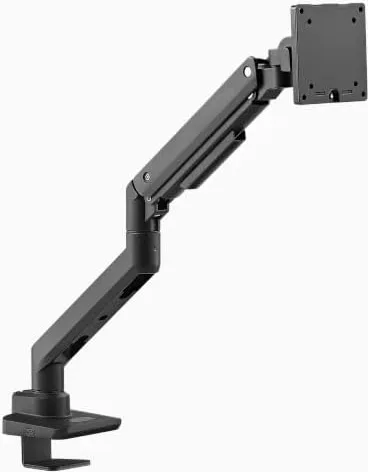
Best for a desk owner running a 17- to 49-inch ultrawide who wants an articulating arm that clamps to the desk edge and costs about $100.
The listing supports three claims. It’s rated for screens from 17 inches up to 49 inches, which covers most ultrawides on sale. It articulates and tilts up to 75 degrees, so you can swing the panel aside for desk work and push it back for viewing. A 5-year supplier warranty backs it, and the enclosure is aluminum alloy with plastic and rubber trim—not plastic throughout.
Owner feedback is positive: 4.7 out of 5 across 19 reviews. Buyers describe the build as sturdy and stable, the adjustment as easy, and large ultrawides as supported without trouble. That review count is small, and the mined feedback turned up no recurring complaint worth flagging. Reassuring, but the track record is thin.
Two limits. Mounting is clamp only. No grommet or wall option appears in the specs, so a desk with a thick lip, a welded frame, or a rear panel may not take it. And the plastic and rubber trim alongside the aluminum is where wear tends to show first on an arm adjusted daily.
Buy if you have a 49-inch-or-smaller ultrawide, a clean desk edge, and no need for grommet mounting. Skip if your desk can’t accept a clamp or you want an all-metal build.
Verdict: The Desky is the budget pick for big ultrawides—sturdy, easy to adjust, and backed by five years. Just know it’s clamp-only, uses plastic and rubber trim, and has only 19 reviews. For a clean desk edge and a 49-inch panel, it’s a real deal.
I have this one and the HD variant and the HD variant has been having issues but this one has been solid and adjusting it from the clamp on the desk couldn’t be easier
Coming from a dual arm monitor from another brand to the single arm from Desky has been a great experience.
I've bought the desky one for a Samsung M7 and it definitly is powerful and smooth to use, I love it.
Ergotron HX Premium Heavy Duty Monitor Arm
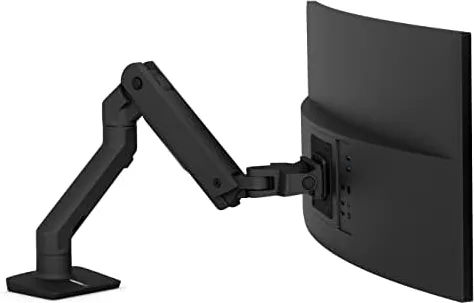
Best for: Anyone mounting a 49-inch ultrawide or a heavy flat panel weighing 20 to 42 lbs on a desk.
The load range is the whole story here. Ergotron rates the HX for monitors from 20 to 42 lbs and screens up to 49 inches. That covers the 49-inch ultrawide class most arms simply cannot hold. Buyers mention exactly that: it supports 49-inch ultrawide monitors without the sag lighter-duty arms show. The arm articulates, tilts up to 75 degrees, and is built from metal—the unit weighs 17.2 lbs, so the desk has to be solid. At $190, it sits well below premium dual-arm setups while carrying more weight than most single mounts. Its 4.6-out-of-5 rating across 2,355 reviews suggests the design holds up in practice.
The weakness is the same spring that makes the heavy lifting possible. Owners report the tension is overpowered for lighter panels. The recurring complaint is specific: monitors under roughly 20 lbs drift into an upward tilt even at the lowest adjustment setting. If your display is near the bottom of the range, expect to fight it. The listing’s minimum-supported screen size of 1 inch is meaningless in practice—the weight floor is what actually limits you.
Buy if your monitor is a 49-inch ultrawide or otherwise lands at 20 lbs and up. Skip if you’re mounting something lighter, because the arm will win.
Verdict: Buy it for heavy ultrawides; owners confirm it holds 49-inch panels without sag. Skip it for sub-20-lb monitors — the spring drifts upward and clamp-only mounting limits desks.
I have the HX with HD pivot and the Asus PG49WCD (8.5kg/18.74 lb. curved 49") and the spring tension is only JUST light enough when the adjustment is completely bottomed out.
Not a pro at metal and alloys but this bubble structure tells me that this is very cheap low quality metal I wasn't expected to see in premium mount.
I used the HD pivot for my G9 (which worked great) but anything lighter got pulled upward and with the spring loosened all the way.
Ergotron LX Monitor Arm
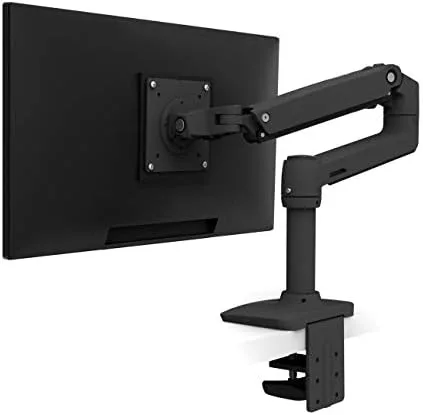
Who it’s for: Best for a desk where the monitor lands in one position and stays there for years—not for someone who swings the screen around all day.
The hardware is the argument for the $199 price. The arm is metal, the mount ships at 9.8 pounds, and it holds its shape instead of flexing under load. It carries monitors from 7 to 25 pounds, handles screens up to 34 inches, and the VESA plate takes both 75x75mm and 100x100mm patterns. Tilt reaches 75 degrees. The 10-year warranty says a lot about expected service life, and a 4.6 out of 5 average across 10,989 reviews suggests owners largely agree. One sizing note: the listing gives 34 inches as both the minimum and maximum supported screen size, so check your panel and its weight before ordering.
The weak point is the plastic bushing where the screw passes through the joint. Owners report that repeated movement grinds against it. The recurring complaint across reviews is bushing damage, usually on arms that get repositioned often. Set the arm once and wear stays low. Adjust it constantly and this is the part that goes first.
Buy if you want a single mount for a 34-inch screen that you position once and leave alone. Skip if you pivot, tilt, or swing your monitor throughout the day, or if your panel is lighter than 7 pounds.
Verdict: A long-warranty metal arm that’s built to stay put, not to be swung around daily. The plastic bushing in the pivot is the known weak spot, so it earns its keep only on desks where the monitor is set once. For static 34-inch setups, it’s a solid buy; for frequent adjustments, pass.
I have two Ergotron LX that have been in daily extended use for 11 years now with everything from 24" to 32" heavy monitors and will, I assume, work for... ever, as long as VESA 100 mounts are a thing.
Now, this also means the ergotron has more movement (shake) but worse, if you move your monitors a lot as I do, this screw will slowly grind away at the plastic.
You need to clean them now and then and maybe put some PTFE spray in the joints but don't see any wear on them really.
Ergotron LX Pro Premium Monitor Arm
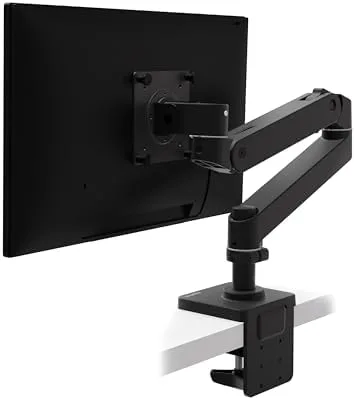
Best for: a single flat or curved monitor up to 34 inches that sits on the lighter side of the arm’s range, on a desk where you want the screen to swing and tilt rather than stay bolted in place.
The LX Pro handles one display between 4 and 22 pounds and mounts to either a 75 x 75mm or 100 x 100mm VESA pattern, so most mid-size flat and curved panels will bolt on without an adapter. It’s an articulating arm, not a fixed post, so it extends and folds rather than just rising up and down. Tilt travel reaches 85 degrees, which is more than most people need for a desk setup. Build is metal throughout, and the arm itself weighs 8.3 pounds—it feels like hardware rather than a plastic bracket. Ergotron backs it for 10 years, which is unusually long at this $199 price.
The complaints are consistent and worth weighing. Owners report the monitor tilts or drifts out of the angle they set, and some buyers describe the materials as cheaper than expected for the money. Both issues tend to show up as you approach the top of that 22-pound ceiling, which is why the lighter end of the range is the safer bet.
Buy if your monitor is on the lighter side and you want a long warranty with real articulation. Skip if you’re near 22 pounds or need the tilt to hold rock-solid all day.
Rated 4 out of 5 across 319 reviews.
Verdict: The LX Pro is a $199 bet that pays off only with lighter panels. A 10-year warranty and 85-degree articulation impress, but owners report tilt drift and cheap-feeling materials near the 22-pound ceiling. Buy it for a sub-15-pound monitor you move often; otherwise, spend the money on a sturdier arm.
Plastic where metal used to be and monitor was tilting sideways when the arm is extended, even when rotation is locked with an extra screw.
It doesn't keep the angle if you turn your monitor away from you (180°), so you will always have to re-adjust it or it will be crooked.
I am pro owner but not a happy one. In general, the impression is that they cut a lot of corners for the product of such price.
How the Four Arms Compare
| # | Product | Award | Price | Rating | |
|---|---|---|---|---|---|
| 1 | Desky Heavy Duty Ultrawide Monitor Arm Black | best overall | $99.99 | 4.7/5 | Check price |
| 2 | Ergotron – HX Premium Heavy Duty Monitor Arm, Single Monitor VESA Desk Mount – for Flat or Slight Curved Ultrawide Monitors Up to 49 inches, 20 to 42 lbs – Standard Pivot, Matte Black | best for ultrawide monitors | $190 | 4.6/5 | Check price |
| 3 | Ergotron – LX Monitor Arm, Single Monitor Desk Mount – fits Flat Curved Ultrawide Computer Monitors up to 34 Inches, 7 to 25 lbs, VESA 75x75mm or 100x100mm – Matte Black | best for long term use | $199 | 4.6/5 | Check price |
| 4 | Ergotron – Upgraded LX Pro Premium Monitor Arm, Single Monitor Desk Mount – fits Flat Curved Ultrawide Computer Monitors up to 34 Inches, 4 to 22 lbs, VESA 75x75mm or 100x100mm – Matte Black | best for lighter monitors | $199 | 4/5 | Check price |
What to Look for in a Standing Desk Monitor Arm
Start with the weight range, not the screen size printed on the box. Spring tension is matched to a band of monitor weights. A display at the light end may not settle firmly; one at the heavy end sags. The listed screen size assumes a typical panel weight, so a denser display within that size can still overwhelm the arm.
Look for an arm that holds its angle through a full sit-to-stand cycle without re-tensioning each time. Owners report that inexpensive springs fail here first: the joint creeps down over weeks, or the height needs a fresh adjustment every time the desk moves. Cable routing matters too, since the arm travels with the display—a channel or clips keep slack from snagging on the desk edge.
Warranty length is the clearest proxy for spring and clamp quality, so weigh it heavily against a lower sticker price. Also confirm the mount clears your desk edge or grommet hole.
Questions before you buy
Do monitor arms stay stable when a standing desk moves up and down?
The guide does not say whether these arms stay stable while a standing desk moves, though buyers mention the Desky Heavy Duty Ultrawide Monitor Arm ($99.99) has a "sturdy and stable build," and the Humanscale M8.1 and Ergotron HX and LX arms use tabletop or clamp mounts. Check with the manufacturer or other owners about sway and clamp re-tightening on height-adjustable desks before buying.
How much weight can these monitor arms support?
None of these listings state a weight capacity — they give supported screen sizes instead, such as 49 inches maximum for the Desky Heavy Duty Ultrawide and Ergotron HX Premium, and 34 inches for the Ergotron LX models (the Humanscale M8.1 lists a 19-inch minimum with no maximum). Check the manufacturer's published weight limit for the exact model before buying.
Will a 49-inch ultrawide monitor fit on these arms?
Yes — the Desky Heavy Duty Ultrawide Monitor Arm Black and the Ergotron HX Premium Heavy Duty Monitor Arm both list a maximum supported screen size of 49 inches, so either will fit a 49-inch ultrawide. The Ergotron LX and LX Pro top out at 34 inches, and the Humanscale M8.1 lists only a 19-inch minimum with no maximum, so check with the manufacturer before using it.
Do I need a clamp mount or a grommet mount for my standing desk?
The guide only covers clamp-style and tabletop mounts — the Humanscale M8.1 includes a two-piece clamp mount, and the Desky Heavy Duty Ultrawide lists a clamp mounting type — so nothing here answers grommet versus clamp for your specific desk. Check your desktop for a pre-drilled grommet hole and its diameter, and confirm the edge thickness and clearance underneath before choosing.
What VESA patterns do these monitor arms support?
None of these listings state a VESA mounting pattern — only the Desky Heavy Duty Ultrawide Monitor Arm lists "VESA" under compatible devices, with no size given. Buyers should check each arm's manufacturer spec sheet or product page for its supported VESA hole spacing before ordering.
How long should a monitor arm warranty be?
Among these arms, the longest coverage is 10 years on the Ergotron LX and Upgraded LX Pro, while the Desky Heavy Duty Ultrawide offers 5 years and the Humanscale M8.1 lists only a limited warranty with no term stated, so 5 to 10 years is a reasonable benchmark to look for.
Why do some monitor arms struggle with lighter monitors?
Heavy-duty arms like the Ergotron HX Premium (rated up to 49 inches) use stiff springs tuned for big displays, so on a light monitor the tension overpowers it and the arm drifts up or won't hold position. Ergotron's own owner feedback on that model specifically notes the spring tension is overpowered for lighter monitors, so match the arm's minimum weight rating to your display.