What's the Best Dual Monitor Arm? 5 Picks Compared
- Updated
- Picks
- 5
- Edition
- No. 1
- Published by
- Try Mersianto
Ergotron's LX side-by-side arm leads on durability and a 10-year warranty, but it costs more than most setups need. VIVO and Kensington cover smaller budgets, while Ergotron's HX and vertical stacking models handle larger, heavier pairs.
How We Chose the Best Dual Monitor Arms
Every dual monitor arm here earns its place on two specs: weight capacity per screen, in pounds, and the screen size range, in inches. A pair of 24-inch displays at 9 pounds each asks far less of a gas spring than two 32-inch panels at 17 pounds. An arm sized for the lighter pair can sag, drift, or refuse to hold position under the heavier one.
Then we look at warranty length and terms. How long does coverage run? Is the lifting mechanism included? That’s the part that fails first. Owner reports fill in what spec sheets can’t: how an arm behaves after months of adjustment rather than on day one, how much desk space the base occupies, and whether cable management survives repeated repositioning.
A clean photo doesn’t get a pass. The picks are matched to weight, screen size, and budget. The right arm for two 27-inch panels is often not the right arm for two 32-inch ones.
Ergotron LX Dual Side-by-Side Arm (45-245-224): Best Overall
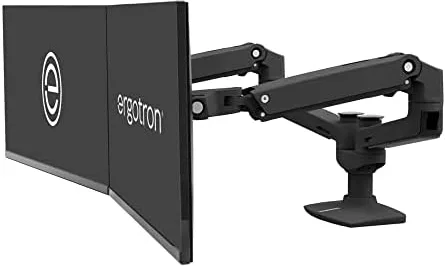
Ergotron LX Dual Monitor Arm — Best Overall
This is for someone who repositions two monitors daily and wants a desk clamp mount that won’t need replacing.
The kit weighs 13.9 pounds and carries two displays from 7 to 20 pounds each, up to 27 inches. That per-arm range is the practical part: it covers most 24- to 27-inch office panels plus the occasional heavier one. The articulating design gives you 75 degrees of tilt for stacking a monitor low or angling it away from window glare. It’s a tabletop clamp mount, so no drilling and nothing screwed into drywall behind the desk. Ergotron backs it for 10 years. That’s unusually long for a moving mechanical part, and it’s the clearest signal of how the metal arms are expected to hold up. At $425.99 with a 4.5/5 average across 450 reviews, buyers clearly aren’t treating it as a disposable purchase.
The recurring complaint is the joints. Owners report the plastic bushings and screws wear or crack after heavy, repeated adjustment—the exact behavior this arm is bought for. Move it a few times a year and it’s a non-issue. Swing both arms through their full arc every day and those parts are the first thing to go.
Sound motion and a decade of coverage, undermined by plastic where metal would matter.
Buy if you have two mid-weight monitors and adjust them occasionally. Skip if you need constant repositioning—or if $425 is too much for a mount you’ll still be nursing along.
Verdict: The Ergotron LX earns its best-overall spot only if you adjust monitors occasionally. Two mid-weight screens and light repositioning? Buy it for 10-year coverage and rock-solid metal. But daily full-arc swings will crack plastic bushings, so heavy users should skip this $426 mount and accept a shorter warranty elsewhere.
I have two Ergotron LX that have been in daily extended use for 11 years now with everything from 24" to 32" heavy monitors and will, I assume, work for... ever, as long as VESA 100 mounts are a thing.
Now, this also means the ergotron has more movement (shake) but worse, if you move your monitors a lot as I do, this screw will slowly grind away at the plastic.
I'm thinking of buying this one as I have an ergotron lx and the plastic bushing have the same issue where it gets damaged.
VIVO STAND-V102O: Best Budget
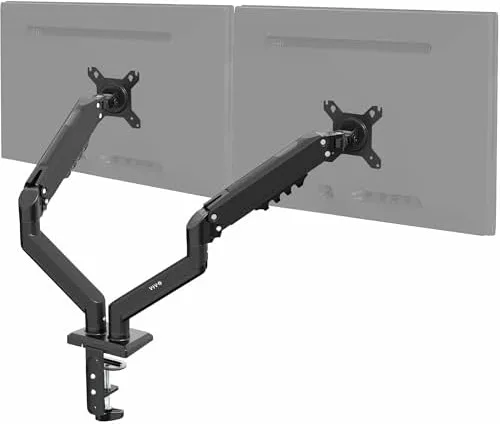
Best for: anyone running two 13–30 inch monitors who wants full articulation without paying more than about $50.
The price is the headline. At $49.99 this VIVO STAND-V102O sits well under most dual-arm mounts, and the 4.4 out of 5 average across 1,938 reviews suggests the savings aren’t coming out of reliability. Articulation isn’t stripped down, either. The arms swivel, rotate, tilt, and articulate, with a maximum tilt angle of 90 degrees. So you can run stacked, side by side, or flip a screen to portrait. The 13–30 inch range covers the common pairings—two 24-inch panels, or a 27-inch plus a smaller secondary. Construction is alloy steel in black, and VIVO backs it with a 3-year warranty, which is longer than the coverage on a lot of budget arms.
On weaknesses, the spec sheet lists no weight capacity. If you’re mounting a heavy 30-inch panel, you have no published number to check it against before buying. Tension-spring arms also have to be balanced against the weight of the screen they’re carrying. Without that figure, the margin is guesswork. Tilt tops out at 90 degrees.
Buy if you want two screens on articulating arms for around $50 and your monitors sit in the mainstream weight range. Skip if you need a published weight rating or you’re mounting something unusually heavy.
Verdict: The VIVO STAND-V102O is a $50 gamble: decent articulation, alloy steel, and a 3-year warranty, but no published weight capacity means you’re trusting your monitors to guesswork. Fine for two lightweight screens; if you’re mounting anything heavy or need certainty, skip it.
i don't get any noticeable wobble with my dual arm.
Ergotron HX Dual Monitor Arm (45-476-224): Best for Large Screens
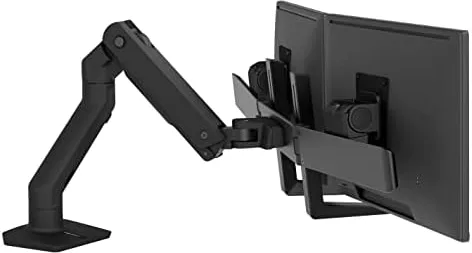
Best for: anyone running two 32-inch monitors who wants the arm clamped to the desk and left alone, and who would rather buy one mount than replace a cheaper one twice.
Strengths. The aluminum construction is the most consistent thing buyers mention across 129 reviews averaging 4 out of 5, and the materials match the price. Each arm carries 5 to 17.5 pounds, so the weight ceiling covers most 32-inch panels on the market. Articulation runs through the full range. The 75-degree maximum tilt lets you angle a screen down for seated work or up when you stand. At $324.99 for a dual setup, it undercuts pairing two single premium arms.
Weaknesses. Spring tension is the recurring gripe. Buyers report the adjustment window is too narrow—the arms are over-sprung for light panels and only just adequate at the heavy end. If your monitors sit near 5 pounds, expect to fight the arm. If they sit near 17.5 pounds, expect to run tension at the stop. The 5.5-pound mount also needs a desk edge that can take the clamp load without flexing.
Verdict. Buy if your two monitors land in the middle-to-heavy part of the range and you want an aluminum dual arm built to stay put. Skip if you’re mounting lightweight panels, if you need to adjust tension often, or if $324.99 is more than the monitors themselves are worth to you.
Verdict: Buy if your two monitors land in the middle-to-heavy part of the range and you want an aluminum dual arm built to stay put. Skip if you’re mounting lightweight panels, if you need to adjust tension often, or if $324.99 is more than the monitors themselves are worth to you.
On the other hand, after having it for a few years now, I realize I'll be able to get likely 10+ years out of this and it's nice to have a no compromise mount every time I upgrade my monitor.
I have the HX with HD pivot and the Asus PG49WCD (8.5kg/18.74 lb. curved 49") and the spring tension is only JUST light enough when the adjustment is completely bottomed out.
As an owner of the ergotron hx for my 49" I can say for me it delivers on quality and the safety of my hardware making it worth the money.
Kensington SmartFit K59601WW: Best for One-Touch Adjustment
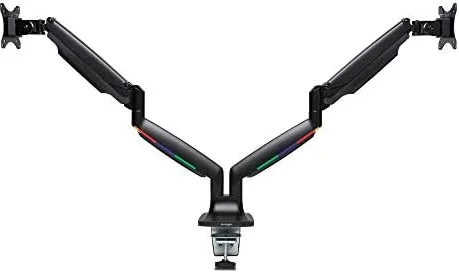
Best for: a two-monitor desk where you raise and lower the screens by hand all day and don’t want to touch a tension screw.
One-touch height adjustment is the draw here. It’s a gas-spring articulating arm, backed by 90 degrees of tilt—set the height, then push it around. It fits a wide range: 13 to 34 inches, VESA mountable, and it attaches either with a C-clamp or through a grommet hole. Owners report rock-solid stability once mounted. Repeat buyers own multiple units, which is the kind of signal a 4.3/5 average across 61 reviews supports. At $59.98 for a dual arm, the price is the other argument.
The weaknesses are structural rather than anecdotal. The enclosure is plastic, not metal, so this isn’t a buy-it-for-life piece of hardware. The listed item weight is 15.4 pounds, and the warranty runs 2 years. The mined complaint record here is thin—no recurring failure pattern surfaces in the reviews. So there’s no single defect to warn you about, and no pattern to reassure you either.
Buy if you need one-hand height changes across two screens sized 13–34 inches and your desk takes a clamp or a grommet hole. Skip if you want a metal-bodied arm, want more than 2 years of coverage, or can’t drill or clamp.
Verdict: Buy it only if you accept a plastic body as the price of $60 one-touch gas-spring height. Owners say it holds, but the 2-year warranty and plastic shell make this a disposable stand, not a long-term mount.
Honestly wouldn’t get any other arm. I have this one and the HD variant and the HD variant has been having issues but this one has been solid and adjusting it from the clamp on the desk couldn’t be easier
Yes. I have 3 of them and nothing short of nuclear fallout would move my monitors.
Ergotron LX Vertical Stacking Arm (45-509-224): Best for Stacked Setups
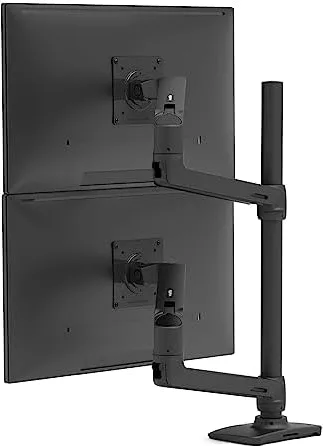
Best for anyone stacking two monitors in a vertical column rather than placing them side by side. The Ergotron LX holds two screens up to 40 inches each, as long as each weighs between 7 and 22 pounds. Owners rate it 4.6 out of 5 across 1,559 reviews. The mount weighs 19 pounds and is made of metal, and Ergotron backs it with a 10-year warranty. The mount is articulating and lists a maximum tilt angle of 75 degrees. The finish is matte black. List price is $484.99.
The honest weakness, repeated in owner feedback: downward or negative tilt is essentially zero, and pins may block what little movement exists. If you need the lower monitor angled upward or the top monitor tilted down steeply, this arm can work against you. Buy if you want a metal mount with a long warranty for two stacked monitors inside the 7-to-22-pound range and the 40-inch ceiling. Skip if you need meaningful negative tilt or your monitors fall outside those limits.
Verdict: At $485 and 19 pounds of steel, this Ergotron earns its 10-year warranty for stacked setups up to 40 inches. But the near-zero negative tilt is a real limitation: if you need the top display angled down steeply, buy something with true downward travel. For tall-pole stability and longevity, it’s the one to beat.
Test setting it with my 32 incher I found that (yes I should read the specs next time) there is basically 0 (says -5 degrees) negative (downwards) tilt to the arm.
Very disappointed at that, even though the construction of the arm is really good.
i just unbent the pins blocking it and i’m getting at least -20°.
Side-by-Side Comparison
| # | Product | Award | Price | Rating | |
|---|---|---|---|---|---|
| 1 | Ergotron – LX Dual Monitor Arm, VESA Desk Mount – for 2 Monitors Up to 27 Inches, 7 to 20 lbs Each – Matte Black | best overall | $425.99 | 4.5/5 | Check price |
| 2 | VIVO Aluminum Articulating Dual Monitor Arm for 13 to 30 inch Screens, Desk Mount Tension Spring Monitor Stand for 2 Screens, Black, STAND-V102O | best budget | $49.99 | 4.4/5 | Check price |
| 3 | Ergotron – HX Dual Monitor Arm, VESA Desk Mount – for 2 Monitors Up to 32 Inches, 5 to 17.5 lbs Each – Matte Black | best for large screens | $324.99 | 4/5 | Check price |
| 4 | Kensington SmartFit Dual Monitor Arm (K59601WW) Black | best for one touch adjustment | $59.98 | 4.3/5 | Check price |
| 5 | Ergotron – LX Vertical Stacking Dual Monitor Arm, VESA Desk Mount – for 2 Monitors Up to 40 Inches, 7 to 22 lbs Each – Tall Pole, Matte Black | best for stacked setups | $484.99 | 4.6/5 | Check price |
How to Choose a Dual Monitor Arm
Start with weight, not screen size. Arms are rated per arm, and the number that matters is the monitor’s weight with its stand removed. A 27-inch panel can land anywhere from about 8 to 20 pounds depending on panel type and backlight. If your screens sit near the top of a listed capacity, gas-spring arms tend to hold position better than mechanical-spring models. Owners report that overloaded arms sag or drift downward over months.
Next, confirm the VESA pattern on the back of each monitor and the arm’s stated screen range. An arm rated for 17 to 32 inches usually accommodates most desk setups. But the height of the pole and the reach of each joint determine whether the screens actually meet at the center of your desk.
Check desk compatibility. Clamp mounts need a thick enough edge and a clear underside. Grommet mounts need an existing hole. Finally, compare warranty length and how owners describe customer service. Gas springs and tilt joints are the parts most likely to fail first.
Questions before you buy
What weight capacity should a dual monitor arm have for my screens?
None of these dual arms list a weight capacity, so pick by the supported screen size and check the monitor's own weight against the arm's manual before buying: the Kensington SmartFit covers 13–34 inches, the VIVO STAND-V102O covers 13–30 inches, and the Ergotron HX is rated up to 32 inches.
How much desk space does a dual monitor arm free up?
The listings don't state a desk-space figure, so buyers should check the mount base footprint and clamp or grommet depth for the specific model, such as the tabletop-mounted Ergotron LX Dual Monitor Arm or VIVO Aluminum Articulating Dual Monitor Arm, against their own desk.
Is a gas-spring arm better than a tension-spring arm?
The guide doesn't rank gas-spring against tension-spring arms, so there's no head-to-head answer here — only the Kensington SmartFit (K59601WW, $59.98) is described as gas-spring, while the Ergotron HX Dual ($324.99) lists "spring tension adjustment" as a drawback. Buyers should instead check the arm's supported screen size range, tilt range, and warranty, since those are what the listed models actually differ on.
Can a dual monitor arm hold two different sized monitors?
Yes — dual arms such as the VIVO STAND-V102O (13 to 30 inches) and the Kensington SmartFit K59601WW (13 to 34 inches) are listed with a supported screen-size range rather than one fixed size, so two differently sized monitors can work as long as each falls inside that range. Also confirm each monitor's weight is within the arm's rated per-arm capacity, which is worth verifying with the manufacturer since it isn't listed here.
What is the difference between side-by-side and vertical stacking dual arms?
The Ergotron LX Dual Side-by-Side Arm ($425.99) holds two monitors next to each other on one desk mount for screens up to 27 inches, while the Ergotron LX Vertical Stacking Dual Monitor Arm ($484.99) stacks one display above the other and supports screens up to 40 inches. Buyers considering the vertical model mention it has limited downward tilt, so check that adjustment range if you like to angle the lower screen down.
Do I need a desk clamp or a grommet mount?
Most of these arms, including the Ergotron LX Dual ($425.99) and Ergotron HX Dual ($324.99), are listed only as tabletop mounts without specifying clamp versus grommet, so check the manufacturer's install specs or your desk's edge and hole setup before buying. The Kensington SmartFit Dual (K59601WW) is the one model that explicitly states it works with either a C-clamp or a grommet mount.
How long should a monitor arm warranty last?
Warranties in this guide range from 2 years on the Kensington SmartFit Dual Monitor Arm to 3 years on the VIVO STAND-V102O and 10 years on both the Ergotron LX Dual Monitor Arm and the Ergotron LX Vertical Stacking Dual Monitor Arm, which suggests 10 years is the longest you should expect. The Ergotron HX Dual Monitor Arm lists no warranty, so check with the seller before buying that one.