All guides / Monitor Light Bars
Best Monitor Light Bar with Remote Control: 4 Options in 2026
- Updated
- Picks
- 4
- Edition
- No. 1
- Published by
- Try Mersianto
Four monitor light bars ship with a remote: the Quntis Pro White takes the top spot with auto-dimming and a 4.6 rating, the OOWOLF is the budget pick at $36.99, and the Quntis PRO+ is built for curved screens.
Why a Remote Control Changes a Monitor Light Bar
A monitor light bar sits above your screen. It lights the keyboard and desk below. The controls usually sit up there too, so every brightness or color change starts with a reach over the desk.
A remote puts those two adjustments at arm’s reach. Brightness is the setting you change most over a day: afternoon sun, an evening lamp, a monitor that dims late at night. Color temperature follows the task. Cooler light for detail work, warmer light for reading. Neither change is worth leaning forward for, but you make both constantly. That’s the case for paying for a remote.
This guide ranks four monitor light bars that ship with one. Each is matched to a desk setup—curved screens, budget builds, and so on. So the remote you buy is one your desk can actually use.
Best Overall: Quntis Monitor Light Bar Pro White
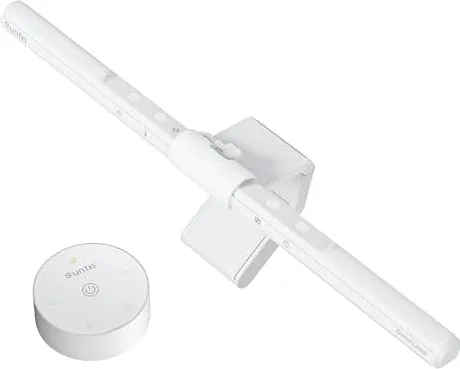
Who it’s for: anyone who works, studies, or games at a monitor for hours and wants the light above the screen instead of a lamp crowding the desk.
Strengths. The bar is 16.1 inches long, but only 0.78 inches deep and tall. The body is aluminum, so it spans a typical widescreen monitor without taking desk space. Dimming is stepless for both brightness and color temperature, not a handful of fixed steps. Auto-dimming adjusts output as the room changes, and a two-hour timer is included. Control comes two ways: touch on the bar and a separate remote. That matters when the bar sits behind the screen and is awkward to reach. Buyers mention effective illumination and value for money, and the 4.6/5 average across 118 ratings supports that.
Weaknesses. Power is corded USB at 5 volts and 5 watts. Placement depends on a free port, and the bar goes dark when the computer does. There’s no battery option. The listing also flags it as not waterproof, and mounting is desktop-only—no clamp or wall option is described. It’s one light source, so wide multi-monitor setups may show uneven coverage at the edges.
Verdict. Buy if you want a slim, dimmable bar over a single monitor and can live with USB power. Skip if you need portability, moisture resistance, or coverage across two or three screens.
Verdict: Buy the Quntis Pro for a slim, remote-controlled bar over one monitor, but accept USB-only power and no water resistance. Skip if you need battery operation, moisture protection, or even coverage across multiple screens.
I went with Quntis for the same reason and I'm happy with it. It throws light on the monitor, desk and back wall just as it should. It's stable and doesn't move (unless my cat nudges it!).
I haven't used the BenQ but do own a Quntis. I can remember the model but its the one that projects light onto your wall as well. I'm really happy with it and have no issues.
I have a Quntis light bar. Works perfectly fine and illuminates my desk more than enough. Has temperature change setting as well as brightness. Bargain compared to the BenQ.
Best Budget: OOWOLF Monitor Light Bar with Remote
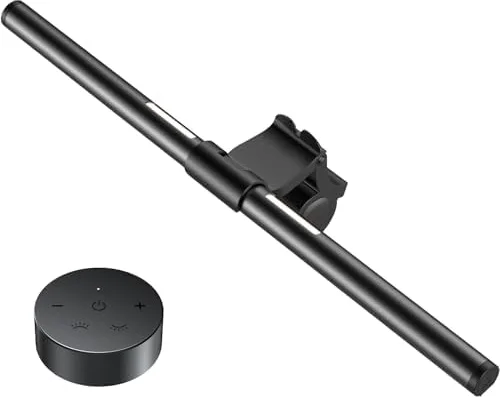
Who it’s for: anyone lighting a single desk monitor who wants remote control without spending much. At $36.99, this OOWOLF bar sits at the budget end of the category.
Three things stand out. The bar is 16.14 inches wide and 0.79 inches deep, a slim footprint that suits most monitor widths, and it weighs 0.77 pounds. Output is adjustable across 84 LEDs—both color temperature and brightness—with a rated Ra95 color rendering index. That’s the figure that governs how accurately colors show up under the light. Control is entirely remote, so there’s no reaching over the screen for a switch. The 59-inch cable leaves room to route to a USB port.
Here’s the catch: cheaper or older light bars in this category tend to have problems that newer models fix with added features, so check the exact model before buying. This one is also not water resistant. And 5 watts is modest—plan on task lighting, not room lighting.
At 4.4 out of 5 across 2,322 reviews, with a one-year manufacturer warranty, it’s a defensible budget pick. Buy if you want a slim, remote-controlled bar for monitor work at a low price. Skip if you need higher output, weather resistance, or a longer bar.
Verdict: At $36.99, the OOWOLF TL03 is the budget remote-control monitor bar to beat for single displays. Ra95 color accuracy and 84 dimmable LEDs deliver real desk lighting, not a toy. USB-only power and no water resistance are the trade-offs—easily worth it if your monitor has a free port.
I just bought a Quntis off of Amazon and have been using it for the last 4 days and have been pretty impressed for around $60.
My newer one however, don’t have these issues instead provide more features like a wireless controller and a backlight.
I have the Benq with wireless controller and it’s an absolute must have
Best for Curved Monitors: Quntis ScreenLinear PRO+ with Remote
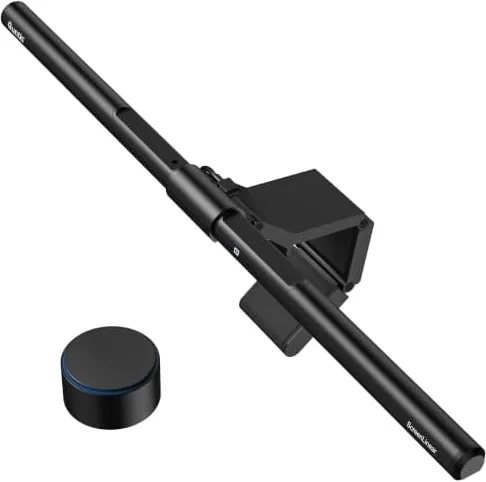
Who it’s for: someone who wants task light on a curved or flat monitor and would rather adjust it from a remote than reach over the screen.
The remote is the feature owners bring up most. Brightness and dimming changes happen without touching the bar. The 20.08-inch span and a mount rated for monitors between 0.12 and 2.36 inches thick cover most curved displays and a fair number of thick-bezel flat ones. The asymmetrical shade is aluminum with a painted finish. At roughly 1.26 pounds, it has enough heft to feel like hardware rather than an accessory. Power comes over USB at 5 volts and 5 watts, and auto-dimming is a secondary control option.
The recurring complaint is interference with the monitor itself. Buyers mention light bleeding onto the screen panel, and several note that the bar bends and needs readjustment to sit correctly. It is not water resistant. Since it’s corded, the USB run constrains where the desk can go.
Buy if you have a curved monitor, want the remote as your primary control, and are willing to fine-tune the mount position once. Skip if you have a thin or unusually shaped panel, if any screen glare bothers you, or if you’d rather not deal with a cord at all.
Verdict: Skip it. The remote is handy, but light bleed and a bendy mount undermine the core job of a light bar: even, glare-free illumination. Unless you enjoy constant adjustment, spend your money elsewhere.
The Remote Control is not touch sensitive by the way it requires manually turning the dial which is fine because it works well.
The light bar sits securely on my wide monitor and the touch controls work perfectly fine on the remote thing.
I would not say it's a deal breaker though I have been using it for a few days and I barely notice it.
Best with Backlight: BlitzMax BM-ES1 PLUS Monitor Light Bar
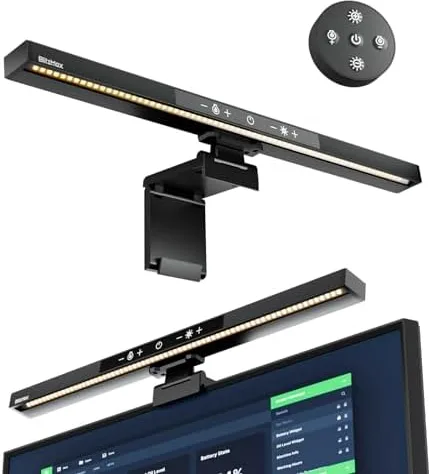
Who it’s for: anyone who wants light thrown onto the wall behind a monitor instead of a lamp eating desk space.
Hardware. The list is specific: 66 LEDs, adjustable color temperature, stepless dimming, and a memory function that returns to the last setting. The remote runs on RF rather than infrared, so it works without a clear line of sight to the bar. Touch controls on the unit cover you when the remote isn’t at hand. The clamp takes monitors from 0.4 to 1.4 inches thick, which covers most laptops and desktop panels. At 17.3 inches long, roughly 1 pound, and $39.95, it sits at the low end of the category. 179 reviews average 4.5 out of 5.
Weaknesses. The listing’s own spec sheet is the weak point. It claims 230 volts and an E26 bulb base on a 4.5-watt LED bar, lists Ethernet as the connectivity protocol while also claiming RF, and calls the unit battery powered despite desktop mounting. It also flags water resistance while marking the product not waterproof. Owners report a backlight feature they value, but nobody should lean on these electrical figures for anything.
Verdict. Buy if you want an inexpensive, remote-controlled backlight for a standard monitor and can ignore a sloppy spec sheet. Skip if your display is unusually narrow, since the 17.3-inch bar may overhang it.
Verdict: Buy the BM-ES1 PLUS for its RF remote and backlight on a standard monitor, but treat the listing’s electrical specs as fiction. Check your monitor thickness and you’ll likely be satisfied; otherwise, look elsewhere.
I have the Xiaomi light bar and strongly recommend it. If mine were to break, I would replace it without a moment's hesitation.
The light bar (BenQ ScreenBar Halo) lights my desk perfectly, without causing glare in any of the places I don’t need it.
My newer one however, don’t have these issues instead provide more features like a wireless controller and a backlight.
Remote-Controlled Light Bars Compared: Price, Rating, and Monitor Fit
| # | Product | Award | Price | Rating | |
|---|---|---|---|---|---|
| 1 | Quntis Monitor Light Bar Pro White, Eye-Care No Glare USB Computer Lamp, Stepless Dimming & Auto-Dimming Brightness, Dual Control, Modern Aesthetic Space Saving Desk Accessories Office Gaming Reading | best overall | $49.99 | 4.6/5 | Check price |
| 2 | Monitor Light Bar with Remote, Ra95 Computer Monitor Lamp for Eye Caring, USB Reading Lamp Task Lamp, Dimmable Light Bar with Backlight, No Glare Space Saving Home Office 16.14” 1-Pack | best budget | $36.99 | 4.4/5 | Check price |
| 3 | Quntis Monitor Light Bar with Remote Control, Fit for Curved/Flat Monitor, Eye-Care USB Computer Lamp Dimmable Screen Light Bar with Auto-Dimming, No Glare Home Office Gaming Desk Lamp | best for curved monitors | $49.99 | 4.4/5 | Check price |
| 4 | Monitor Light Bar with Remote Control,USB Computer Lamp,Eye-Care Screen Bar,Adjustable Color Temperature,Stepless Dimming,No Glare Desk lamp Home Office Game,(BM-ES1 PLUS) | best for backlight | $39.95 | 4.5/5 | Check price |
What to Check Before Buying a Monitor Light Bar with Remote
A remote only earns its place if it works from where you sit. Start with the signal. Infrared remotes need a clear line of sight to the bar and can struggle when the head is angled toward a wall or the monitor sits deep under a shelf. Radio-frequency remotes pass through obstructions. They’re the safer pick for low-mounted bars.
Check what the remote actually controls. The useful ones adjust brightness and color temperature in steps and remember your last setting after a power cut. A remote that only toggles on and off adds little over a button on the bar itself.
Mounting matters more than the remote on curved displays. The clip has to grip the top bezel without the counterweight tipping forward, and it needs to clear a screen that curves toward you. Measure your monitor’s top edge thickness and compare it to the bar’s listed range. Then confirm the bar’s length against your display width if you want even spread.
Last, decide on power. A USB connection to the monitor shuts the bar off with the screen. A wall adapter keeps it live.
Questions before you buy
Do monitor light bars with a remote control need batteries?
None of these listings specify whether the remote itself takes batteries, though the BlitzMax Monitor Light Bar with Remote Control ($39.95) is listed as battery powered at 230 volts and 4.5 watts, while the Quntis and OOWOLF remotes are paired with corded electric bars. Check the remote's included components or manual for the battery type before buying.
Will a monitor light bar fit a curved screen?
None of these light bars list curved-screen compatibility, so check the manufacturer's specs for your specific monitor curve before buying — the BlitzMax BM-ES1 PLUS, for example, only states a fit for monitors 0.39 to 1.38 inches thick, and the Quntis ScreenLinear PRO+ lists 0.12 to 2.36 inches, with no mention of curvature. Owners of the Quntis RGB PRO Backlight do report some instability or wobbling, which is worth weighing if your screen is curved.
How thick can my monitor be for the light bar to clamp on?
The BlitzMax Monitor Light Bar with Remote Control fits monitors from about 0.39 to 1.38 inches thick, while the Quntis Monitor Light Bar with Remote Control (ScreenLinear PRO+) handles 0.12 to 2.36 inches. For the other bars in this guide, check the clamp opening against your monitor's thickness before buying.
Does the remote adjust both brightness and color temperature?
On the BlitzMax Monitor Light Bar with Remote Control ($39.95), the OOWOLF Monitor Light Bar with Remote ($36.99), and the Quntis ScreenLinear Pro White ($49.99), the listed features pair a remote or stepless control with both dimmable brightness and adjustable color temperature. Because the specs don't break out which functions the remote itself handles on each model, confirm that with the seller before buying.
Do these light bars plug into a USB port on the monitor or a wall adapter?
The Quntis Monitor Light Bar Pro White, Quntis Monitor Light RGB PRO Backlight, and Quntis Monitor Light Bar with Remote Control all list 5-volt USB connectivity, while the BlitzMax BM-ES1 PLUS is battery powered. None of the specifications say whether the USB cable is intended for a monitor's USB port or a wall adapter, so check the listing photos or included accessories before ordering.
Can a monitor light bar cause glare or reflections on the screen?
Yes, glare or reflections on the screen are possible, though the Quntis Monitor Light RGB PRO Backlight ($61.99) lists a non-glare design and several models here use a downlight or asymmetrical shape that directs light onto the desk rather than the screen. Owners of the Quntis Monitor Light Bar with Remote Control ($49.99) do report monitor interference such as light bleed, so if a specific bar's angle or brightness is poorly adjusted, glare can still show up.
Is a remote-controlled light bar worth it over a touch-control model?
If hands-off adjusting matters to you, remote models cost no more here — the OOWOLF Monitor Light Bar with Remote is $36.99 and owners strongly recommend its wireless remote, while the touch-only Quntis Monitor Light RGB PRO Backlight runs $61.99. The trade-off is that remote models like the Quntis ScreenLinear PRO+ ($49.99) draw complaints about monitor interference such as light bleed, so pick based on whether that matters more than reach-free control.