Best Budget Monitor Arm: 4 Picks Worth Buying in 2026
- Updated
- Picks
- 4
- Edition
- No. 1
- Published by
- Try Mersianto
Owners report solid hold on monitors up to 32 inches from arms starting around $33 a pair. Weigh cheap dual mounts against pricier single arms with longer warranties and ultrawide support.
How we compared budget monitor arms
We lined up budget monitor arms by the numbers that decide whether a cheap mount actually holds up. Price per arm comes first. A dual mount listed at $32.90 covers two screens for less than many single-arm models cost on their own. But that math only works if the arm also clears your monitor’s weight and size.
From there: published weight ratings in pounds, and the screen-size ceiling each arm is built for, in inches. Ultrawide panels push both figures harder than standard-size displays. That’s where the jump from budget brackets to pricier models usually happens.
Tilt range matters too. A narrow arc limits how far you can angle a panel down for a low seating position or up for standing work. Warranty length rounds out the comparison. A longer term on a cheap arm can outweigh a shorter one on a costlier mount. Owner comments on sag, wobble, and clamp damage fill in what spec sheets leave out.
Pixio PS1S Wave: best overall
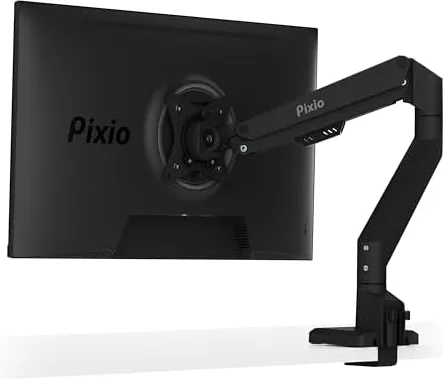
Pixio PS1S Wave Black Single Monitor Arm — Best Overall
This arm suits anyone with a 17- to 32-inch monitor weighing up to 19.8 lbs who wants the screen off the desk and is willing to spend about an hour getting the setup right.
At $59.99, the PS1S Wave sits well below the price of most gas-spring arms. The enclosure is metal, not plastic. The mount is a tabletop clamp, so nothing gets drilled into a wall. VESA compatibility covers the standard bolt pattern. Integrated cable management runs the display cables along the arm instead of letting them drape across the desk. A 4.7 out of 5 average across 461 reviews suggests most buyers end up satisfied.
The catch? The gas spring. Owners repeatedly describe tension adjustment as time-consuming and difficult. Several report that turning the Allen key screw doesn’t free the arm. The joint stays stiff or moves unpredictably no matter how far they turn it. That complaint shows up often enough to treat as a pattern, not an isolated defect.
Buy if you have one monitor, a fixed viewing position, and patience for a frustrating first adjustment. Skip if you routinely swing the screen between sitting and standing positions, or if you want tension you can dial in by hand in seconds.
Verdict: At $59.99, the PS1S Wave is the budget arm to beat for a single 17-32” monitor under 19.8 lbs: metal build, clean cable routing, solid clamp. Just budget an hour for the gas-spring adjustment, because owners consistently find it stiff. Set it once and leave it.
I would keep adjusting towards the minus until it’s able to be moved, it might take a while to do, when I did this for mine it took quite a while to tension the springs to the right weight
i’m trying to adjust the gas spring monitor arms so it’s in a horizontal position like shown in the manual, but no matter how i adjust the screw with the allen key, it’s not moving.
I absolutely love it for my Acer Nitro gaming laptop!
NB North Bayou G35: best budget
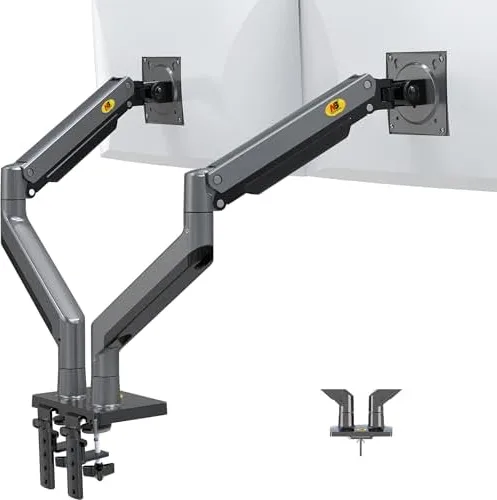
Best for anyone running two 22-inch to 32-inch monitors who wants them off the desk without spending much. At $32.90, the G35 is priced like a single arm.
The aluminum build and tabletop mounting are the two specs that matter most here. Each arm carries 4.4 to 26.4 pounds, which covers most mainstream 24- to 27-inch panels and a fair number of 32-inch ones. Range of motion is genuine full motion — swivel, rotate, and 30 degrees of tilt, with height adjustment. Portrait mode and side-by-side angles are both on the table. Buyers with dual setups are the core of the 4.4/5 rating across 687 reviews. Several note it handles heavier displays without complaint.
Then there’s the catch. The recurring complaint is weight support that behaves inconsistently. Some heavier monitors need the tension cranked down hard before the arm stops sagging. A few never hold position at all. That’s the gap between the listed 26.4-pound ceiling and what an individual arm will actually do with a dense panel. The number is a maximum, not a guarantee.
Buy if your monitors sit in the lighter half of that weight range and you want two arms for the price of one. Skip if you’re mounting anything near the top of the range or need sag-free positioning without fiddling.
Verdict: The G35 is a bargain dual mount only if your monitors stay around 20 lbs and you don’t mind trial-and-error tensioning. For $16.45 per arm, aluminum full-motion coverage is hard to beat, but near the 26.4lb limit sag becomes a coin flip. Buy light, skip heavy.
I got this 2 weeks ago and have a 34" wide-screen and a 24" on them. Works great. Wide screen is 19lbs and no issues.
I have this with a 34" wide screen and a 24" and does great. I am only limited with it due to space on a small desk.
My 19lb 32" Odyssey G7 required me to really wrench on the VESA hinge so it doesn't flop down.
Ergotron LX: best for ultrawide
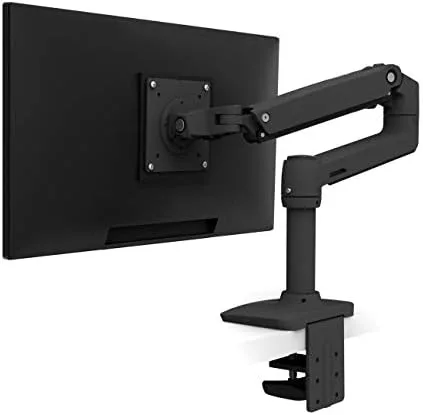
Who it’s for: Someone mounting a single flat or curved ultrawide up to 34 inches on a desk, with the monitor weighing between 7 and 25 pounds.
The load range is the real story here. Ergotron rates this arm from 7 to 25 pounds. That covers most 34-inch ultrawides and a fair number of 27- and 32-inch panels too. The VESA plate accepts both 75x75mm and 100x100mm patterns, so you’re not hunting for an adapter before the arm goes up. Articulating movement plus 75 degrees of tilt handles the usual positioning. Pull the screen closer, push it back toward the wall, angle it down for a lower seat. The warranty runs 10 years. The 4.6 out of 5 average across 10,989 reviews suggests most buyers get years of use rather than months.
The recurring complaint is plastic. Owners report plastic bushings and related plastic parts wear out or break under heavy, frequent repositioning — the kind of daily adjusting a monitor arm invites. Metal is the headline material, but the pivot points aren’t all metal. That’s where the failures show up.
Buy if you set the arm once and leave it, or you want a 10-year warranty behind a 34-inch ultrawide under 25 pounds. Skip if you plan to swing and tilt the monitor constantly all day — the plastic internals are the likeliest thing to give out, and at $209.69 that’s a real consideration.
Verdict: At $209.69, the Ergotron LX is a set-and-forget mount, not a daily-adjustment workhorse. The 10-year warranty and 10,989-review 4.6 average justify the price for a stationary 34-inch ultrawide, but plastic bushings will fail if you constantly swing it. Buy for stability, skip for constant motion.
I have two Ergotron LX that have been in daily extended use for 11 years now with everything from 24" to 32" heavy monitors and will, I assume, work for... ever, as long as VESA 100 mounts are a thing.
Now, this also means the ergotron has more movement (shake) but worse, if you move your monitors a lot as I do, this screw will slowly grind away at the plastic.
You need to clean them now and then and maybe put some PTFE spray in the joints but don't see any wear on them really.
VIVO STAND-V001O: best for tilt
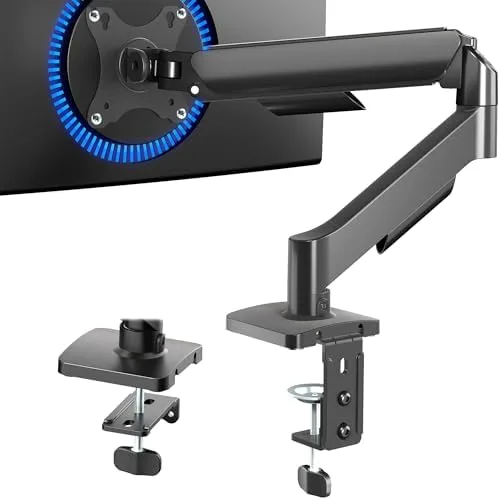
VIVO STAND-V001O Single Monitor Stand — Review
This mount suits anyone with a 17 to 32 inch monitor under 19.8 pounds who wants an articulating desk arm and cares most about tilt range. At $69.99, it’s mid-range for a single-arm mount. The 4.3/5 average across 2,812 ratings suggests most buyers get what they expect.
The 90-degree maximum tilt is the standout spec. Few single arms in this price band publish that figure. It matters if you rotate a panel toward you for drafting, reading, or a seated gaming angle. VESA 75x75 and 100x100 compatibility covers essentially every monitor in the supported size range. You’re not shopping around the mount. Build materials are aluminum, steel, and plastic. VIVO backs it with a 3-year warranty — longer than the one-year coverage common at this price.
The honest downside is movement after installation. Sagging and shifting over time is the recurring complaint in owner feedback. It shows up alongside mentions of durability and long-term reliability. Buyers report arms that drift out of position rather than holding a set angle indefinitely.
Buy if you want wide tilt on a light-to-mid-weight panel and can accept occasional re-tightening. Skip if your monitor approaches 19.8 pounds or you need an arm that never moves once set.
Verdict: The VIVO STAND-V001O earns its 4.3 stars for 90-degree tilt at a fair $69.99, but buyer reports of sagging and slow drift make it a poor choice for heavy panels or set-and-forget setups. Three-year warranty helps; expect occasional re-tightening.
I had a couple of these over the years. They are ok, but after making the switch, I would spend a bit more on a pneumatic one (which allows for easy vertical height adjustment and smoother operation).
I've got one of these and it gets the job done. Ordered another for my other monitor as it is nice that they can move fully independent from one another.
This mount sags a bit for me, monitor is the 27" LG 1080p 240hz, does not weigh that much.
Specs and prices side by side
| # | Product | Award | Price | Rating | |
|---|---|---|---|---|---|
| 1 | Pixio PS1S Wave Black Single Monitor Arm Stand Desk Mount - Fits up to 32 inches Monitors and up to 19.8lbs. VESA Compatibility and Integrated Cable Management | best overall | $59.99 | 4.7/5 | Check price |
| 2 | NB North Bayou Dual Monitor Arm Ultra Wide Full Motion Swivel Monitor Mount for 22”-32” Monitors Load Capacity from 4.4 to 26.4lbs for Each Arm Height Adjustable Monitor Stand G35 | best budget | $32.9 | 4.4/5 | Check price |
| 3 | Ergotron – LX Monitor Arm, Single Monitor Desk Mount – fits Flat Curved Ultrawide Computer Monitors up to 34 Inches, 7 to 25 lbs, VESA 75x75mm or 100x100mm – Matte Black | best for ultrawide | $209.69 | 4.6/5 | Check price |
| 4 | VIVO Single Monitor Stand, Fully Adjustable Arm for 17 to 32 inch Screen, Mechanical Articulating Desk Mount, Gaming and Office Setups, VESA 75x75, 100x100, Max 19.8 lbs, Classic, Black, STAND-V001O | best for tilt | $69.99 | 4.3/5 | Check price |
What to look for in a budget monitor arm
Start with price per arm, not the sticker price. A $32.90 dual mount works out to $16.45 per arm. That undercuts most single-arm mounts at the same shelf price. Compare like for like before deciding a cheap arm is a bargain.
Weight and screen limits decide whether a budget arm works at all. Check the stated weight range per arm against your monitor’s weight without its stand. Check the maximum screen size against the panel’s diagonal. Ultrawide displays are wider and heavier at the edges. An arm rated for a standard 27-inch monitor can struggle with a wider screen even when the pound rating looks sufficient. That gap is what separates budget arms from models built for ultrawides.
Tilt range sets how far you can angle a panel up or down before it slips. A narrow range rules out overhead or low mounting. Compare warranty terms last. Coverage on gas springs and joints is the clearest sign of how long a maker expects the arm to hold position.
Questions before you buy
How much should I spend on a monitor arm?
There's no fixed amount; the monitor arms in this guide range from $32.90 for the NB North Bayou G35 to $209.69 for the Ergotron LX, with the Pixio PS1S at $59.99 and VIVO Single Monitor Stand at $69.99 in between. Match your monitor's size and weight to each arm's supported screen size and load capacity before buying.
Will a cheap dual arm hold two heavy monitors?
The $32.90 NB North Bayou G35 dual arm is rated for 4.4 to 26.4 lbs per arm, so it can hold two heavy monitors within that range, though its listed drawbacks include weight support limitations. If your monitors exceed 26.4 lbs each, check a mount's per-arm capacity before buying, since the j5create dual mount lists no weight rating.
What is the difference between a swivel, rotate, and articulating arm?
Swivel, rotate, and articulating are listed as separate movement types for the NB North Bayou G35 (Rotate), VIVO STAND-V001O and Ergotron LX (Articulating), and Pixio PS1S (Swivel), but the listings don't define how those motions differ, so check each brand's specs for the exact range and axis of movement.
How do I know if my monitor fits an arm?
Match your monitor's screen size and weight to the arm's listed range: the NB North Bayou G35 fits 22 to 32 inch monitors at 4.4 to 26.4 lbs per arm, the VIVO STAND-V001O covers 17 to 32 inches, the Pixio PS1S Wave covers 17 to 32 inches up to 19.8 lbs, and the Ergotron LX is listed for 34 inch screens. You'll also need a monitor with VESA mounting holes, which the Pixio PS1S Wave notes as a requirement.
Do budget monitor arms sag or shift over time?
One budget option in this guide, the VIVO Single Monitor Stand at $69.99, is flagged for sagging or shifting over time, while the pricier Ergotron LX at $209.69 is instead flagged for plastic parts wearing or breaking. If you want to avoid either issue, check the weight rating against your monitor and the joint material before buying, since the less expensive NB North Bayou G35 at $32.90 and the j5create at $59.98 list no long-term wear notes either way.
Is a longer warranty worth paying more for?
In this guide the longest coverage does come with the highest price: the Ergotron LX at $209.69 lists a 10-year warranty, while the $69.99 VIVO STAND-V001O lists 3 years, and the Pixio PS1S Wave and j5create JTSA102 give only "Manufacturer Warranty" and "Contact Manufacturer" with no stated term. Since the value of extra years depends on what the warranty actually covers, buyers comparing these should confirm the coverage details and claim process directly with each brand before paying more.
Can a budget arm support an ultrawide monitor?
Budget models in this guide top out at a 32-inch screen size, so a 34-inch ultrawide falls outside their listed range — only the Ergotron LX, at $209.69, is rated for 34 inches. If your ultrawide is 32 inches or smaller, check the weight limit: the Pixio PS1S handles up to 19.8 lbs, and the NB North Bayou G35 supports 4.4 to 26.4 lbs per arm.