All guides / Monitor Light Bars
Best Monitor Light Bar for Ultrawide Monitors: 6 Options in 2026
- Updated
- Picks
- 6
- Edition
- No. 1
- Published by
- Try Mersianto
For a 34-inch or wider screen, bar length and clamp fit matter more than lumens: the 19.7-inch BenQ ScreenBar Pro is the top pick, the curved-screen Halo 2 is next, and the OOWOLF covers tight budgets at $36.99.
Why an Ultrawide Monitor Needs a Different Light Bar
Ultrawide monitors are wider than standard displays, and many are curved or thick. A light bar built for a standard monitor falls short in two ways. First, it may not be long enough to span the full screen. Second, the mount may not secure properly on a curved back or thick bezel. That leaves edges unlit or the bar slipping. This guide weighs owners’ fit and mounting reports. The listed bar length is the first spec to check. It tells you whether the bar covers the screen. Mounting type is second. It determines whether the bar holds on a curved or thick panel. If either fails, the light bar doesn’t do its job. This guide ranks light bars by listed bar length and mounting type first, then by owner feedback. Brightness claims alone don’t decide it. A bar that reaches across your ultrawide and stays attached beats one that only advertises higher output.
Best Overall: BenQ ScreenBar Pro
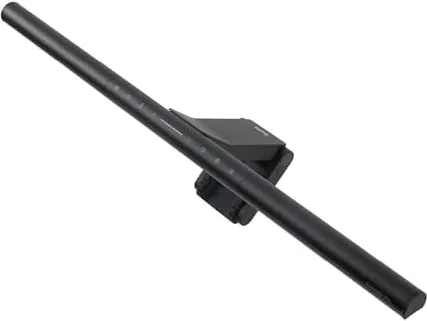
Best for anyone lighting a desk around a curved or ultrawide monitor who wants the light source off the desktop entirely.
The numbers are hard to argue with. It holds a 4.8 out of 5 across 1,346 ratings. Owners repeatedly say it outperforms competing bars. Functionally, it backs that up. Brightness and color temperature adjust. A motion sensor turns it on and off. Touch control sits within reach—no separate app required. The body mixes aluminum, zinc, polycarbonate, and ABS. It clamps to the monitor instead of taking up desk space. Power comes from a corded USB-C connection: 5 volts, 5 watts. You can run it off the monitor’s own port if that port supplies enough current.
Limits exist, though. There’s no water resistance rating. Keep it away from kitchens and anywhere wet. It’s corded only—no battery. The clamp mount means it lives on a monitor edge, nowhere else. At 1.76 pounds, it hangs off the panel. Check that against a thin or flimsy stand. Heavy-duty ultrawide arms handle it fine. Lightweight ones may notice.
Buy if you want dialed-in task lighting without adding a lamp footprint to your desk. Skip if you need something portable, freestanding, or usable away from a monitor.
Verdict: The BenQ ScreenBar Pro is the ultrawide benchmark: a 19.7-inch bar with adjustable brightness, motion-sensor on/off, and a clamp that holds curved panels. It is corded and not water resistant. For desk-free task lighting over a big screen, nothing else matches its fit, controls, and output. Buy once.
The best thing is that the light comes from above the very center of the desk and is not covered by anything.
The BenQ is FAR superior. It's more stable, as in it grips better to the monitor (I have a curved one).
The dial for the the benQ is much premium as well, in terms of functions and engineering.
Best for Curved Ultrawides: BenQ ScreenBar Halo 2
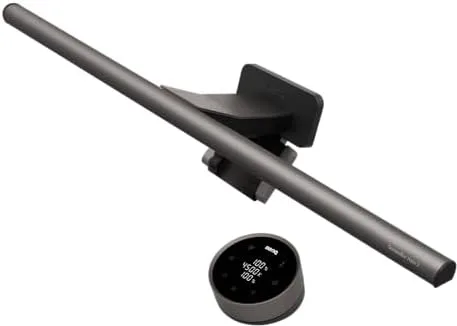
This one’s for people running a curved ultrawide or multi-monitor desk. You want light on the keyboard without glare bouncing off the panel. The ScreenBar Halo 2 hangs off the top bezel. That gives back the desk space a conventional lamp would take.
Concrete strengths: dual light sources. The front bar handles task lighting. A rear backlight adds a soft wash behind the monitor—buyers mention this matters most in a dark room. Color temperature and brightness are adjustable. A wireless desktop dial plus touch control means you’re not reaching over the screen. It runs $139 with a 4.7/5 average across 1,391 ratings. That consistency is the argument. Owners report the motion sensor handles on/off automatically. It’s the kind of feature that quietly becomes the reason you keep it. Aluminum body, USB-powered at 5 watts, 1-year warranty.
The honest weakness is bulk. The bar and especially the rear mounting block are chunky. The recurring complaint: they clutter an otherwise clean setup. At roughly 1.8 lb, the whole assembly isn’t invisible on a slim panel. A photographed or minimal desk will show it.
Buy if you work or game after dark on a curved ultrawide and want automatic, adjustable lighting. Skip if a clean silhouette behind the monitor is the priority.
Verdict: The ScreenBar Halo 2 earns its place with automatic on/off, strong low-light output, and adjustable color temperature. But the bulky mount is a real eyesore. Buy it for function over form. Skip it if you want a clean monitor silhouette.
I just want to give my short review about this light bar because honestly I love it, ive been eyeing on this for awhile now but I just never thought I will need the upgrade.
I mainly use it when I get in the dark which I prefer, I love the look of warm lighting during night and minimal lighting.
I use it both during the day and in low light, and honestly I'm so used to it that it's hard to do without.
Best for Gaming Setups: Govee Monitor Light Bar
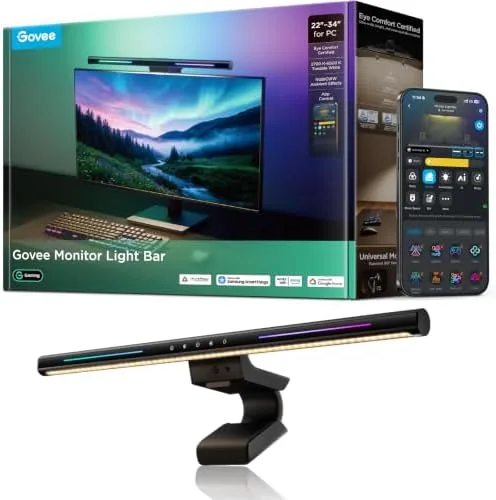
Best for: Gamers and readers who want colored ambient light behind the screen plus a downward white task light, without surrendering desk surface.
Three things stand out. RGBIC backlighting plus adjustable color temperature means one fixture covers both bias lighting and a usable work light. The review data names vibrant colors as the dominant praise across 31 ratings at 4.8/5. Control is broad. Touch, app, and voice over Wi-Fi—with a motion sensor on board. The aluminum body clamps to the monitor instead of sitting on the desk. It fits panels 0.12–6.3 inches thick, which covers most displays.
Weaknesses are structural rather than reported failures. It’s corded electric and not waterproof. It needs an outlet and shouldn’t go anywhere damp. Setup runs through Wi-Fi and an app. If you want a lamp that responds the instant you tap it, the smart layer is part of the workflow, not optional. Notably, the review data surfaced no recurring complaint pattern. Build quality gripes aren’t the issue here. The $99.99 price is.
Buy if you want colored backlight and a white task light from one 18-watt bar and don’t mind app configuration. Skip if you want a battery-powered lamp or a plain on/off switch.
Verdict: For $99.99, the Govee Monitor Light Bar earns its spot if you want vibrant RGBIC backlighting plus usable white task light in one clamp-on aluminum bar. Buy it for smart, colorful desk lighting. Skip it if you need simple controls or battery power—the Wi-Fi setup and cord are the real tradeoffs.
In my day to day, I primarily have the strips set to an orange color to help light up the area behind my monitor to try to reduce eye strain, and it has helped.
I use it on my 27-inch monitor, where it was a little long so I have some ends of cables sticking out.
Got the Govee Light Bars for my monitor. I’m absolutely in love with them!
Best for Precise Control: BenQ ScreenBar Plus
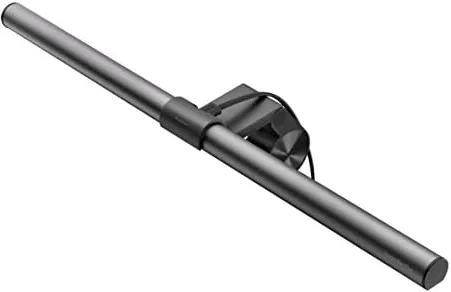
BenQ ScreenBar Plus — best for people who want the controls off the lamp itself and within arm’s reach.
The Plus version exists for the desktop dial. Instead of tapping the bar above your monitor, you adjust brightness and hue from a separate controller on the desk. Auto-dimming and hue adjustment handle routine changes on their own. The fixture is aluminum, weighs 1.5 pounds, and clips to the monitor. It clears desk surface. The mount is the space-saving part, not the footprint. It runs on 5 volts and 5 watts over USB, so a computer port or spare USB adapter is enough. The asymmetrical shade is the design element BenQ pairs with its no-glare claim. Shade height is 3.6 inches. Matte silver resists fingerprints better than gloss.
Two things to know. Owners repeatedly mention the lowest brightness setting is still brighter than they want for a dark room. Work at night with everything else off, and it may run hot for you. It’s also corded only. No battery option.
Buy if you want a dial under your hand and a lamp that clears your desk. Skip if you need genuinely dim output or untethered placement.
Verdict: The ScreenBar Plus earns its premium reputation for desk-dial control and glare-free light. But the too-bright minimum dim setting is a real flaw for dark rooms. Buy it for adjustable, space-saving monitor lighting. Skip it if you need truly low nighttime output.
Adding the Screenbar addressed that issue, however, its minimum brightness setting was way too bright and that stopped me from using it more often.
I feel like it helps with eye strain and provides the lighting i wanted on my desk, better that an awkward lamp would have.
Also no shadows when im working on my desk now, wich i always got from the overhead light in the ceiling.
Best Value: Quntis Monitor Light Bar Pro
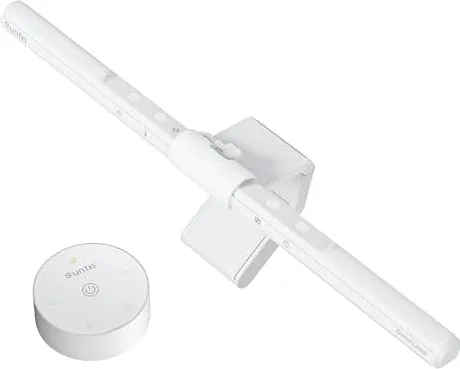
Who it’s for: Anyone with a single monitor who wants task lighting above the screen instead of on the desk. Students, programmers, gamers in a dorm or home office.
Strengths: The 16.1-inch bar mounts on top of the monitor and plugs in over USB. It clears the desktop entirely. It runs on 5 volts at 5 watts from a single LED source. The aluminum body matches the white finish of most modern displays. Controls are flexible for the price: stepless dimming, color-temperature adjustment, auto-dimming brightness, a touch switch on the unit, and a separate remote—plus a 2-hour timer. At $49.99 it holds a 4.6/5 average across 118 reviews. Buyers cite effective illumination, adjustable brightness and color temperature, and value for the money as recurring positives.
Weaknesses: Power is corded USB only. Placement is limited by where you can reach a powered port. There’s no battery option. It’s also not waterproof, so damp rooms are out. And while the listing names multi-monitor workstations as a use case, one 16.1-inch bar covers one screen. A second monitor means buying a second light.
Verdict: Buy if you want glare-free, adjustable light over a single screen and value a clean desktop. Skip if you need wireless placement, a multi-screen span from one unit, or a lamp you can use near water.
Verdict: At $49.99, the Quntis Pro is the no-drama single-monitor choice: 16.1 inches, aluminum, touch and remote, stepless dimming, auto-brightness, and a timer. It clears the desk and owners call it a value. Corded USB and no water resistance are the only real limits. Buy it for one screen. Skip it for multi-monitor.
I went with Quntis for the same reason and I'm happy with it. It throws light on the monitor, desk and back wall just as it should. It's stable and doesn't move (unless my cat nudges it!).
I haven't used the BenQ but do own a Quntis. I can remember the model but its the one that projects light onto your wall as well. I'm really happy with it and have no issues.
I have a Quntis light bar. Works perfectly fine and illuminates my desk more than enough. Has temperature change setting as well as brightness. Bargain compared to the BenQ.
Budget Pick: OOWOLF Monitor Light Bar with Remote
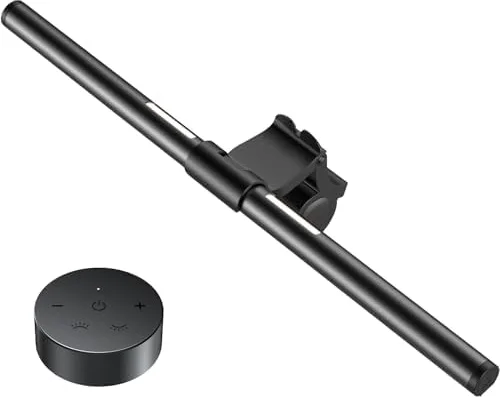
Best for: anyone who wants a wide, dimmable monitor light bar with a remote for under $40, and who has an outlet within reach of a 59-inch cord.
The bar is 16.14 inches wide. It spans most standard monitors without overhanging. It runs 84 LEDs at 5 watts and 5 volts. The manufacturer lists a color rendering index of 95. That matters if you’re matching colors on screen or reading printed pages under the same light. Adjustable color temperature, dimming, and a separate backlight are all listed. Owners repeatedly call the wireless remote controller a strong point. You can tune the light without reaching over the monitor. The aluminum body weighs about 0.77 lb. The 1-year manufacturer warranty is standard for this price. At 4.4 out of 5 across 2,322 ratings, the value story holds up.
The honest catch: the recurring complaint in this category is that cheaper light bars share problems newer models fix by adding features. Budget units get left behind. Also note the remote is the only switch listed. Lose it and you’re stuck. The lamp is not water resistant.
Buy if you want an adjustable, remote-controlled bar at a budget price. Skip if you want on-bar touch controls or long-term feature updates.
Verdict: At this price, the OOWOLF TL03 is the default answer for a single monitor. The wireless remote, 95 CRI, and dimming cover the essentials. The 59-inch cord and lack of water resistance are the trade-offs. Skip it only if you need touch controls or portability. For a clean desk on a budget, it wins.
I just bought a Quntis off of Amazon and have been using it for the last 4 days and have been pretty impressed for around $60.
My newer one however, don’t have these issues instead provide more features like a wireless controller and a backlight.
I have the Benq with wireless controller and it’s an absolute must have
Comparison: Bar Length, Mounting, and Price
| # | Product | Award | Price | Rating | |
|---|---|---|---|---|---|
| 1 | BenQ ScreenBar Pro LED Monitor Light Bar (Black) - Ultrawide Lighting, Motion Sensor, Adjustable Brightness/Color Temperature, Eye-Care USB-C Monitor lamp, No Glare, Curved Monitors, Monitor accessory | best overall | $199 | 4.8/5 | Check price |
| 2 | BenQ ScreenBar Halo 2 LED Monitor Light Bar - Wireless Controller, Backlight, Motion Sensor, Adjustable Brightness/Color Temperature, Eye-Care, No Screen Glare, Fits Curved Monitor, Monitor Accessory | best for curved ultrawides | $139 | 4.7/5 | Check price |
| 3 | Govee Monitor Light Bar, RGBIC Backlight, for 0.12-6.3-inch Thick Monitors | best for gaming | $99.99 | 4.8/5 | Check price |
| 4 | BenQ ScreenBar Plus e-Reading LED Computer Monitor Light Bar with Desktop Dial, Auto-Dimming and Hue Adjustment, No Screen Glare, Space Saving, USB Powered, Matte Silver | best for precise control | $139 | 4.7/5 | Check price |
| 5 | Quntis Monitor Light Bar Pro White, Eye-Care No Glare USB Computer Lamp, Stepless Dimming & Auto-Dimming Brightness, Dual Control, Modern Aesthetic Space Saving Desk Accessories Office Gaming Reading | best value | $49.99 | 4.6/5 | Check price |
| 6 | Monitor Light Bar with Remote, Ra95 Computer Monitor Lamp for Eye Caring, USB Reading Lamp Task Lamp, Dimmable Light Bar with Backlight, No Glare Space Saving Home Office 16.14” 1-Pack | best budget | $36.99 | 4.4/5 | Check price |
How to Choose a Monitor Light Bar for an Ultrawide Screen
Start with the bar’s listed length. Ultrawide panels are wider than standard 16:9 displays. A bar sized for a 27-inch monitor won’t span the full width. Measure your screen’s width in inches and compare it against the body length the maker lists.
Then check the mount. Most bars hang from a weighted counterweight that rests against the back of the panel. Those counterweights carry a maximum panel thickness. Curved ultrawides add a second variable. A flat counterweight or clip may contact only the curve’s high point. Look for a mount the maker describes as curved-compatible, or a hinged clip that follows the panel’s curve.
Owner reports are the best evidence on how a mount behaves over time, especially on thick or curved panels. Skim them for notes on sag, sliding, and position drift rather than brightness praise. Rank candidates by listed length and mount fit first, brightness last.
Questions before you buy
How long should a monitor light bar be for an ultrawide monitor?
None of these light bars lists an ultrawide recommendation, so the longest options here—the 19.7-inch BenQ ScreenBar Halo 2 and the 20.07-inch BenQ ScreenBar Plus—are the ones to compare against your screen. Check each bar's listed width (the Quntis Pro is 16.1 inches, the OOWOLF 16.14 inches, and the YEELIGHT 17.6 inches) against your ultrawide's actual width before buying.
Will a monitor light bar fit on a curved ultrawide screen?
None of the light bars in this guide, including the BenQ ScreenBar Plus and ScreenBar Halo 2 at $139, the Quntis at $49.99, or the Xiaomi and YEELIGHT at $39.95, list curved-screen or ultrawide compatibility in their specs. Check the mounting clip's shape and your monitor's bezel thickness and curve radius before buying, since a counterweighted clip meant for a flat panel may sit unevenly on a curved one.
Do monitor light bars work on monitors thicker than 2 inches?
The guides don't list a maximum monitor thickness for any of these bars, so none of them can be confirmed to fit a monitor thicker than 2 inches. Buyers should check each manufacturer's stated clamp or mounting thickness range before ordering.
Does a monitor light bar cause glare or reflections on the screen?
Owners of the YEELIGHT Monitor Light Bar RGB Backlight report that light scatters onto the monitor or screen, so glare and reflections are possible with some bars. To minimize it, look for an asymmetrical design such as the BenQ ScreenBar Plus ($139), which is shaped to throw light forward rather than onto the panel, or a narrow 25-degree beam angle like the Xiaomi Mi Computer Monitor Light Bar.
Can a monitor light bar be powered from the monitor's own USB port?
The Xiaomi Mi Computer Monitor Light Bar and similar models in this guide run on 5 volts at 1 A (5 watts) over USB, so they can be powered from a USB port if it supplies that much — but check your monitor's port rating before relying on it. The BenQ ScreenBar Plus, YEELIGHT, and Quntis bars are also listed as USB-powered, while the OOWOLF model includes a 59-inch cable.
Is a light bar worth it for a 34-inch or 49-inch ultrawide setup?
Nothing in this guide confirms fit for a 34-inch or 49-inch ultrawide, so check that the bar spans your screen before buying: the widest listed is the BenQ ScreenBar Halo 2 at 19.7 inches, followed by the YEELIGHT at 17.6 inches, the OOWOLF and Quntis Pro at about 16.1 inches, and the BenQ ScreenBar Plus at 8.26 inches wide. Buyers mention satisfaction with the Quntis Pro at $49.99 and the OOWOLF remote model at $36.99 for general desk illumination.
How many lumens do I need for a wide, bright home office?
Only the Xiaomi Mi Computer Monitor Light Bar lists a light output figure here, at 500 lumens maximum, while the other monitor light bars (BenQ ScreenBar Plus, YEELIGHT, Quntis, OOWOLF, and BenQ ScreenBar Halo 2) don't publish lumen ratings, so compare their wattage (all 5 watts) and dimming range instead. If you need a wide, bright spread across a large desk, look for a bar rated well above 500 lumens and check the manufacturer's own lumen spec before buying.
Will a light bar block a webcam mounted on top of the monitor?
The BenQ ScreenBar Halo 2 is the only one here that ships with a webcam accessory, so it is designed to sit alongside a webcam mounted on top of your monitor. For the Xiaomi, BenQ ScreenBar Plus, YEELIGHT, Quntis, or OOWOLF bars, check the clip depth and how far the bar's counterweight extends behind the monitor before buying, since none of them list a webcam mount or clearance.
Do the remote controls and apps work with multi-monitor and ultrawide desktops?
Only the Quntis Monitor Light Bar Pro White lists multi-monitor workstations among its uses, and none of these bars state ultrawide compatibility beyond their 16.1 to 17.6 inch widths. Check the clamp depth and bar width against your specific monitor setup, since app and remote control features like Xiaomi's Mijia app and the YEELIGHT Matter protocol don't address multi-monitor or ultrawide fit.