Best Monitor Arm for Ultrawide Monitors: 5 Options in 2026
- Updated
- Picks
- 5
- Edition
- No. 1
- Published by
- Try Mersianto
Ultrawide screens need arms rated for their weight and span. Ergotron's HX HD leads for 49-inch curved models, the LX suits 34-inch screens, and budget picks from Mount-It! and ULTRARM reach 44 lbs at far lower prices.
How to Match an Arm to Your Ultrawide
Ultrawide panels break the assumptions most monitor arms are built around. A 21:9 or 32:9 screen carries more mass farther from the mounting plate than a 16:9 display of the same diagonal. A curved chassis pushes that mass forward. An arm that holds a flat panel just fine can sag under an ultrawide.
Four specs decide the match.
- Weight capacity. Compare the arm’s rated load to the monitor’s weight without its stand, plus any adapter or quick-release plate. A gas spring running near the top of its range has little adjustment left.
- VESA pattern. Match the hole spacing on the back of the panel to the plate the arm includes. Adapters work, but they add depth.
- Reach. The extension has to clear half the panel’s width. Otherwise the screen can center, but it can’t angle.
- Tilt. Deeply curved screens need enough tilt travel to square the panel to your eyeline.
The picks below are grouped by monitor size, curve, and budget. Start from the display you own.
Ergotron HX HD Premium Heavy Duty Gaming Monitor Arm: Best Overall
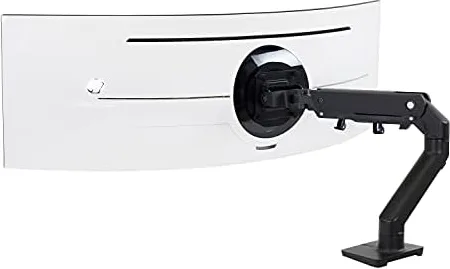
Best for: Anyone mounting a heavy 49-inch 1000R curved ultrawide. And only that kind of buyer.
The number that matters is the weight range: 28 to 42 lbs. Most desk arms top out well below that. A 49-inch curved panel sits right in this window. The arm itself weighs 16.8 lbs. That tells you what you’re clamping to the desk. Owners consistently describe the build as sturdy. They report it holds these large monitors without sagging. It ships with a desk clamp, grommet mount, extension, mounting hardware, and both VESA 75x75mm and 100x100mm patterns. So it fits most large panels out of the box. The articulating arm allows 20 degrees of tilt. Ergotron backs it with a 10-year manufacturer warranty. Rating sits at 4.6 out of 5 across 1,818 reviews, with buyers frequently recommending it.
Two caveats. First, the $189 price is higher than most monitor arms. Reviewers say so plainly. Second, the gas spring is tuned for heavy loads. Buyers mention it’s not suitable for lighter monitors. The arm pulls them upward instead of holding position. That’s not a defect. It’s the same stiffness that makes heavy panels work.
Buy if you have a 28-to-42-lb curved ultrawide and want it positioned precisely. Skip if your monitor is light, or if $189 is more than you want to spend on a mount.
Verdict: If you’re hanging a 28-to-42-lb 1000R curved ultrawide, this is the arm to buy. Sturdy, precise, 10-year warranty. It’s not for light monitors and the $189 price stings. Owners say it holds these monsters without sagging. Skip it unless you own exactly that heavy panel.
Same for the pivot, costs more than an average monitor arm, but the build is high quality and the massive G9 doean’r seem to stress it, so overall the match is awesome 😎
Not a pro at metal and alloys but this bubble structure tells me that this is very cheap low quality metal I wasn't expected to see in premium mount.
Yep! My mistake was thinking that it was just able to take _more_ , rather than being completely unsuitable for lower weighted monitors.
Ergotron LX Monitor Arm (Matte Black): Best for 34-Inch Ultrawides
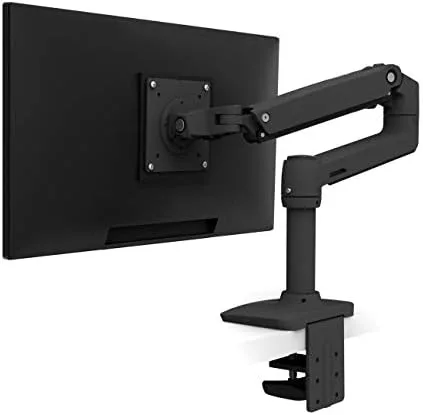
Best for: anyone mounting a single flat, curved, or ultrawide display up to 34 inches that weighs between 7 and 25 pounds.
The weight window is the strength here. Most single arms top out around 15 to 20 pounds. A 34-inch ultrawide with a sturdy stand can sit near the upper end of that. Ergotron rates this one to 25 pounds. There’s headroom, not a limit you bump into. The arm is a metal build weighing 9.8 pounds itself. It’s articulating, and it tilts up to 75 degrees. It fits both VESA 75x75mm and 100x100mm patterns. You’re not hunting for an adapter plate. The warranty runs 10 years. That’s unusual for desk hardware, and it tells you something about the expected service life. The 4.6-out-of-5 rating across 10,989 reviews is consistent with that.
The weakness is plastic. Owners report that plastic bushings and related plastic parts wear out or break under heavy, repeated adjustment. The metal frame outlasts the parts that let it move. Buyers who set the arm once and leave it alone are unlikely to notice.
At $209.69, buy if you have a heavy 34-inch ultrawide and want a long warranty and a wide weight range. Skip if you reposition the arm daily or want to spend less on a lighter monitor.
Verdict: The Ergotron LX is overpriced if you fidget daily—plastic parts fail. But for a heavy 34-inch ultrawide you set once, its 25-pound capacity, metal frame, and 10-year warranty justify the cost. Buy it for a set-and-forget heavyweight. Skip it if you reposition constantly.
I have two Ergotron LX that have been in daily extended use for 11 years now with everything from 24" to 32" heavy monitors and will, I assume, work for... ever, as long as VESA 100 mounts are a thing.
Now, this also means the ergotron has more movement (shake) but worse, if you move your monitors a lot as I do, this screw will slowly grind away at the plastic.
You need to clean them now and then and maybe put some PTFE spray in the joints but don't see any wear on them really.
Ergotron Trace Single Monitor Arm: Best for 38-Inch Ultrawides
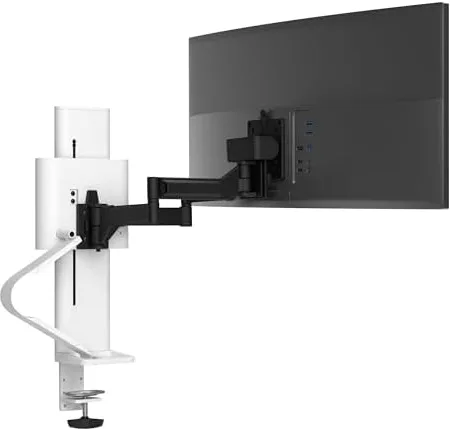
Best for someone with a 38-inch ultrawide in the 6.5-to-21.5 lb range who wants the panel off the desk entirely.
The case rests on three things. Owners report the arm stays steady under a large panel, with minimal wobble at the joint. That’s the practical result of a metal build and a load rating that tops out at 21.5 lbs. The 38-inch rating matches the display it’s built around. The panel sits inside spec instead of at the ceiling of it. It also articulates, tilts up to 80 degrees, and carries a 15-year warranty. That’s a long horizon for a $189 mount.
Two caveats. The spec sheet lists 38 inches as both the minimum and maximum supported screen size. Anything smaller falls outside the published range. The unit itself weighs 15.4 lbs. Its tabletop clamp depends on your desk edge and thickness to work at all. Across 119 ratings (4.3/5), no single recurring complaint theme dominates the feedback. Treat those limits as structural, not a pattern of defects.
Buy it if you’re hanging a 38-inch ultrawide in the supported weight range and your desk takes a clamp. Skip it if your monitor is smaller, or if a 15.4-lb arm is more hardware than your setup needs.
Verdict: The Trace is a one-monitor specialist. Buy it only if you own a 38-inch ultrawide between 6.5 and 21.5 lbs. Owners report it holds steady with minimal wobble, and the 15-year warranty is serious. For anything smaller or heavier, it’s the wrong arm. Skip it and buy a more flexible mount.
Coming from a standard ergotron lx single arm for the past couple years with my LG 34GK950F, the trace mount is noticeably more stable (less wobble).
Yep no problem with my ultrawide, no horizontal wobble either which was always an issue with classic arm mounts
I put a piece of lego as a support structure between the monitor mount and the arm and it works like a charm.
Mount-It! Heavy-Duty Ultrawide Monitor Arm: Best for Samsung Odyssey G9
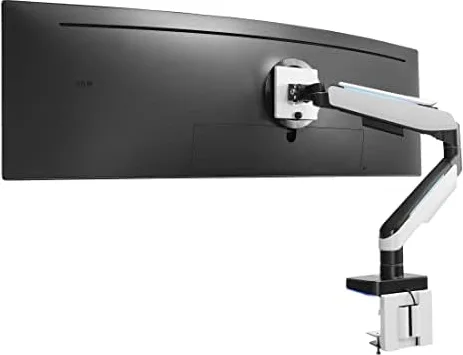
Mount-It! MI-4881 Heavy-Duty Ultrawide Monitor Arm — Review
Buy this if you’re putting a 49-inch ultrawide—a Samsung Odyssey G9, say—on a desk. You want a single clamped arm instead of a freestanding stand.
Capacity is the headline. The arm holds up to 44 lb and supports screens from 17 to 49 inches. That covers the biggest curved panels on the market. A gas spring does the lifting. Repositioning a heavy display doesn’t mean loosening a bolt every time. Tilt runs to 70 degrees and the arm swivels. That’s enough range for most seating angles. Both 75x75 and 100x100 VESA patterns are supported. The enclosure is alloy steel and aluminum, not a plastic shell. Clamp and grommet mounting are both included. You don’t need to drill your desk. The warranty is lifetime. At $109.99, the price sits well below what a 44-lb-capacity arm often costs.
The catch is the track record. A 3.9 out of 5 average across 88 reviews is middling, not glowing. That’s the strongest caution signal here. The RGB lighting is a take-it-or-leave-it extra. The grayish white with matte black two-tone finish won’t blend into an all-black setup.
Buy if you need 44 lb of headroom, 49-inch support, and VESA flexibility on a clamped arm. Skip if you want a near-flawless rating or a plain black, unlit mount.
Check priceVerdict: At $109.99, the MI-4881 delivers 44 lb of holding power and a lifetime warranty. But the 3.9-star rating and gimmicky RGB mean it’s not the no-drama choice. Buy for heavy ultrawide capacity on a budget. Skip if you want proven reliability or plain black.
ULTRARM Heavy Duty Monitor Arm MA20P-S: Best Budget
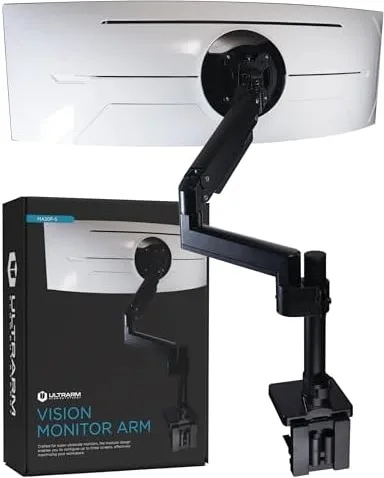
ULTRARM MA20P-S (best budget)
Buy this if you need one desk-mounted arm to carry a large ultrawide—17 to 57 inches, up to 44 pounds—with pneumatic height adjustment instead of a fixed pole.
Capacity is the point. A 57-inch, 44-pound rating and a 100x100mm VESA maximum cover the biggest consumer ultrawides. Buyers cite 57-inch compatibility as the reason it worked for them. Owners also report stable performance without issues. That’s the failure that matters most once a heavy panel is hanging off a clamp. The joint set is broad: height adjustment, articulation, 50 degrees of tilt, rotation, and swivel. The build is aluminum and metal, and it weighs 13 pounds. ULTRARM backs the $22.99 arm with a 3-year manufacturer warranty.
Weaknesses are harder to pin down. The mined complaint data for this listing shows no recurring theme. There’s no clear failure pattern to warn you about. The numbers show a 4.2 average across 591 reviews. A slice of buyers landed short of satisfied for reasons the data doesn’t name. It also holds a single monitor. The VESA cap rules out mounting patterns larger than 100x100.
Verdict: buy if one heavy ultrawide on a desk stand is the job. Skip if you need dual monitors or want an arm with a documented complaint history to judge it by.
Verdict: The MA20P-S is a budget workhorse for huge single ultrawides. Its 57-inch, 44-lb rating, 50-degree tilt, and stable owner reports make it a smart buy if you mount one heavy panel. Skip it only if you need dual arms or a spotless review history.
My question is I am seeing some flex on the ultrarm at the base but I also things its the rubber padding causing it to flex.
I’ve been using a couple of these ( https://a.co/d/hMopEEM ) on my 57” Neo G9’s and have not had any issues.
Hey bud, I've actually added the second arm as an extension and it has been holding up!
How the Picks Compare
| # | Product | Award | Price | Rating | |
|---|---|---|---|---|---|
| 1 | Ergotron – HX HD Premium Heavy Duty Gaming Monitor Arm, Single Monitor Desk Mount – for 1000R Curved Ultrawide Monitors Up to 49 Inches, 28 to 42 lbs, VESA 75x75mm or 100x100mm – HD Pivot, Matte Black | best overall | $189 | 4.6/5 | Check price |
| 2 | Ergotron – LX Monitor Arm, Single Monitor Desk Mount – fits Flat Curved Ultrawide Computer Monitors up to 34 Inches, 7 to 25 lbs, VESA 75x75mm or 100x100mm – Matte Black | best for 34 inch ultrawides | $209.69 | 4.6/5 | Check price |
| 3 | Ergotron – Trace™ Single Monitor Arm, VESA Desk Mount – for Monitors Up to 38 Inches, 6.5 to 21.5 lbs – White | best for 38 inch ultrawides | $189 | 4.3/5 | Check price |
| 4 | Mount-It! Heavy-Duty Ultrawide Monitor Arm up to 49”, 44 lb Capacity, Desk Mount for Curved & Widescreen Monitors, Compatible with Samsung Odyssey G9, Gas Spring, RGB Lighting, VESA 75x75 & 100x100 | best for samsung odyssey g9 | $109.99 | 3.9/5 | Check price |
| 5 | ULTRARM Heavy Duty Monitor Arm for Ultrawide Monitors up to 57” and 44 lbs, Single Desk Stand, Pneumatic Height Adjustable, Modular Extension Arms - Max VESA 100x100, Black, MA20P-S | best budget | $22.99 | 4.2/5 | Check price |
What to Check Before Buying
Ultrawide panels place their mass far from the mounting plate. That’s where most arms fall short. Before committing, check four things against your specific screen.
Rated weight, not just diagonal size. A large curved display can weigh noticeably more than a smaller flat one. The curve pushes the center of gravity forward of the bracket. Find the arm’s stated weight range. See whether your monitor sits near the middle of it rather than at the ceiling.
Tilt tension at your load. Gas-spring arms are tuned to a weight window. Owners report that arms rated only slightly above a heavy ultrawide droop at the tilt joint over time. An adjustable or replaceable spring—or a mechanical-joint design—gives more room to compensate.
Reach and span. Measure from your desk’s back edge to where the screen center needs to sit. Then confirm the arm’s horizontal reach covers that distance at the height you want.
Mounting hardware. Confirm your monitor’s VESA pattern. Check whether a recessed or curved back requires a spacer or adapter plate before the bracket seats flush.
Questions before you buy
How much weight capacity does an ultrawide monitor arm need?
An ultrawide monitor arm should be rated for at least your monitor's weight and screen size; for example, the ULTRARM Heavy Duty Monitor Arm supports up to 57 inches and 44 lbs, while the VIVO Premium Aluminum Monitor Arm supports up to 49 inches and 33 lbs. Buyers should check their monitor's exact weight and VESA pattern against the arm's listed capacity, since a 49-inch ultrawide can weigh 30 lbs or more.
Will a 49-inch curved monitor fit on a standard monitor arm?
A standard monitor arm generally won't, since models like the Ergotron LX top out at 34 inches; you need an arm rated for 49 inches such as the VIVO Premium Aluminum Monitor Arm (STAND-V101G1, $79.99, 49 inches and 33 lbs), the Ergotron HX HD Premium Heavy Duty Gaming Monitor Arm ($189, 49 inches), or the Mount-It! MI-4881 ($109.99, 49 inches). Also confirm your monitor's weight stays within the arm's limit.
Do monitor arms support 57-inch ultrawide monitors?
Yes, some do: the ULTRARM Heavy Duty Monitor Arm and the ULTRARM Laptop and Monitor Stand are both rated for ultrawide monitors up to 57 inches and 44 lbs, while most other arms in this guide top out at 49 inches or less. For any 57-inch panel, confirm the arm's maximum screen size and weight rating match your monitor.
What is the difference between a standard pivot and an HD pivot?
The guide doesn't define a standard pivot versus an HD pivot; the only HD pivot listed is in the Ergotron HX HD Premium Heavy Duty Gaming Monitor Arm (45-647-224), whose included hardware names an "HD Pivot" for a 49-inch, 20-degree-tilt arm. Buyers should check Ergotron's spec sheet for the HD pivot's weight rating and tilt range against a standard pivot, since those details aren't given here.
Can I mount an ultrawide arm with a grommet instead of a desk clamp?
Yes, but only certain ultrawide arms list grommet mounting — the Ergotron HX HD Premium Heavy Duty Gaming Monitor Arm at $189 includes a grommet mount, the Mount-It! Heavy-Duty Ultrawide Monitor Arm up to 49" at $109.99 lists clamp and grommet mounting, and the Ergotron LX in polished aluminum at $199 ships with desk clamp and grommet mount bases. For any other arm here that just says "tabletop mount," check the box contents for a grommet base before buying.
How long should a monitor arm warranty last?
Warranty length varies widely in this guide: the Ergotron arms run 10 to 15 years (Trace at $189, HX HD at $189, LX at $199–$210), VIVO and ULTRARM offer 3 years, and Mount-It! lists a lifetime warranty. If you want coverage that matches a long-term desk setup, look for at least 10 years, and check the warranty terms yourself for arms with none listed, such as the ATDEC Fortis or Inovativ Mantis.
Are cheaper monitor arms safe for heavy ultrawide screens?
Price alone doesn't determine safety: the $22.99 ULTRARM Heavy Duty Monitor Arm is rated for ultrawides up to 57 inches and 44 lbs with owners reporting stable performance, while the $79.99 VIVO Premium Aluminum arm tops out at 49 inches and 33 lbs and lists arm failure causing the monitor to fall as a drawback. So match the arm's rated maximum screen size and weight capacity to your monitor's actual weight (plus a margin) and confirm its VESA pattern fits before buying.