All guides / Monitor Light Bars
Best Monitor Light Bar for Small Desks: 4 Options in 2026
- Updated
- Picks
- 4
- Edition
- No. 1
- Published by
- Try Mersianto
For small desks, clamp-mounted, space-saving bars make the most sense. BenQ ScreenBar Pro is best overall, Mount-It! is the budget pick, and BenQ ScreenBar Halo 2 adds a wireless dial and backlight. Monster Duo is for RGB gaming.
Why a Monitor Light Bar Helps on a Small Desk
A monitor light bar sits on the top edge of your display. It casts light down onto the desk, not out into the room. The source stays above the screen and points at the work surface. That puts light on your keyboard, notebook, or paperwork. No lamp base, arm, or shade takes up desk space.
Small desks feel this most. A regular lamp eats surface area. The base and the arm’s reach compete with the monitor stand, keyboard, and mouse. A clamp-mounted bar attaches to the monitor itself. The footprint it adds is the top edge of a screen that’s already there.
Bars differ in reachable controls, light adjustment, price, and owner ratings. Those are the factors covered below.
BenQ ScreenBar Pro: Best Overall for Small Desks
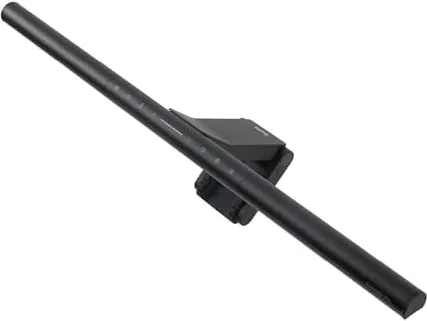
Best for wide or curved monitor setups. You get light on the work surface, not in your eyes.
The bar spans 19.68 inches. That’s the whole point. Buyers running ultrawide and curved panels report even coverage across the full width, not the hot spot a single desk lamp throws to one side. Controls are touch-based. You get adjustable color temperature, brightness, and a motion sensor that turns the light on and off. The head is a 5-watt LED drawing 5 volts DC over USB-C. It clamps on instead of using a stand. The base and shade use aluminum, with ABS, polycarbonate, and zinc in the mix. Owners give it 4.8 out of 5 across 1,346 ratings. They call out the control layout and feature set. They describe the glare-free result as superior to competing brands.
Two limits stand out. It’s corded only and runs off the included transformer. That means a free USB power source, and no light during an outage. It has no water resistance rating, so damp or outdoor spots are out. At $199 it costs more than most bars. Review data shows no recurring defect pattern, so price is the real objection, not reliability.
Buy if you want wide, touch-controlled, glare-free coverage over an ultrawide or curved monitor and you’ll pay for fit and finish. Skip if you need battery power, splash resistance, or a budget price.
Verdict: The BenQ ScreenBar Pro is the pick for ultrawide and curved desks. Broad glare-free coverage, touch tuning, and motion on/off justify the $199 if you want set-and-forget lighting. It’s corded and not water-resistant, so skip it for outages or damp setups.
The best thing is that the light comes from above the very center of the desk and is not covered by anything.
The BenQ is FAR superior. It's more stable, as in it grips better to the monitor (I have a curved one).
The dial for the the benQ is much premium as well, in terms of functions and engineering.
BenQ ScreenBar Halo 2: Best for Adjustability and Low-Light Use
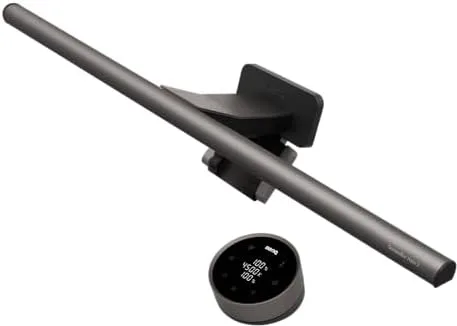
Best for: anyone who wants a desk lamp that disappears into the monitor instead of sitting on the desk — and who will actually use a dial to tune brightness and color temperature.
Control is the standout. The wireless desktop dial adjusts brightness and color temperature by touch. It remembers your last setting. A motion sensor turns the bar on and off without a button. BenQ lists two light sources, so the rear backlight works with the front bar. Owners report that combo helps in a dark room where a single downward light would leave the wall behind the monitor black. The aluminum body and polished dark grey finish weigh about 1.76 lb. The 19.7-inch width spans a typical widescreen panel. BenQ says it fits curved monitors, which few clamp bars do cleanly. At $139 with a 4.7/5 average across 1,391 reviews, satisfaction is high for the price band.
The honest weakness is mounting bulk. The recurring complaint is a bulky rear block. Buyers say it has a noticeable presence on top of the monitor. That’s the main thing to live with. It’s a clamp-and-counterweight design, not a slim clip.
Buy if you want dial-based adjustment, automatic on/off, and rear backlight. Skip if your monitor sits against a wall, you use a webcam and need the top edge clear, or you want something you never notice.
Verdict: The BenQ ScreenBar Halo 2 earns its $139 price if you want a wireless dial, motion sensor, and rear backlight on a curved monitor. The bulky clamp is a real flaw. Owners still rate it highly and report glare-free, even light. Skip it only if you need a slim mount or a budget bar.
I just want to give my short review about this light bar because honestly I love it, ive been eyeing on this for awhile now but I just never thought I will need the upgrade.
I mainly use it when I get in the dark which I prefer, I love the look of warm lighting during night and minimal lighting.
I use it both during the day and in low light, and honestly I'm so used to it that it's hard to do without.
Mount-It! Monitor Light Bar: Best Budget Space-Saver
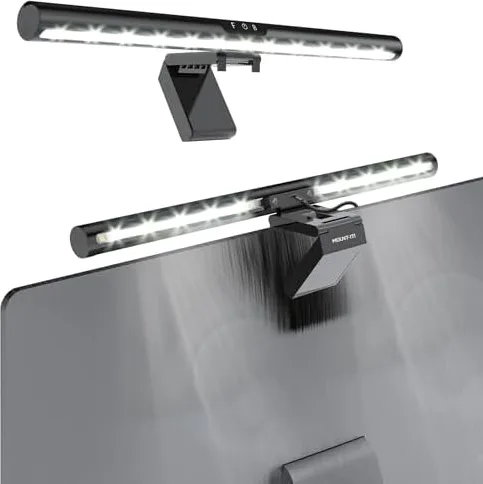
Best for: anyone who wants a $33 clamp-on light bar that clears desk space instead of adding another lamp to it.
The Mount-It! TS-7010 measures 16.5 inches wide. That spans most standard monitors. The shade sits under an inch tall (0.95”), so it stays unobtrusive at the top of the bezel. It clamps on, so the desktop footprint is basically zero. Inside, 80 LEDs handle stepless dimming and adjustable color temperature. Touch controls drive it. The body is aluminum and plastic. It weighs 1.3 pounds. At $32.99, it carries a 5-year manufacturer warranty. That’s unusually long at this price.
Two things to weigh. First, the rating: 3.7 out of 5 across 39 reviews. Solid, not stellar. Read the reviews before you commit. Second, power is USB only. The box has the lamp and a power cable, no wall adapter. So you need a free USB port within cable reach, and you’ll route a cord across the desk. It’s also not water resistant. Keep it clear of drinks and plants.
Buy if you want a wide, color-temperature-adjustable bar on a tight budget and you have a spare USB port. Skip if you’d rather plug into a wall outlet or want a higher-rated pick before spending.
Check priceVerdict: For $33, the Mount-It! TS-7010 earns its keep by vanishing onto your monitor and adding dimming plus color temperature. Just don’t expect a stellar review average (3.7/5) or wall power. It’s the budget clamp-on for desk clearance, but only if you have a USB port to spare.
Monster Duo Monitor Light Bar: Best for RGB Gaming Atmosphere
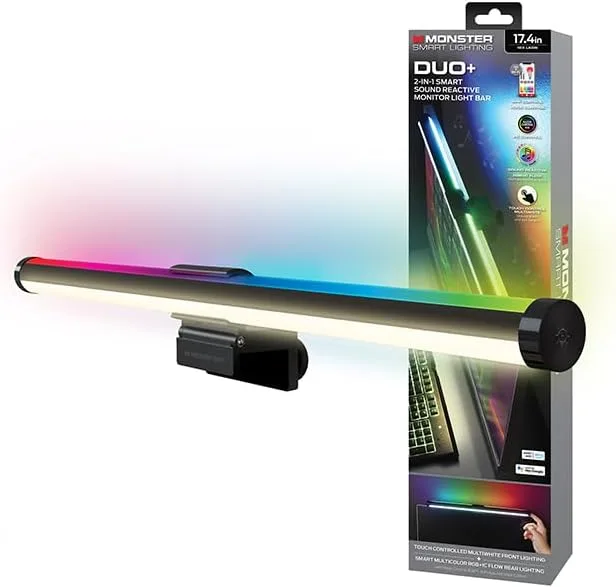
Best for gamers who want the desk to glow without adding a second lamp.
Monster bundles two lighting jobs into one bar. The RGBIC side handles atmosphere. The multiwhite side is listed for reading and decoration, so you can kill the color and still see the desk. Control is the real selling point. You get touch on the unit, app control, voice through Alexa and Google, and Razer Chroma over Wi-Fi. That’s worth having if the rest of the room already runs on Chroma. It’s a tabletop, corded USB fixture. You need an open port, and it stays where you put it.
At $16.99 with a limited one-year warranty, price is the other argument for it.
Two things to weigh. The 3.6/5 average comes from just 8 ratings. That’s too small a sample to say much beyond “mixed.” The finish is listed as “matte or polished,” so the listing never commits. You may not know which version shows up until it does. It’s also not water resistant. Fine for a game room, wrong for anywhere damp.
Buy if you want cheap ambient plus white light and you already live in the Alexa, Google, or Chroma ecosystem. Skip if you need a serious task light or want certainty about the finish before ordering.
Check priceVerdict: At $16.99, this is a Chroma-synced novelty, not a serious task light. The RGBIC glow is cheap fun. But 8 ratings averaging 3.6 and a “matte or polished” finish that’s anyone’s guess mean you’re gambling. Buy it as a game-room accent when Alexa, Google, or Chroma already run the room. Skip it for actual desk work.
Small-Desk Monitor Light Bar Comparison: Mounting, Controls, and Price
| # | Product | Award | Price | Rating | |
|---|---|---|---|---|---|
| 1 | BenQ ScreenBar Pro LED Monitor Light Bar (Black) - Ultrawide Lighting, Motion Sensor, Adjustable Brightness/Color Temperature, Eye-Care USB-C Monitor lamp, No Glare, Curved Monitors, Monitor accessory | best overall | $199 | 4.8/5 | Check price |
| 2 | BenQ ScreenBar Halo 2 LED Monitor Light Bar - Wireless Controller, Backlight, Motion Sensor, Adjustable Brightness/Color Temperature, Eye-Care, No Screen Glare, Fits Curved Monitor, Monitor Accessory | best for adjustability | $139 | 4.7/5 | Check price |
| 3 | Mount-It! Monitor Light Bar, USB-Powered LED Lamp with Stepless Dimming and Adjustable Color Temperature, Eye-Caring Desk Light for Home, Office, and Gaming, Dual Light Modes, Space-Saving Design | best budget | $32.99 | 3.7/5 | Check price |
| 4 | Monster Duo Monitor Light Bar: Reduce Glare, Enhance Comfort, Boost Style, Level Up Your Gaming Atmosphere — 2-in-1 RGBIC & Multiwhite LED, App Voice Touch Control, Alexa Google Razer Chroma | best for gaming | $16.99 | 3.6/5 | Check price |
How to Choose a Monitor Light Bar for a Small Desk
How to Choose a Monitor Light Bar for a Small Desk
A light bar earns its place on a tight desk by clamping to the monitor’s top edge instead of standing on the work surface. No footprint where the keyboard and notebook sit. Before buying, check the clamp against your display: bezel thickness, flat or curved back panel, and whether the mount uses a weighted counterweight or a spring clip. Curved or unusually thick bezels rule out some designs.
Controls are the second filter. On-bar touch buttons are common. Rotary dials give finer steps. A separate remote or wireless puck helps when the bar sits high and behind the screen, out of easy reach. Look for adjustable brightness and color temperature. Asymmetric optics matter too; they throw light down onto the desk, not into your eyes or onto the panel.
Finally, weigh price against owner ratings. Read reviews from buyers with similarly sized monitors to confirm fit.
Questions before you buy
Do monitor light bars take up desk space?
Most monitor light bars clamp over the top of the display rather than sitting on the desk — the BenQ ScreenBar Halo 2, BenQ ScreenBar Pro (with its patented clamp), and the Mount-It! TS-7010 are all clamp-mounted, so they leave your desk surface clear. One exception here is the Monster Duo ($16.99), whose installation and mounting type are listed as tabletop, meaning it does occupy desk space.
Are clamp-mounted monitor light bars better for small desks?
If a small desk means you can't spare any surface area, clamp-mounted bars like the Mount-It! TS-7010 ($32.99) and the BenQ ScreenBar Pro ($199) sit entirely off the desktop, which suits tight spaces. Note that the BenQ ScreenBar Halo 2 is a counter-example: buyers mention bulky, obtrusive monitor mounting despite its 4.7 rating. Check each clamp's maximum desk thickness and required clearance behind your monitor before buying, since none of these listings state a desk-size limit.
What width monitor light bar fits a small desk setup?
The narrowest option is the Mount-It! Monitor Light Bar at 16.5 inches wide, so it's the best fit for a compact desk; the BenQ ScreenBar Halo 2 and ScreenBar Pro are both about 19.7 inches wide and better suited to larger monitors.
Can a monitor light bar cause glare on a small monitor?
Yes — the BenQ ScreenBar Halo 2 and ScreenBar Pro are each about 19.7 inches wide, so on a small monitor they can overhang the screen edges and put bright LED light in your line of sight, which is what reads as glare. Measure your monitor's width first and look for a glare-reducing design, such as the Monster Duo Monitor Light Bar (rated 3.6) or the BenQ ScreenBar Pro (rated 4.8), which is noted for glare-free, unobstructed lighting.
Is a wireless controller worth it on a small desk?
The BenQ ScreenBar Halo 2 ($139, rated 4.7) is the only light bar here that includes a wireless controller—a remote control paired with a desktop dial—while the Mount-It! ($32.99) and both other BenQ models use touch or push-button controls. None of the listings state how much desk footprint the remote or dial takes up, so check the controller's dimensions or whether it can mount off the desk if space is your main concern.
How much should I spend on a monitor light bar for a small desk?
Monitor light bars here range from $16.99 for the Monster Duo to $199 for the BenQ ScreenBar Pro, so for a small desk you can start around $33 with the Mount-It! Monitor Light Bar or $16.99 with the Monster Duo if you want the lowest cost. If you prefer the highest owner ratings, the BenQ ScreenBar Halo 2 at $139 and ScreenBar Pro at $199 rate 4.7 and 4.8, though buyers mention the Halo 2 has bulky, obtrusive monitor mounting.
Can a monitor light bar fit a curved monitor?
None of these models lists curved-monitor compatibility, so check with the manufacturer before buying — the BenQ ScreenBar Pro's patented clamp and the Mount-It! TS-7010's clamp mount are the details worth confirming against your screen's curve and bezel thickness.
Do RGB monitor light bars help with work or only gaming?
They can help with work, not just gaming: the BenQ ScreenBar Halo 2 ($139) lists work from home, home office, reading, and gaming among its recommended uses. The multicolor, music-sync Monster Duo ($16.99) is the one aimed mainly at a game recreation room, with reading and decoration as its other uses.