Best Monitor Arm for Heavy Monitors: 6 Options in 2026
- Updated
- Picks
- 6
- Edition
- No. 1
- Published by
- Try Mersianto
For heavy screens, weight capacity matters most. The Ergotron HX supports 20 to 42 pounds on monitors up to 49 inches, while the Mount-It! MI-4891 claims 55 pounds for far less money. Five more arms cover other priorities.
What to Look For in an Arm Built for Heavy Monitors
Most monitor arms look identical in photos. They’re not identical on a desk. The real specs are weight capacity in pounds and screen size in inches. Those two numbers decide whether an arm can hold a heavy ultrawide—or fail a week after you mount it.
Weight capacity comes first. A light-duty arm isn’t a candidate for a wide, heavy panel. The gap between categories leaves little room once a display is mounted and tilted.
Screen size matters because of reach as much as mass. A large ultrawide extends farther from the mounting point than a standard display with a similar diagonal. The arm has to hold that offset without drifting. Buyers mention checking the listed limits against their exact panel before ordering. The maximums are ceilings, not targets.
Ergotron HX Premium Heavy Duty: Best Overall
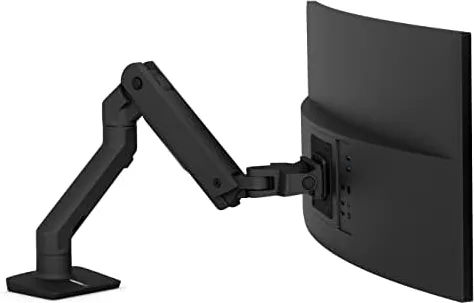
Best for: anyone mounting a 49-inch ultrawide or a heavy flat panel that needs to move through a wide arc without re-clamping the desk every few months.
Capacity is the headline spec. This arm is rated for monitors from 20 to 42 pounds and screen sizes up to 49 inches. That covers most 49-inch ultrawides on the market. Not many single-arm desk mounts reach that top end. The articulating design adds 75 degrees of tilt, so the monitor can angle up, down, or swing to the side instead of parking in one spot. The build is metal throughout. The mount itself weighs 17.2 pounds—heavy hardware for a tabletop clamp, which matches the load it carries. At $190 it sits at the upper end of the single-arm category. The 4.6-out-of-5 average across 2,355 reviews suggests buyers generally get what they pay for.
The recurring complaint is the gas spring. Owners report the tension is overpowered for lighter monitors. A screen near the bottom of the range can drift upward and tilt instead of holding position. Twenty pounds is the stated minimum, and that’s where buyers mention the most trouble. If your monitor is well below 20 pounds, look elsewhere.
Buy if you’re hanging a 49-inch ultrawide or a panel near the 42-pound ceiling. Skip if your monitor is light or you want to swap displays often.
Verdict: The Ergotron HX is the arm to buy for 49-inch ultrawides up to 42 pounds—solid metal, smooth 75-degree tilt, and enough real-world praise to justify $190. Just skip it for monitors under 20 pounds; the overpowered gas spring drifts on light panels.
I have the HX with HD pivot and the Asus PG49WCD (8.5kg/18.74 lb. curved 49") and the spring tension is only JUST light enough when the adjustment is completely bottomed out.
Not a pro at metal and alloys but this bubble structure tells me that this is very cheap low quality metal I wasn't expected to see in premium mount.
I used the HD pivot for my G9 (which worked great) but anything lighter got pulled upward and with the spring loosened all the way.
Desky Heavy Duty Ultrawide: Best for Ultrawide Screens
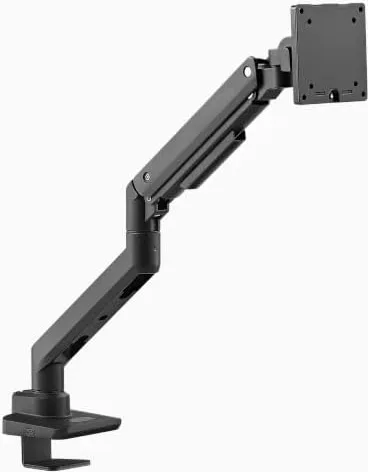
Best for someone hanging a 17- to 49-inch ultrawide off the back edge of a desk and wanting one articulating arm to carry it.
The arm itself weighs 7.5 pounds. That’s a lot of metal for a one-monitor mount. The aluminum alloy build matches what owners describe: sturdy, stable, no sag under a large panel. Movement is articulating with up to 75 degrees of tilt, so a 49-inch screen can be angled rather than locked flat. Owners report smooth, easy adjustment and enough heavy-duty capacity for big displays. Desky covers it with a 5-year supplier warranty.
Two limits stand out. Mounting is clamp only—the specs list no grommet or wall option. A desk with a thick lip, a drawer right under the edge, or a glass top may not work. And the 4.7/5 rating rests on just 19 reviews. The mined feedback contains no recurring complaint at all, which is encouraging, but it’s a thin base for judging how the joints hold up over years.
At $109.99, buy if your desk edge takes a clamp and you want one arm to handle a 49-inch ultrawide. Skip if you need a through-desk grommet mount, or if you’d rather wait for a longer review history before committing.
Verdict: Clamp-only and a thin review base, but the metal build, smooth articulation, and heavy-duty capacity make this the clear pick for a 49-inch ultrawide under $110. If your desk takes a clamp, buy it; if you need a grommet, move on.
I have this one and the HD variant and the HD variant has been having issues but this one has been solid and adjusting it from the clamp on the desk couldn’t be easier
Coming from a dual arm monitor from another brand to the single arm from Desky has been a great experience.
I've bought the desky one for a Samsung M7 and it definitly is powerful and smooth to use, I love it.
Mount-It! MI-4891: Best Budget
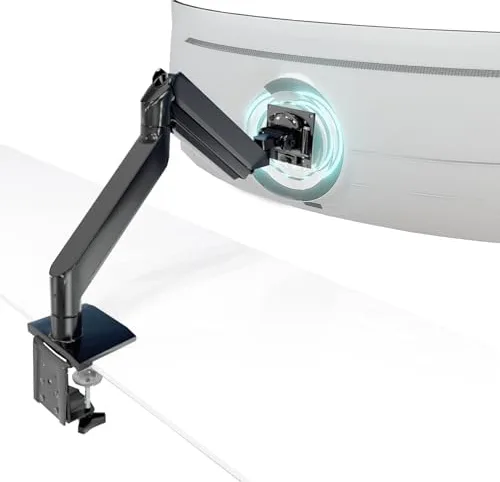
Best for someone with a heavy curved ultrawide (24–57 inches) who wants articulating, height-adjustable mounting without paying flagship prices.
The MI-4891 is steel, and it’s rated to 55 lb. That’s substantial headroom for the large curved panels this arm targets. It means the load isn’t sitting near the limit. It supports VESA 75x75 and 100x100, so it covers the common backs on ultrawide monitors. The gas spring handles height adjustment while the arm articulates. Two mounting options are included: a desk clamp or a grommet base. That matters if your desk edge won’t take a clamp. Mount-It! backs it with a lifetime warranty—unusual at $79.99.
The caveats are real. The rating sits at 3.9 out of 5 across 78 reviews—decent, but not unanimous at this price. More concerning, the published specs contradict each other. The highlight copy claims 13–57 inch screens, while the spec table lists a 24 inch minimum. Maximum tilt is listed as 90 degrees in one field and a tilt range of +50/-20 in another. Verify the fit for your exact panel before ordering.
Buy if you have a 24–57 inch VESA-compatible display, a desk that accepts a clamp or grommet, and about $80 to spend. Skip if you need support at the smaller end of that range or want specs that don’t fight each other.
Check priceVerdict: At $80, the MI-4891 is a risky but rational buy for heavy 24–57-inch ultrawides: 55 lb steel, lifetime warranty, clamp or grommet. Just don’t trust the spec sheet—confirm tilt and screen-size limits for your exact monitor, because Mount-It! contradicts itself. If your panel fits, this arm is a bargain.
ATDEC Fortis: Best for Large Curved Monitors
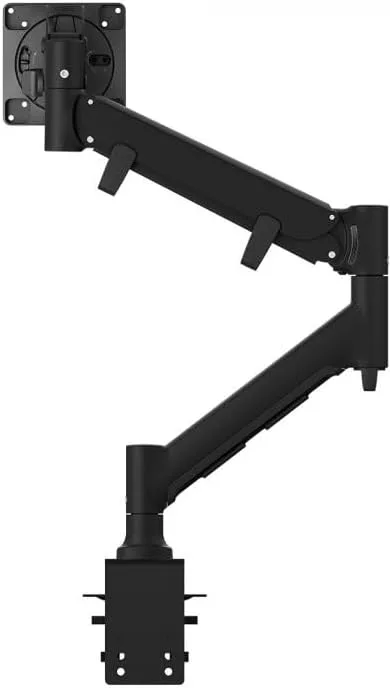
Best for someone with a large curved monitor who wants it held up by the desk rather than the wall.
The Fortis AWMS-HXB-H-B-V is a tabletop-mounted articulating arm built from metal—both the main material and the enclosure. That matters. Owners report the arm holds large curved panels steady, which is the hard part when you’re hanging a wide, heavy screen off a single mount. Because it clamps to the desk instead of a stud, renters and anyone in a room with tile, glass, or an awkward wall orientation can skip the drilling entirely. Buyers also mention the overall quality feels proportionate to what they paid.
Two things to weigh before ordering. First, this is a 13.2 lb arm by itself. That weight sits on your desk surface along with the monitor—check that your desk edge and its construction can carry the load before you commit. Second, at $310.31 there are no reviews and no rating on file yet. You’re buying on the spec sheet and the ATDEC name, not on an owner track record.
Buy if you need articulating desk-mounted support for a large curved monitor and your desk can take the load. Skip if you need a wall mount, want cheaper options, or would rather wait for reviews to accumulate first.
Verdict: At $310, this is a heavy, desk-clamped metal arm with no reviews yet. It promises stable support for large curved monitors without wall drilling, but you’re betting on specs and brand, not owner track record. Buy only if your desk can handle 13.2 lb plus panel and you can’t wall-mount.
This is a great stand I was really struggling to find something that could support 1000R's without mounting to the wall or something similarly crazy.
Totally stable, easy to mount the monitors (with help) they easily adjust as well.
Only downside is the free standing mount is $450, but totally worth it IMO.
Ergotron LX: Best for Durability
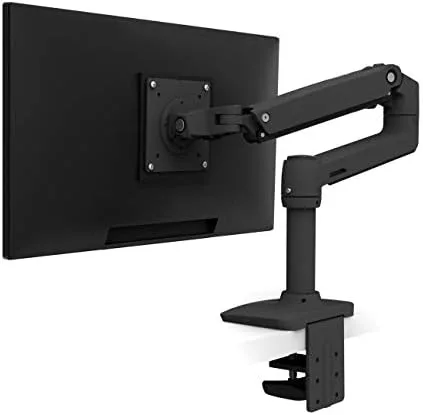
Best for: anyone mounting a flat or curved monitor up to 34 inches that weighs between 7 and 25 lbs, who wants the arm to still be serviceable years from now.
Strengths. The enclosure is metal. Ergotron backs the LX with a 10-year warranty—the longest coverage in this price bracket and the clearest evidence behind the durability reputation. Compatibility is broad rather than fussy. VESA 75x75 and 100x100 covers nearly every 34-inch flat or curved ultrawide, and the 7-to-25-lb range spans everything from a light 24-inch panel to a loaded ultrawide. Articulation includes up to 75 degrees of tilt, so overhead and low-angle positions are realistic for a desk mount. At $209.69, a 4.6 out of 5 average across 10,989 reviews is a large enough sample to be meaningful, not lucky.
Weaknesses. The weak points are plastic, not metal. Recurring complaints point to plastic bushings and related plastic parts wearing or breaking under heavy use. If your monitor sits near the 25-lb ceiling and you reposition it daily, that’s the failure mode to expect—not the arm itself. Lighter monitors moved occasionally fare better.
Verdict. Buy if you want a metal single-monitor arm with a 10-year warranty and a broad 7-to-25-lb, 34-inch envelope. Skip if your monitor is close to 25 lbs and you adjust the arm constantly, or if you’d rather spend less on a lighter-duty mount.
Verdict: For a 34-inch, 7–25 lb monitor, the Ergotron LX is a solid metal arm with a 10-year warranty and smooth 75-degree tilt. The plastic parts are the weak point—they wear under heavy daily use. Buy it if you want long-term durability without constant repositioning; skip if you’ll abuse it daily at the weight limit.
I have two Ergotron LX that have been in daily extended use for 11 years now with everything from 24" to 32" heavy monitors and will, I assume, work for... ever, as long as VESA 100 mounts are a thing.
Now, this also means the ergotron has more movement (shake) but worse, if you move your monitors a lot as I do, this screw will slowly grind away at the plastic.
You need to clean them now and then and maybe put some PTFE spray in the joints but don't see any wear on them really.
Hexcal Single Monitor Arm: Best for Cable Management
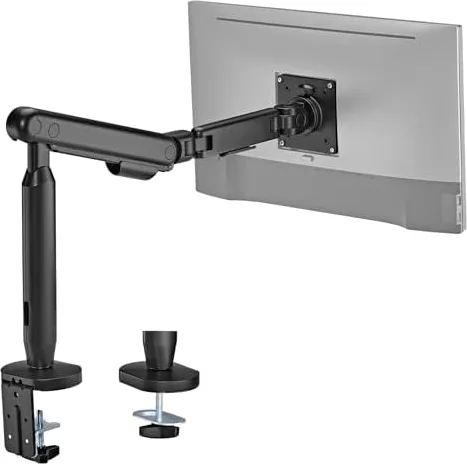
The Hexcal Single Monitor Arm fits someone with one 13- to 35-inch monitor who wants the cables routed inside the arm rather than clipped on outside, without moving up to a heavier-duty mount. It lists at $79.99.
Capacity is the headline number: 24.2 lbs. That covers most 27- and 32-inch panels and some 35-inch ones, though heavier 35-inch displays will exceed it. Both VESA 75x75 and 100x100 patterns mount without an adapter. The enclosure is alloy steel and aluminum with plastic trim. Owners report a stable, solid hold once the arm is set. Cable management is built into the arm itself, which is this model’s stated specialty. Buyers also describe adjustment as smooth and easy.
The weaknesses are quieter. The spec sheet lists movement only as “rotate”—no tilt range, swivel, or height figures are published. Confirm the range you actually need before ordering. And the 4.1/5 average rests on just 11 reviews, with no recurring complaint pattern visible yet. That’s a thin evidence base for judging joint wear over a few years.
Buy if your monitor is under 24.2 lbs, you need both VESA patterns, and internal cable routing matters. Skip if you have a heavy 35-inch panel or you want published tilt and height specs before committing.
Verdict: For under $80, the Hexcal is a sensible buy if your monitor stays below 24.2 lbs and you want hidden cables. The stable hold and smooth adjustment are real, but 11 reviews and unpublished tilt specs make it a quiet gamble for heavy 35-inch panels.
I have this one and the HD variant and the HD variant has been having issues but this one has been solid and adjusting it from the clamp on the desk couldn’t be easier
I chose not to use these management channels because the exit direction of the cables was still visible when my monitor arm was close to the wall.
I use the Hexcal Heavy Duty Monitor Arm, recommended by a shopping guide. It works perfectly with my Samsung Odyssey G9
How These Heavy-Duty Arms Compare
| # | Product | Award | Price | Rating | |
|---|---|---|---|---|---|
| 1 | Ergotron – HX Premium Heavy Duty Monitor Arm, Single Monitor VESA Desk Mount – for Flat or Slight Curved Ultrawide Monitors Up to 49 inches, 20 to 42 lbs – Standard Pivot, Matte Black | best overall | $190 | 4.6/5 | Check price |
| 2 | Desky Heavy Duty Ultrawide Monitor Arm Black | best for ultrawide | $109.99 | 4.7/5 | Check price |
| 3 | Mount-It! Heavy Duty Monitor Arm Mount for Samsung Odyssey G9, Holds 55 lb | best budget | $79.99 | 3.9/5 | Check price |
| 4 | ATDEC Fortis Monitor ARM - Black | best for large curved monitors | $310.31 | — | Check price |
| 5 | Ergotron – LX Monitor Arm, Single Monitor Desk Mount – fits Flat Curved Ultrawide Computer Monitors up to 34 Inches, 7 to 25 lbs, VESA 75x75mm or 100x100mm – Matte Black | best for durability | $209.69 | 4.6/5 | Check price |
| 6 | Hexcal Single Monitor Arm, Up to 35 inches Monitor Mount, 24.2 lbs with Built-in Cable Management and Free VESA 75x75mm or 100x100mm - Black | best for cable management | $79.99 | 4.1/5 | Check price |
Buyer’s Guide: Matching an Arm to Your Monitor
Two numbers on an arm’s spec sheet decide whether it will work with an ultrawide: weight capacity and supported screen size range.
Weight capacity is stated as a range, not a ceiling. A gas-spring arm tuned for a lighter band may refuse to hold position at the bottom of its range. Push one past its maximum, and it will drift or sag at the joint. Owners report sag shows up first at full extension, where leverage on the joint is greatest.
Screen size range matters separately from weight because ultrawide panels carry their mass far from the mounting plate. Owners of 49-inch super-ultrawides mention that arms rated for the same weight in a narrower 16:9 size can still struggle. The load sits farther out.
Confirm the VESA pattern and the arm’s tilt range before buying. Check whether the clamp or grommet base fits your desk thickness.
Questions before you buy
How much weight can a heavy-duty monitor arm actually hold?
None of these listings state a weight capacity, so the closest figure available is supported screen size — the Ergotron HX handles up to 49 inches, the Mount-It! MI-4891 up to 57 inches, and the Desky up to 49 inches. Check each maker's published weight rating (and your monitor's weight without its stand) before buying, since a 49- or 57-inch panel can vary widely in pounds.
Will a heavy monitor arm work with a curved ultrawide screen?
Yes—the Desky Heavy Duty Ultrawide Monitor Arm Black supports screens up to 49 inches, the Mount-It! Heavy Duty Monitor Arm Mount for Samsung Odyssey G9 fits 13–57 inch ultrawide curved screens, and the Ergotron HX Premium Heavy Duty Monitor Arm holds 49-inch ultrawide monitors. Just check that your monitor’s VESA pattern (75x75 or 100x100) and weight fall within the arm’s limits.
What VESA patterns do these monitor arms support?
Only the Mount-It! Heavy Duty Monitor Arm Mount for Samsung Odyssey G9 lists its VESA patterns, stating VESA 75x75 or 100x100. For the Desky, Ergotron, ATDEC, and Hexcal arms, VESA sizes aren't given, so buyers should confirm with the manufacturer or retailer before ordering.
Is a clamp mount or a grommet mount better for a heavy monitor?
Only the Mount-It! Heavy Duty Monitor Arm for Samsung Odyssey G9 ($79.99, rated 3.9) offers both a clamp and grommet base, and it supports screens up to 57 inches, while the clamp-mounted Desky Heavy Duty Ultrawide Monitor Arm ($109.99, rated 4.7) tops out at 49 inches—so neither style is inherently better here based on what's listed. Check your desk's thickness, whether it has a grommet hole, and whether the arm's weight capacity covers your monitor, since grommet mounting is typically sturdier on thin or hollow-core desks.
Can I mount two heavy monitors on a single arm?
No — every arm in this guide is a single-monitor mount, so you can't hang two heavy monitors on one. For example, the Desky Heavy Duty Ultrawide Monitor Arm ($109.99) and the Ergotron HX Premium ($190) each support one screen up to 49 inches. If you need two, look for a dedicated dual-monitor arm rated for the combined weight of both displays.
Do heavy monitors need extra desk support under the clamp?
None of these listings state that a heavy monitor needs extra desk support under the clamp, so check your desk's thickness, material, and the clamp's maximum opening instead. The Ergotron HX, for example, is a 17.2-pound arm rated for a 49-inch ultrawide, and the Mount-It! MI-4891 offers a clamp or grommet base, which gives you a second mounting option if the clamp feel is a concern.
What warranty should I expect on a premium monitor arm?
Premium monitor arms in this guide typically carry 10-year warranties — the Ergotron LX and Upgraded LX Pro both list 10 Years — while the Mount-It! MI-4891 goes further with a Lifetime warranty and the Desky Heavy Duty Ultrawide offers 5 Years Supplier Warranty. If a listing like the Ergotron HX doesn't state one, check the manufacturer's site before buying.
Why does monitor weight still cause an arm to sag or drift?
Sag or drift usually means the monitor's weight falls outside the arm's spring-tension range: buyers mention the Ergotron LX Pro (34-inch maximum) "doesn't hold position," while the Ergotron HX Premium Heavy Duty arm's spring tension is "too strong for lighter monitors." Since these listings give no per-arm weight capacity, check the manufacturer's stated weight range against your monitor's actual weight before buying.