All guides / Monitor Light Bars
Best Monitor Light Bar for 24-inch Monitors: 5 Options in 2026
- Updated
- Picks
- 5
- Edition
- No. 1
- Published by
- Try Mersianto
For 24-inch screens, the BenQ ScreenBar Pro is the best overall; the Halo 2 adds backlight and a wireless dial, Quntis covers RGB, and the SAMPHON is the budget pick.
Why a 24-inch monitor needs a focused light bar shortlist
Most light bars are designed around 27-inch and 32-inch screens. Marketing now leans ultrawide: longer housings, wider clamps, brackets shaped for a curved panel. A 24-inch display is about 21 inches wide in the usual 16:9 shape. That’s the small end. Plenty of features that sell the big bars do nothing here.
What matters is narrower. You want a bar short enough that light lands on the desk, not past the screen edges. The clamp has to clear a thin bezel or a low-profile stand. Brightness and color temperature should be reachable without an app or a remote that ends up lost in a drawer. And the price has to make sense for a compact desk or a secondary display.
This shortlist covers bars that fit that geometry. They spread light across a 24-inch panel without washing out the wall behind it.
Best overall: BenQ ScreenBar Pro
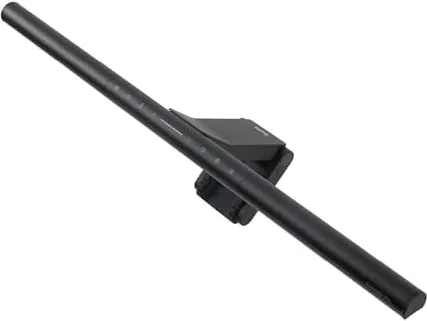
If you run an ultrawide or a wide desk monitor and want light on the keyboard without a lamp eating desk space, this is the first one to check. It’s 19.68 inches wide, so it spans a large display. Buyers consistently point to lighting quality and everyday functionality as the reasons it stays mounted.
The clamp is the real design feature. Nothing touches the desk surface, so papers and a mouse pad keep their room. Brightness and color temperature both adjust. The body mixes aluminum and zinc with ABS and polycarbonate — it reads as hardware, not a plastic strip. Touch controls sit on the bar itself. It draws 5 watts over USB and ships with its own transformer. Weight is about 1.8 pounds, warranty is one year. A 4.8-out-of-5 average across 1,350 reviews is a strong signal for a $169 accessory.
Honest limits. It’s corded, so plan on a free outlet or powered port — there’s no battery. The only control method listed is touch. No app, no remote. It has no water-resistance rating, so keep drinks away. Smaller monitors will feel that 19.7-inch overhang.
Buy if you have a wide display and want clip-on task lighting. Skip if you need wireless or app control, or you’d rather spend well under $100.
Verdict: For a wide monitor, this is the light bar to beat: 19.68 inches of clamp-mounted LED coverage with adjustable temperature and touch control. It draws 5 watts over USB and stays put. Don’t expect portability or water resistance.
The best thing is that the light comes from above the very center of the desk and is not covered by anything.
The BenQ is FAR superior. It's more stable, as in it grips better to the monitor (I have a curved one).
The dial for the the benQ is much premium as well, in terms of functions and engineering.
Best for backlight: BenQ ScreenBar Halo 2
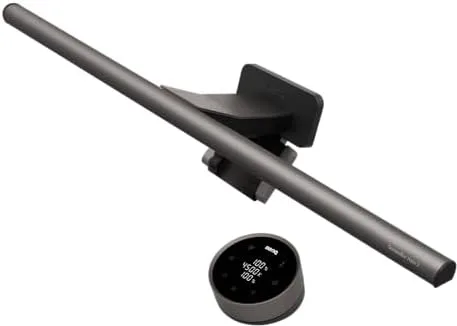
Best for people who work or game after dark and want the wall behind their monitor lit, not just the desk in front of them.
The Halo 2 does two jobs at once. Two LED sources — a front bar and a rear backlight — let you wash the wall behind the screen. Owners credit that setup with reduced eye strain in a dark room. Color temperature and brightness both adjust. It draws five watts over USB, so a single powered port runs the whole thing.
Control is the other draw. A desktop dial handles brightness and temperature without reaching over the monitor. The motion sensor turns the lamp on and off automatically. At 4.7 out of 5 across 1,395 ratings, the automatic on/off behavior and low-light performance are the two most-praised traits. Buyers mention the dial as the reason they stopped touching the bar itself.
The weakness is physical. The rear mounting block is large, roughly the size of the bar’s 4.3-inch profile. It eats monitor-top space, so a webcam gets shoehorned in. Thin-bezel or glass-back panels can flex under the 1.76-pound assembly.
Buy if you have a dark-room backlight need and monitor-top room to spare. Skip if your panel already carries a webcam and a light, or you want something you can pack away.
Verdict: The BenQ ScreenBar Halo 2 is the monitor light to beat for dark-room work. Automatic motion sensing and a desktop dial make control effortless, and the rear backlight genuinely reduces eye strain. The bulky rear mount is the only real flaw — skip it if your monitor top is already crowded.
I just want to give my short review about this light bar because honestly I love it, ive been eyeing on this for awhile now but I just never thought I will need the upgrade.
I mainly use it when I get in the dark which I prefer, I love the look of warm lighting during night and minimal lighting.
I use it both during the day and in low light, and honestly I'm so used to it that it's hard to do without.
Best for eye care: BenQ ScreenBar E-Reading
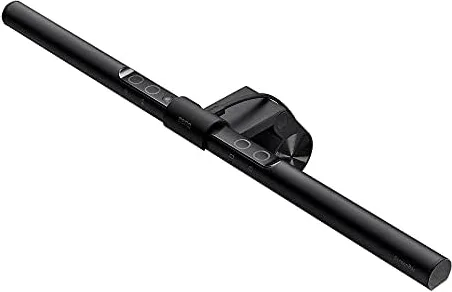
Best for anyone logging long hours at a desk who wants even light on the work surface without it hitting them in the eyes.
The bar mounts at tabletop level. It runs 20.08 inches across by 1.97 inches deep and tall, so it spans a wide stretch of desk while taking up almost nothing. The body is matte black aluminum, around 1.8 pounds. Owners repeatedly describe the illumination as comfortable and non-blinding. Brightness and color temperature both adjust, with touch control on the unit itself. Power is USB, rated at 5 volts and 5 watts. It holds 4.7 out of 5 across 4,495 ratings.
The recurring complaint is the bottom of the dimming range. Buyers report that even the lowest setting stays fairly bright directly in front of you. Some mention an older, cheaper light bar that dimmed further down. It’s indoor-only and not water-resistant, so a garage or workshop is out.
At $169.15, buy if you want adjustable, non-blinding task lighting and rarely need a genuinely dim room. Skip if you need a very low minimum, or you’d rather spend less on the same basic idea.
Verdict: The BenQ ScreenBar earns its price on a 24-inch desk with even, non-glaring light, adjustable color temperature, and a clamp that frees the desktop. Its dimmest setting is still bright, so if you need a truly dark room or want cheaper, pass. Otherwise, buy it.
This is the only gripe i have with the BenQ light - it's lowest setting is still pretty bright in front Previously I had a cheap-o light bar, which has a much lower setting
My lights in my office are too bright, but the screen bar is just enough light to see what I'm doing without being blinding.
My favorite feature is that it auto adjusts the lighting to the available light conditions as the day goes on.
Best for RGB: Quntis Monitor Light RGB PRO Backlight
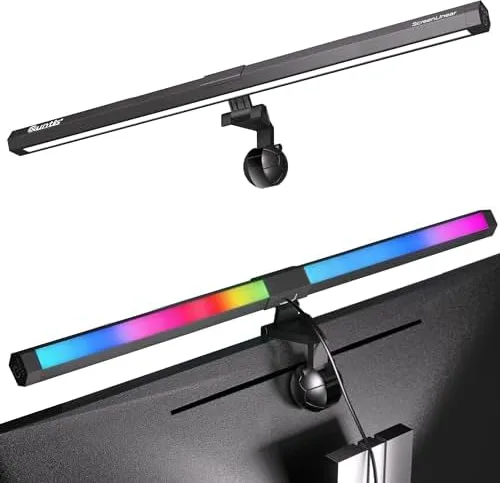
Best for gamers and work-from-home users who want ambient color behind a monitor plus a non-glare bar aimed at the desk, powered from one USB connection.
The RGB PRO Backlight packs two LED light sources into a 17.12-inch aluminum bar: a 15-mode dimmable backlight for the wall behind the screen and an Ra95 downlight with three color temperature settings. Both run through touch controls. A memory function returns to your last setting. It draws 5 watts over USB, so it sips power and stays usable through long night sessions — the use case owners mention most often. That’s a big reason 304 reviewers landed at 4.3 out of 5 stars. Clip-on installation keeps the desktop clear, and the matte black aluminum body blends in with most monitors.
The recurring knock is mounting. Buyers report the bar can sit unstable or bend against the monitor and need periodic readjustment. That matters if you reposition or tilt the screen often. It’s also not water-resistant, so a drink-heavy desk setup isn’t ideal.
Buy if you want a $49.59 dual-light bar for a mostly fixed monitor and value the RGB backlight. Skip if you need a mount that holds position through constant adjustment.
Verdict: At $49.59, the RGB PRO Backlight earns its spot for dark-room users who want ambient color plus desk lighting. The unstable mount keeps it from being a set-and-forget choice.
For precision work, as a hobbyist, I would not rely on this lamp given that you can’t move it around and the area that is bright enough to see fine detail surfaces is limited.
It acts as a desk lamp you can change the colour temperature and brightness of which I like, it’s also meant to reduce strain on your eyes by acting as a blue light filter!
While I did find some wobbling initially with the lamp being unstable, a bit of light pressure on the sticky-backing on the hook kept things pretty sturdy.
Best budget: SAMPHON Monitor Light Bar
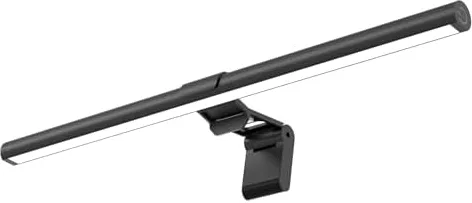
Best for: budget-conscious desk users who want a 15.7-inch light bar over a standard monitor without spending much — it runs $19.63.
What you get for the money is decent. The LED strip is rated to 900 lumens, enough output to matter on a dark desk. It’s 15.75 inches long and 0.78 inches wide, so it sits across wider monitors without much overhang. The 3.3-inch height keeps the head above the screen line. Three color temperatures with stepless dimming cover the usual late-night and daytime settings. It draws 5 volts at 1 amp. A plain USB power cable is included, so there’s no wall adapter to track down. Owners rate it 4.2 out of 5 across 441 reviews, and the feedback lands on value: buyers say it’s worth the price and that they’d buy it again. SAMPHON backs it with a 1-year warranty.
The honest downside is that the payoff is conditional. Some owners describe the benefit as minimal, calling light bars a gimmick that only helps in certain setups. Whether it helps depends on how much ambient light is already in the room. Cheaper models also reportedly carry flaws that newer versions fixed with extra features. This is the budget end of that line, not the improved end.
Buy if you have a dim room and want cheap screen-area lighting. Skip if your room is already well lit, or you want the refinements newer models add.
Verdict: At $20, it’s a gamble. Owners call it a good value, but buyers report the benefit is minimal and gimmicky. It only makes sense in a dim room; if your space is already lit, skip it.
It reduces eye strain (tho some monitors already have the feature for this), it boosts my productivity big time and make my workspace more comfortable.
I bought the BenQ one and ended up returning it because it didn’t really make much of a difference for me (I guess my room has enough light).
I just bought a Quntis off of Amazon and have been using it for the last 4 days and have been pretty impressed for around $60.
Comparison: 24-inch monitor light bars at a glance
| # | Product | Award | Price | Rating | |
|---|---|---|---|---|---|
| 1 | BenQ ScreenBar Pro LED Monitor Light Bar (Black) - Ultrawide Lighting, Motion Sensor, Adjustable Brightness/Color Temperature, Eye-Care USB-C Monitor lamp, No Glare, Curved Monitors, Monitor accessory | best overall | $169.15 | 4.8/5 | Check price |
| 2 | BenQ ScreenBar Halo 2 LED Monitor Light Bar - Wireless Controller, Backlight, Motion Sensor, Adjustable Brightness/Color Temperature, Eye-Care, No Screen Glare, Fits Curved Monitor, Monitor Accessory | best for backlight | $118.15 | 4.7/5 | Check price |
| 3 | BenQ Screenbar E-Reading LED Computer Monitor Light Lamp with Auto-Dimming and Hue Adjustment Features, Matte Black USB Powered Office Lamp (ScreenBar_Black) Complements with Backlight/RGB setups | best for eye care | $169.15 | 4.7/5 | Check price |
| 4 | Quntis Monitor Light RGB PRO Backlight, Eye-Care Dual Light Computer Light Bar Gaming Office Desk Lamp, 15 Modes Dimmable Backlight, 3 Color Temperature Adjustable Brightness, Ra95 Screen Light Bar | best for rgb | $49.59 | 4.3/5 | Check price |
| 5 | Monitor Light Bar, Eye-Care USB Computer Monitor Lamp for Home Office Gaming, 15.7” Ultrawide LED Light, 3 Color Temperatures Stepless Dimming Screen Bar | best budget | $19.63 | 4.2/5 | Check price |
How to choose a monitor light bar for a 24-inch screen
Fit comes first. Match the bar’s width to the 24-inch panel, not to the desk. A bar sized for an ultrawide can overhang the bezels, throwing light past the screen onto the wall. An undersized bar leaves the outer edges of the work surface dark. Check the counterweight or clip against your bezel thickness and against any webcam already mounted on top. The two compete for the same spot. A clip that fits a thin bezel may not close over a thicker one.
For glare control, look for asymmetric optics that direct light down onto the desk instead of at the panel. You also want a dimming range that reaches low enough for evening sessions.
Controls come in two forms: on-bar dials and separate remotes. A remote is easier to reach when the bar sits behind a crowded desk.
Price tends to track width and control type more than peak brightness. On a 24-inch screen, a narrower mid-range bar with a remote can cover the same area as a wider flagship.
Questions before you buy
Will a monitor light bar fit a 24-inch monitor?
Yes — the BenQ ScreenBar E-Reading, ScreenBar Pro, and ScreenBar Halo 2 each run about 19.7 to 20.1 inches wide, so they fit across the top of a 24-inch monitor, while the Quntis Curved Monitor Light Bar is built for 34-inch and larger screens. The Under Monitor RGB Light Bar is a 12-inch bar designed to sit under a monitor rather than mount on top.
Does a monitor light bar cause glare on the screen?
Nothing in these listings directly addresses glare on the screen itself, so look for a bar that aims light downward at your desk rather than at the panel—the Quntis Curved Monitor Light Bar lists "Downlight" as its lighting method, and BenQ Screenbar E-Reading owners report "comfortable, non-blinding illumination," though some buyers mention the minimum brightness stays too bright.
Can I use a monitor light bar with a webcam?
Yes — the BenQ ScreenBar Halo 2 includes a webcam accessory among its included components, so it can be set up with a camera. For the other bars here, like the BenQ ScreenBar, ScreenBar Pro, or the Quntis models, no webcam accessory or camera clearance is listed, so check your monitor's top bezel clearance and your webcam mount before buying.
Does a monitor light bar need USB-C or just USB power?
These monitor light bars just need 5-volt USB power rather than USB-C specifically — the BenQ ScreenBar, ScreenBar Pro, and Halo 2 all list USB connectivity, and the Quntis models run at 5 volts as well. Since none of them specify a port shape, check the included cable and your monitor or adapter's port type if you need USB-C.
How bright should a monitor light bar be for a 24-inch screen?
None of these listings give a brightness output in lumens, so there's no number to match to a 24-inch screen — check the manufacturer's brightness spec and confirm a bar around 17–20 inches wide fits above your monitor. What the guide does show is wattage (5W on the BenQ ScreenBar E-Reading, ScreenBar Pro, and ScreenBar Halo 2; 10W on the Quntis curved bar) plus adjustable, auto-dimming control, and buyers mention the E-Reading's minimum brightness stays too bright for dark rooms.
Are RGB backlights useful for everyday work?
The RGB backlight models here — the Quntis Curved Monitor Light Bar 15 RGB Backlight at $47.99 and the Quntis Monitor Light RGB PRO Backlight at $49.59 — are listed for gaming, streaming, movies, and decoration rather than everyday work. If your priority is daily desk work, look at the BenQ ScreenBar models, where owners mention comfortable, non-blinding illumination and adjustable brightness and color temperature.
Is a wireless controller worth it on a monitor light bar?
If you want wireless control, the BenQ ScreenBar Halo 2 at $118.15 includes a remote control and a desktop dial while costing less than the touch-only BenQ ScreenBar E-Reading and ScreenBar Pro at $169.15 each, so it adds convenience without a price premium here. Buyers mention its automatic on/off convenience and adjustable color temperature and brightness, though the bulky design with a large rear block is a noted drawback; the Quntis Curved Monitor Light Bar at $47.99 also includes a remote control if you want a cheaper option.