All guides / Monitor Light Bars
Best Monitor Light Bar: 5 Picks Worth Buying in 2026
- Updated
- Picks
- 5
- Edition
- No. 1
- Published by
- Try Mersianto
The BenQ ScreenBar Halo 2 is the best overall for its wireless dial, motion sensor, backlight, and curved-monitor fit at $139. The ScreenBar Pro suits ultrawide setups, while the Mount-It! is the budget choice.
Best Monitor Light Bar: What Matters for Screen Glare and Fit
A monitor light bar is a narrow fixture that clamps to the top of a display and lights the desk below it. It doesn’t light the room. Two variables separate a bar that earns its place from one that gets unplugged: where the light goes, and whether the mount fits your monitor.
Glare control comes down to optics. Bars built to throw light down and forward keep it off the panel. Bars that spill backward brighten the screen itself. Owners report the spill is visible in dark scenes, and that it undercuts the reason for buying a bar in the first place.
Fit is mechanical. The clamp needs clearance for your monitor’s thickness and a top edge flat enough to grip. Thin-bezel and curved displays are the usual trouble spots. Buyers mention counterweights and rubber pads as the parts that decide whether a bar stays put.
Control method is what you live with daily: a dial on the bar, a touch strip, or a wireless remote.
This guide sorts BenQ’s premium models, a budget bar, and an RGB gaming bar by those three factors.
BenQ ScreenBar Halo 2: Best Overall Monitor Light Bar
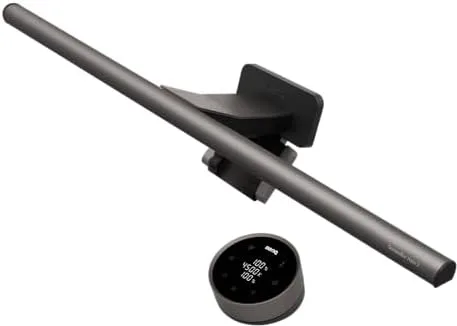
Best for anyone who works late at a desk, especially in a dark room, and wants light on the keyboard without glare bouncing off the screen.
For $139, the ScreenBar Halo 2 covers a lot of ground. Two LED sources — the front bar and a rear backlight — give you task light plus a soft wash behind the monitor instead of one harsh pool of light. Brightness and color temperature are both adjustable. A memory function keeps your settings between sessions. The motion sensor handles on/off on its own. Owners single that out as the reason the light actually gets used rather than forgotten. The aluminum body and dark grey finish put the unit at about 1.8 pounds. The wireless desktop dial offers a second control path next to touch controls on the bar. At 4.7 out of 5 across 1,391 reviews, satisfaction is high. BenQ includes a 1-year warranty.
The recurring complaint is bulk. Buyers describe the bar as obtrusive. On a shallow or visually minimal desk, it reads as a large object clamped above the screen. It also needs a USB cable at all times—no battery, no cordless placement.
Buy if you want automatic, adjustable light on a monitor and don’t mind the footprint. Skip if you want something you barely notice.
Verdict: The ScreenBar Halo 2 earns its place for late-night work: motion-sensor on/off, adjustable color, and wireless control beat most bars. But it’s bulky and corded. Skip it if you want a near-invisible setup or battery-powered placement.
I just want to give my short review about this light bar because honestly I love it, ive been eyeing on this for awhile now but I just never thought I will need the upgrade.
I mainly use it when I get in the dark which I prefer, I love the look of warm lighting during night and minimal lighting.
I use it both during the day and in low light, and honestly I'm so used to it that it's hard to do without.
BenQ ScreenBar Pro: Best for Ultrawide and Curved Monitors
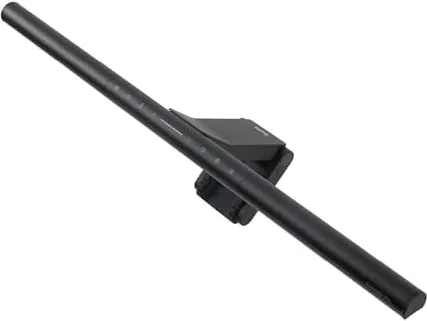
Best for: anyone lighting an ultrawide or curved monitor setup who wants the desk in front of them lit without glare bouncing off the panel — and who has $199 and a free USB-C port to spend on it.
The dimensions back up the ultrawide pitch: 19.68 inches across, 5.31 inches deep, 3.62 inches high. That width lets the bar cover a wide screen instead of pooling light in the middle. Power draw is modest at 5 watts on 5 volts DC. The aluminum base plus ABS and polycarbonate housing keeps weight at 1.76 pounds. Controls are touch-based, with adjustable color temperature and a motion sensor. The clamp mount leaves the desk surface clear. The 4.8-out-of-5 average across 1,346 ratings is high. Owners most often point to how well it functions and how it stacks up against competing bars.
Two things to weigh. The warranty runs one year, which is short for a lamp at this price. It’s corded only and explicitly not water resistant. You need a live USB-C connection and a dry spot—not a kitchen counter. The clamp also assumes a desk edge it can grab.
Buy if you run a wide or curved monitor and want even, glare-free task light from a single bar. Skip if you need battery power, splash resistance, or a longer warranty than 12 months.
Verdict: Owners rate it 4.8 out of 5. That’s the strongest signal here. It’s expensive and tethered, but the width and glare control make it the pick for ultrawide monitors. Buy it if you have $199 and a USB-C port; otherwise skip.
The best thing is that the light comes from above the very center of the desk and is not covered by anything.
The BenQ is FAR superior. It's more stable, as in it grips better to the monitor (I have a curved one).
The dial for the the benQ is much premium as well, in terms of functions and engineering.
Mount-It! Monitor Light Bar: Best Budget Monitor Light Bar
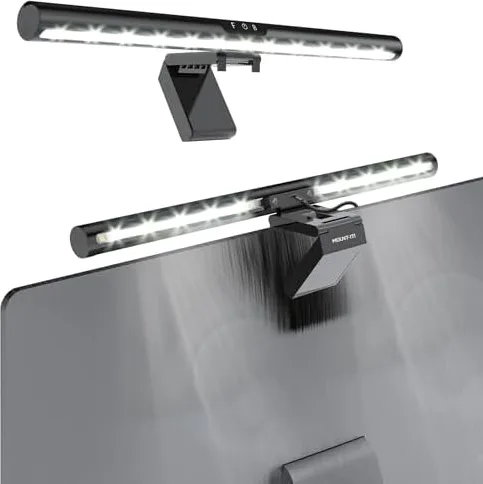
The Mount-It! TS-7010 is for shoppers who want an over-monitor light bar on a tight budget and can accept plastic in the shade housing.
At $32.99, you get a 16.5-inch-wide bar that clamp-mounts over a monitor. The shade is just 0.95 inches tall, so it sits low against the screen. Power comes over USB. The fixture carries 80 LEDs. Stepless dimming pairs with adjustable color temperature and two light modes. Controls are touch and push-button. The body mixes aluminum and plastic and weighs about 1.3 pounds. Mount-It! lists a 5-year manufacturer warranty on the model.
The catch is owner satisfaction. Thirty-nine ratings average 3.7 out of 5. That’s lukewarm. It suggests the bar functions but doesn’t win everyone over. Two limits are baked into the specs. The shade material is plastic rather than glass or metal. The lamp is explicitly not water resistant, so keep drinks and humidifiers clear of it.
Buy if you want an inexpensive USB light bar for a desk or office setup and a long warranty matters more to you than polish. Skip if you’d rather pay up for a consistently well-rated pick, want metal where you can see it, or need anything moisture-tolerant.
Check priceVerdict: For $33, you get a basic clamp-on light bar with a five-year warranty. But the plastic shade and 3.7-star owner rating signal mediocrity. It’ll light a desk, not impress. Buy only if budget is the entire point and you accept the gamble.
BenQ ScreenBar Plus: Best for a Desktop Dial
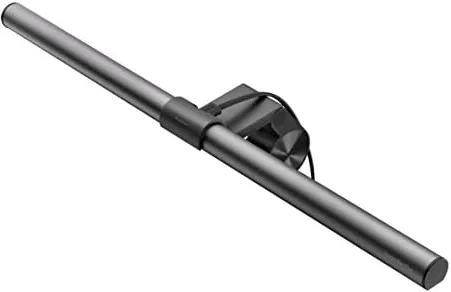
Best for: Anyone at a single-monitor desk who wants light aimed down at the keyboard and papers instead of back at their eyes, with a physical dial instead of an app.
Strengths. The ScreenBar Plus clips to the top of a monitor and shines through an asymmetrical housing. The beam is designed to fall onto the desktop rather than reflect off the panel. The desktop dial is the reason to buy this version over the cheaper ScreenBar: auto-dimming and hue adjustment sit at arm’s reach. No software involved. The body is aluminum with a matte silver finish and weighs 1.5 pounds. It runs on 5 volts at 5 watts over USB, so it adds no desk footprint and sips power. It holds 4.7 out of 5 across 2,215 ratings. BenQ backs it with a one-year warranty.
Weaknesses. Owners report that the lowest brightness setting is still too bright. At its dimmest, the lamp puts out more light than some people want for late-night work. It never drops to a nightlight level. It’s also corded—no battery—so it needs a free USB port.
Verdict. Buy if you want dial-controlled task lighting above a monitor and don’t need an extremely low floor. Skip if you work in a dark room and expect the dimmest setting to be genuinely dim.
Verdict: Buy it for the dial and glare-free desk light. Skip it if you work in a dark room and expect truly dim. BenQ’s best control layout doesn’t fix a minimum floor that’s still too bright, and the corded USB tether limits placement.
Adding the Screenbar addressed that issue, however, its minimum brightness setting was way too bright and that stopped me from using it more often.
I feel like it helps with eye strain and provides the lighting i wanted on my desk, better that an awkward lamp would have.
Also no shadows when im working on my desk now, wich i always got from the overhead light in the ceiling.
Monster Duo Monitor Light Bar: Best for RGB Gaming Atmosphere
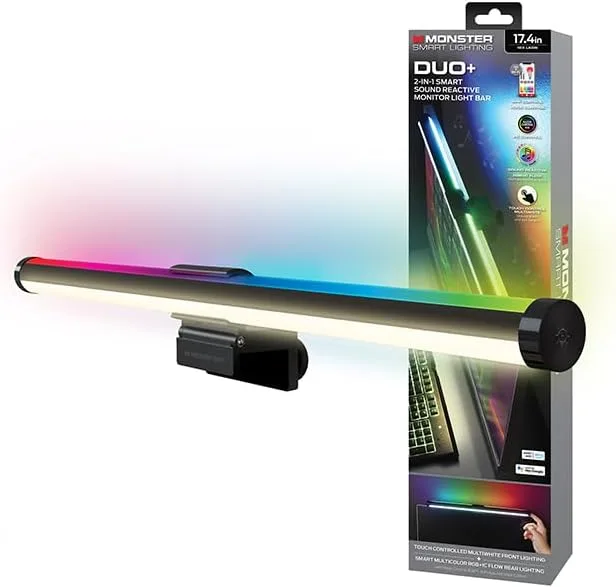
Best for a gamer who wants color on the desk rather than in the whole room.
The Monster Duo is a $16.99 desk light bar with two tricks: RGBIC and multiwhite LEDs in one fixture. You get white task light for reading and colored light for atmosphere, without buying two lamps. Control is unusually broad for the price: touch on the unit, an app over Wi-Fi, and voice through Alexa or Google, with Razer Chroma listed as compatible. Music sync and sound-reactive behavior are built in. That’s the feature that matters most if the lamp is meant to follow game audio.
Mounting is tabletop, not a monitor clamp. It needs desk space in front of or beside the screen. It runs on USB power, corded only. The base is plastic with metal and plastic in the body. It’s indoor-only and explicitly not water resistant, so keep it away from drinks and humidity.
The honest caveat is the rating: 3.6 out of 5, from just 8 reviews. A small sample at that score suggests real mixed results. There’s no reviewer detail here to say which features disappointed buyers. Colors and app reliability aren’t confirmed by anything in the listing. Treat the RGBIC and voice claims as advertised rather than proven. A limited one-year warranty applies.
Buy if you want cheap, app- and voice-controlled lighting for a gaming desk and accept a middling track record. Skip if you need a monitor-mounted bar, water resistance, or a longer review history before spending.
Check priceVerdict: Cheap RGB fun, but the 3.6-star, eight-review track record is a warning. Buy it only as a disposable desk accent for music-synced color. If you need dependable task light, monitor mounting, or long-term satisfaction, spend more elsewhere.
Monitor Light Bar Comparison: Price, Ratings, and Features
| # | Product | Award | Price | Rating | |
|---|---|---|---|---|---|
| 1 | BenQ ScreenBar Halo 2 LED Monitor Light Bar - Wireless Controller, Backlight, Motion Sensor, Adjustable Brightness/Color Temperature, Eye-Care, No Screen Glare, Fits Curved Monitor, Monitor Accessory | best overall | $139 | 4.7/5 | Check price |
| 2 | BenQ ScreenBar Pro LED Monitor Light Bar (Black) - Ultrawide Lighting, Motion Sensor, Adjustable Brightness/Color Temperature, Eye-Care USB-C Monitor lamp, No Glare, Curved Monitors, Monitor accessory | best for ultrawide | $199 | 4.8/5 | Check price |
| 3 | Mount-It! Monitor Light Bar, USB-Powered LED Lamp with Stepless Dimming and Adjustable Color Temperature, Eye-Caring Desk Light for Home, Office, and Gaming, Dual Light Modes, Space-Saving Design | best budget | $32.99 | 3.7/5 | Check price |
| 4 | BenQ ScreenBar Plus e-Reading LED Computer Monitor Light Bar with Desktop Dial, Auto-Dimming and Hue Adjustment, No Screen Glare, Space Saving, USB Powered, Matte Silver | best for dial control | $139 | 4.7/5 | Check price |
| 5 | Monster Duo Monitor Light Bar: Reduce Glare, Enhance Comfort, Boost Style, Level Up Your Gaming Atmosphere — 2-in-1 RGBIC & Multiwhite LED, App Voice Touch Control, Alexa Google Razer Chroma | best for gaming atmosphere | $16.99 | 3.6/5 | Check price |
How to Choose a Monitor Light Bar for Your Desk and Monitor
Three variables separate a monitor light bar that disappears into your setup from one you stop using.
Screen-glare control comes first. A light bar is meant to illuminate the desk, not the panel. The ones that handle this well direct output downward and forward instead of spilling across the screen. A bar that washes over your display forces a choice between a bright desk and a readable one.
Monitor fit is next. Bars clamp or rest on top of the monitor. Panel thickness, bezel shape, and curvature decide whether the mount sits level and holds. Check the clamp’s maximum opening against your monitor before buying. Confirm whether the bar is built for flat panels, curved panels, or both.
Control method decides how often you actually adjust the thing. On-bar dials keep everything in one place. Remotes and app control add range at the cost of another device to track.
From there, budget bars cover the basics. BenQ’s premium models sit at the fit-and-glare end of the market. RGB gaming bars trade some of that focus for desk lighting effects.
Questions before you buy
What is a monitor light bar, and how does it reduce screen glare?
A monitor light bar is an LED lamp that mounts on top of a monitor to light the desk below — examples here include the BenQ ScreenBar Halo 2 ($139), the BenQ ScreenBar Pro ($199), and the Mount-It! Monitor Light Bar ($32.99). The listings don't spell out the glare-reduction mechanism beyond the Monster Duo's "Reduce Glare" name and the BenQ ScreenBar Plus's asymmetrical shape, so check the manufacturer's description for how each one aims light away from the screen.
Will a monitor light bar fit a curved or ultrawide monitor?
The BenQ ScreenBar Pro is the ultrawide option here, at 19.68 inches wide with ultra-wide illumination and a patented clamp. Nothing in these listings confirms fit on a curved panel, so buyers with a curved monitor should verify the clamp and mounting clearance with the seller before ordering.
How is a monitor light bar powered?
These monitor light bars run on standard USB or corded electrical power — the BenQ ScreenBar Halo 2 includes an adapter with its USB power cable, the ScreenBar Plus includes a USB power cable with an inline controller, and the ScreenBar Pro comes with a transformer. They draw 5 volts and 5 watts, so a powered USB port or the included adapter is what supplies them.
Can a monitor light bar be used with a webcam?
Yes — the BenQ ScreenBar Halo 2 ships with a webcam accessory in the box, so it can mount alongside a webcam on your monitor. None of the other light bars in this guide list a webcam accessory, so if you pair one of those with a webcam, check that the monitor's top edge has room for both.
What color temperature is best for reading or working at night?
None of these listings specify a color temperature in kelvin, so they can't tell you which setting is best for night reading — what they offer instead is adjustable color temperature, found on the BenQ ScreenBar Halo 2 ($139), the BenQ ScreenBar Pro ($199), and the Mount-It! Monitor Light Bar ($32.99). Check each product's own manual or packaging for the warmest available setting, since a buyer looking to read or work at night typically wants the lowest, warmest end of that range.
Are budget monitor light bars worth considering?
Budget light bars like the Mount-It! at $32.99 (rated 3.7) and the Monster Duo at $16.99 (rated 3.6) are worth considering only if price outweighs owner satisfaction, since the BenQ models at $139–$199 rate 4.7 to 4.8. The Mount-It! does list a 5-year warranty, but buyers mention no standout feature set for either budget pick compared with the BenQ options' adjustable color temperature and motion sensing.
How do I install a monitor light bar without damaging my monitor?
The BenQ ScreenBar Pro and the Mount-It! Monitor Light Bar are both clamp-mounted, so the light bar grips the top edge of the monitor rather than being adhered or screwed to the screen; the ScreenBar Pro specifically lists a patented clamp. Before buying, check that your monitor's top edge is thin and flat enough for that clamp to close securely.
Related guides
- Best Monitor Light Bar for Small Desks: 4 Options in 2026
- Best Monitor Light Bar for Ultrawide Monitors: 6 Options in 2026
- Best Monitor Light Bar with Remote Control: 4 Options in 2026
- Best Budget Monitor Light Bar in 2026: 4 Picks Ranked
- Best Monitor Light Bar for Curved Monitors: 2 Options in 2026