All guides / Monitor Light Bars
Best Monitor Light Bar for Dual Monitor Setups: 4 Options in 2026
- Updated
- Picks
- 4
- Edition
- No. 1
- Published by
- Try Mersianto
For dual monitors, prioritize wide, glare-free coverage and stable mounting. The BenQ ScreenBar Pro is the top pick; the Quntis remote model is the budget choice; the BenQ Halo 2 suits curved screens.
Why a Dual Monitor Setup Needs a Different Light Bar
A light bar built for one monitor assumes one panel. Add a second display, and three things break.
Coverage first. A single-screen bar tapers at the ends. Output drops before it reaches the outer edge of a two-screen span. You get uneven light at the seam between panels—bright directly under the bar, dimmer toward the outside.
Second, glare. A bar that tilts forward or sits too close can throw light onto the panels. That defeats the purpose.
Third, mounting. A clamp sized for one bezel now has to hold across a seam. Whether it does depends on the bar’s weight and the panels’ thickness.
For dual screens, wide coverage and stable mounting are the deciding factors. The sections below cover both, plus what owners say about living with each option.
BenQ ScreenBar Pro: Best Overall for Dual Monitor Setups
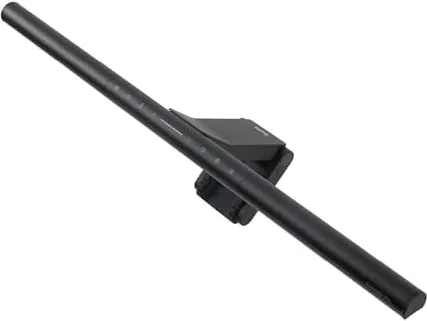
Best for a desk built around an ultrawide or curved monitor, where you want to light the keyboard and paperwork, not the screen.
At 19.68 inches wide, it spans most ultrawide panels. The 5-watt, 5-volt DC LED source runs over USB-C. Brightness and color temperature adjust. A touch switch and motion sensor turn it on before you fumble for a button. Build is solid too: an aluminum base with zinc, polycarbonate, and ABS parts, clamped to the monitor at 1.76 lb. Across 1,346 reviews, owners rate it 4.8 out of 5. They cite functionality, stability, and performance against rival brands.
Two things to accept. No recurring complaint theme showed up in the reviews, so the honest caveats sit in the spec sheet. It’s corded only, no battery. You need a live USB-C port near the monitor. It’s not water resistant. The clamp attaches at the display, so the bar travels with the panel, not the desk.
At $199, buy if you want a wide, adjustable, sturdily built bar over an ultrawide and have USB-C power nearby. Skip if you need battery operation, a freestanding lamp, or moisture resistance.
Verdict: The BenQ ScreenBar Pro is the clear pick for ultrawide desks: wide, bright, adjustable, and sturdily built, with owners rating it above rivals. Cord-only and no water resistance are trade-offs, but at $199 it’s worth it if you have USB-C nearby. Skip if you need battery or a freestanding lamp.
The best thing is that the light comes from above the very center of the desk and is not covered by anything.
The BenQ is FAR superior. It's more stable, as in it grips better to the monitor (I have a curved one).
The dial for the the benQ is much premium as well, in terms of functions and engineering.
Quntis Monitor Light Bar with Remote Control: Best Budget Pick
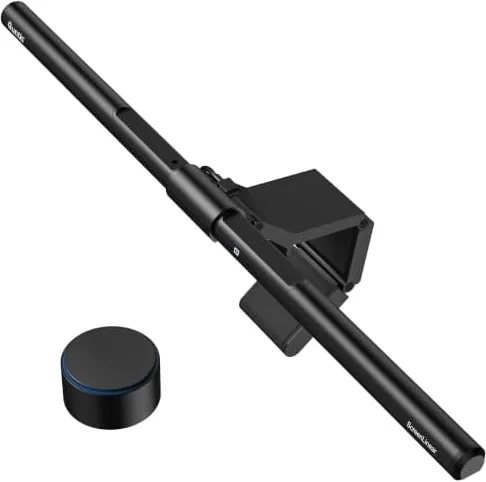
Best for anyone who wants a screen-mounted task light with a handheld remote and a budget under $50.
The bar runs 20.08 inches long in a 0.79-inch profile. That spans most 24- to 27-inch panels without crowding the bezel. Aluminum housing, plastic trim, 1.26 pounds—light enough that the bracket stays put. Power is 5-watt, 5-volt USB, so a monitor’s own USB port can run it. No wall adapter needed. Quntis lists fitment for monitors from 0.12 to 2.36 inches thick, curved or flat. The remote handles brightness and auto-dimming without reaching for the bar. Buyers agree: 4.4 out of 5 across 2,489 reviews, and remote control gets called out most.
Complaints cluster around two things. Owners report the mount won’t clamp securely on some curved panels. It can sit loose or slide on thicker bezels near the top of the stated range. Others mention light bleed—spill past the bar’s edges that washes onto the screen or into the room. That undercuts the no-glare pitch during dark-room work.
Buy if you have a flat or gently curved monitor, a spare USB port, and you want remote control at this price. Skip if your panel is unusually thick or aggressively curved, or if any light spill above the screen bothers you.
Verdict: The Quntis nails remote control, but the monitor clamp and light bleed are real dealbreakers. Buy it only if your monitor fits the clamp range and you can tolerate some spill; otherwise pass on this otherwise solid USB light bar.
The Remote Control is not touch sensitive by the way it requires manually turning the dial which is fine because it works well.
The light bar sits securely on my wide monitor and the touch controls work perfectly fine on the remote thing.
I would not say it's a deal breaker though I have been using it for a few days and I barely notice it.
BenQ ScreenBar Halo 2: Best for Curved Monitors
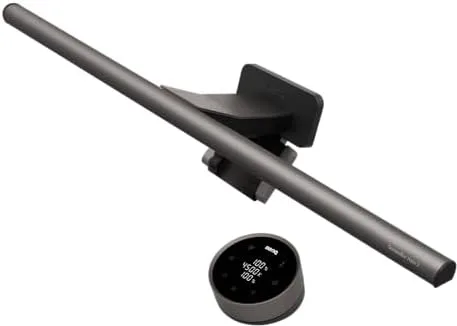
The BenQ ScreenBar Halo 2 is for curved-monitor owners who want a light bar that switches itself on and off and keeps its controls off the screen.
At $139, it costs more than most monitor light bars. Some hardware backs that up: a 1.76-pound aluminum body, two light sources (front bar plus rear backlight), and a wireless desktop dial that pairs with touch controls. Brightness and color temperature both adjust. The motion sensor handles power automatically—buyers mention it works in low light and daytime, not just after dark. The 4.7-out-of-5 rating across 1,391 reviews points to broad satisfaction, not a niche following.
The complaint that keeps surfacing is bulk. The rear counterweight block is large. Owners say the top of the monitor ends up visually cluttered, especially on thin displays. At 19.7 inches wide, it also spans much of the desk. Power runs over USB, so you need an open port or outlet within reach of the included adapter. Warranty is one year.
Verdict: buy if you have a curved monitor, want automatic on/off plus a physical dial, and don’t mind a chunky mount draped over the back of the screen. Skip if you want the fixture to be close to invisible up there, or if $139 is hard to justify for a desk lamp.
Verdict: The ScreenBar Halo 2 justifies its $139 price for curved-monitor owners who want motion-sensing auto on/off and a wireless dial. But the rear counterweight is bulky, and on thin displays it turns your monitor into a cluttered shelf. Buy it for function, not for a clean desk aesthetic.
I just want to give my short review about this light bar because honestly I love it, ive been eyeing on this for awhile now but I just never thought I will need the upgrade.
I mainly use it when I get in the dark which I prefer, I love the look of warm lighting during night and minimal lighting.
I use it both during the day and in low light, and honestly I'm so used to it that it's hard to do without.
BenQ ScreenBar Plus: Best for Desk Dial Control
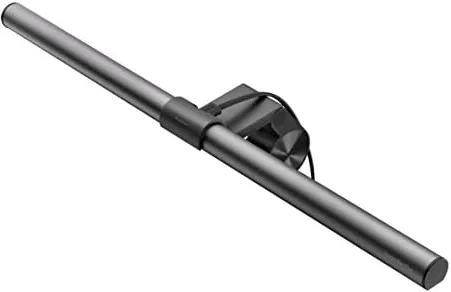
Best for desk workers who want dial-based control instead of reaching for on-screen settings or a phone app.
The control scheme is the point. A desktop dial plus touch switching handle brightness and color hue, so adjustments happen on the desk, not in software. The 5-watt LED draws little power and runs from a 5-volt USB source. The aluminum body in matte silver weighs 1.5 pounds. Its asymmetrical shape aims light down at the work surface while the bar sits above the screen. Buyers mention less desk clutter; the included clip mounts on top of the monitor and frees space a conventional lamp base would occupy. Auto-dimming adjusts output as ambient light changes. At $139, it costs more than a basic clip-on task lamp. The 4.7 out of 5 rating across 2,215 reviews suggests most buyers accept that.
The recurring complaint is the floor on brightness. Owners report the minimum setting is still bright. It won’t dim low enough for late-night use or a dark room. Want a barely-there glow at 2 a.m.? This is not that lamp. It’s also not water resistant, and it needs USB power at all times.
Buy if you want a monitor-mounted bar with a physical dial and don’t need near-dark output. Skip if you need very low minimum brightness.
Verdict: Buy it if you want dial-controlled, glare-free desk lighting and can live with a minimum brightness that is still too bright for late-night work. At $139 it is overpriced for a USB lamp, but the 4.7-star owner satisfaction wins if you do not need near-dark output.
Adding the Screenbar addressed that issue, however, its minimum brightness setting was way too bright and that stopped me from using it more often.
I feel like it helps with eye strain and provides the lighting i wanted on my desk, better that an awkward lamp would have.
Also no shadows when im working on my desk now, wich i always got from the overhead light in the ceiling.
Dual Monitor Light Bar Comparison
| # | Product | Award | Price | Rating | |
|---|---|---|---|---|---|
| 1 | BenQ ScreenBar Pro LED Monitor Light Bar (Black) - Ultrawide Lighting, Motion Sensor, Adjustable Brightness/Color Temperature, Eye-Care USB-C Monitor lamp, No Glare, Curved Monitors, Monitor accessory | best overall | $199 | 4.8/5 | Check price |
| 2 | Quntis Monitor Light Bar with Remote Control, Fit for Curved/Flat Monitor, Eye-Care USB Computer Lamp Dimmable Screen Light Bar with Auto-Dimming, No Glare Home Office Gaming Desk Lamp | best budget | $49.99 | 4.4/5 | Check price |
| 3 | BenQ ScreenBar Halo 2 LED Monitor Light Bar - Wireless Controller, Backlight, Motion Sensor, Adjustable Brightness/Color Temperature, Eye-Care, No Screen Glare, Fits Curved Monitor, Monitor Accessory | best for curved monitors | $139 | 4.7/5 | Check price |
| 4 | BenQ ScreenBar Plus e-Reading LED Computer Monitor Light Bar with Desktop Dial, Auto-Dimming and Hue Adjustment, No Screen Glare, Space Saving, USB Powered, Matte Silver | best for desk control | $139 | 4.7/5 | Check price |
How to Choose a Monitor Light Bar for Two Screens
How to Choose a Monitor Light Bar for Two Screens
For two screens, coverage width, glare control, and mounting stability matter more than the feature list.
Coverage. A bar sized for one display will leave one screen dim, the other bright. Look for a housing long enough to span both panels plus the gap between them. Read how the maker defines coverage—some bars are rated for a single monitor only.
Glare control. Light should land on the desk, not in your eyes. Asymmetric optics push light forward and down, keeping reflections off both screens. Bars with a narrow vertical throw tend to leave a hot spot on whichever panel sits nearest the light.
Mounting. Two screens often mean mismatched bezel thicknesses, or one display on an arm. A weighted clip needs a flat top surface and enough clearance. A pivoting head lets you level the bar across panels that don’t line up.
Adjustability. Independent brightness and color temperature control matter more here, because each panel catches the light differently.
Questions before you buy
Can one monitor light bar cover two monitors?
None of these light bars is described as covering two monitors — their widths run about 15.7 to 20.1 inches, sized for a single screen. If you run a dual-monitor setup, measure the combined screen width and plan on one bar per monitor, or look for a bar explicitly rated for multi-monitor use.
Do monitor light bars cause glare on a second screen?
None of these listings, from the $49.99 Quntis Monitor Lamp to the $199 BenQ ScreenBar Pro, addresses light spill onto a second screen, so there is no glare information here. If you run a dual-monitor setup, check the bar's asymmetric light direction and how far it sits forward of the panel before buying, since the listings only describe single-monitor mounting.
Will a monitor light bar fit a curved monitor?
None of these listings state curved-monitor compatibility, so verify the clamp against your screen's curve before buying. The Quntis Monitor Light Bar with Remote Control is the only one that publishes a fit range — monitors from 0.12" to 2.36" thick — but that figure covers thickness, not curvature, so confirm with the seller for a curved panel.
Do I need one light bar per monitor?
No, but nothing here says one bar covers two screens: every model listed ships as a single "1 Count" unit, so plan on one bar per monitor unless you confirm otherwise. If you're lighting a wide display, note that the BenQ ScreenBar Pro is sold as an ultrawide model at 19.68 inches wide.
How do I control two monitor light bars?
The guide doesn't cover pairing or syncing two light bars together, so check each model's controller before buying: the BenQ ScreenBar Halo 2 ($139) uses a wireless desktop dial plus touch, the ScreenBar Plus ($139) uses a desktop dial, the ScreenBar Pro ($199) is touch-only, and the Quntis bars ($49.99 each) are controlled by touch or, on the ScreenLinear PRO+ model, a remote. Whether one controller can operate two bars at once isn't something owners or the specs indicate, so confirm that with the manufacturer.
Are USB-powered monitor light bars bright enough for dual setups?
None of these 5-watt USB light bars lists a lumen or lux rating, so this guide cannot confirm that any of them is bright enough to light two monitors evenly on its own. For a dual setup, check the manufacturer's stated brightness and the bar's lit length — the BenQ models span roughly 19.7 inches, while the Quntis Computer Monitor Lamp is listed at 15.7 inches wide, and buyers of that Quntis mention poor light throw.
What should I check for clamp stability on thin or thick monitors?
Check that the light bar's stated monitor thickness range covers your panel — the Quntis Monitor Light Bar with Remote Control fits monitors from 0.12" to 2.36" thick, and the BenQ ScreenBar Pro uses a patented clamp. For the BenQ ScreenBar Halo 2, ScreenBar Plus, and other Quntis models, which list no thickness range, look for owner comments about mounting instability or frequent adjustment instead.