All guides / Monitor Light Bars
Best Monitor Light Bar for Laptops: 4 Options in 2026
- Updated
- Picks
- 4
- Edition
- No. 1
- Published by
- Try Mersianto
For laptop screens, the BenQ ScreenBar Halo 2 is the strongest pick thanks to its motion sensor, wireless dial, and glare-free beam; the Monster Duo is the budget option, while the iScreenBar is built specifically for iMacs.
Best Monitor Light Bars for Laptops: What Actually Fits a Laptop Lid
A monitor light bar hangs over the top edge of a screen and throws light down onto a desk. On a desktop monitor, that edge is a thick bezel with a flat back and plenty of clearance. A laptop lid is none of those things. It’s thinner, shorter, and hinged. It has to carry the bar’s weight every time you open or close the screen—and it tilts with it.
That changes what matters. Clamp footprint comes first. The jaws have to grip a thin lid edge without pressing on the panel or crowding the hinge. Weight follows. A heavy bar can pull a light lid out of position. Glare control matters more than raw output because a laptop screen sits closer to your eyes and reflects light straight back. Control type decides whether you can adjust the bar one-handed while the lid is tilted back.
This guide ranks light bars on those four points, not raw brightness.
Best Overall: BenQ ScreenBar Halo 2
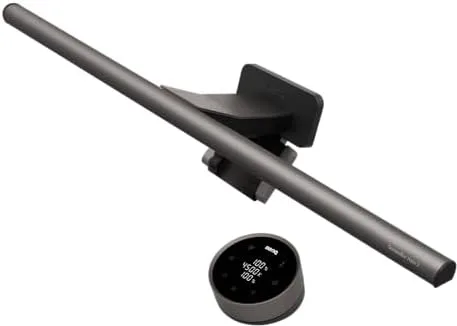
Buy this if you work at a desk after dark and want light on the keyboard without glare bouncing off the screen.
The ScreenBar Halo 2 clips to the top of a monitor and runs on USB power at 5 watts—about what a phone charger draws. The bar has two LED sources: the main light and a rear backlight that washes the wall behind the monitor. Owners report the motion sensor turns the lamp on when they sit down. Reviewers say it holds up in dim rooms and daylight. The wireless desktop dial adjusts brightness and color temperature, and a memory function keeps the last setting. The aluminum body comes in dark grey, and BenQ covers it for one year.
The recurring complaint is bulk. Buyers describe the rear counterweight block as visually intrusive. They say it adds clutter across the top of the monitor, which matters on a thin panel or a tight desk. It’s also wired, so you’ll need a free USB port nearby.
Buy it if you want automatic, adjustable light that avoids screen glare and you can live with hardware sitting on your monitor. Skip it if you want a clean monitor top or need battery power.
Verdict: Buy it if you want reliable auto-on, glare-free desk light and can live with a bulky counterweight on your monitor. Owners love it, but $139 is steep for a lamp. Skip if you demand a clean setup.
I just want to give my short review about this light bar because honestly I love it, ive been eyeing on this for awhile now but I just never thought I will need the upgrade.
I mainly use it when I get in the dark which I prefer, I love the look of warm lighting during night and minimal lighting.
I use it both during the day and in low light, and honestly I'm so used to it that it's hard to do without.
Best for Auto-Dimming: BenQ ScreenBar E-Reading LED Monitor Light
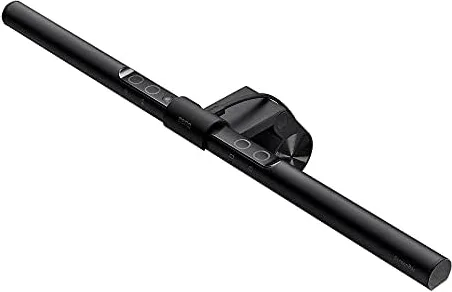
This one suits anyone who spends long hours in front of a monitor and wants task light on the keyboard and papers without a bright bar reflecting off the screen.
The 20.08-inch span covers most standard monitors, and it clamps to the top edge rather than eating desk space. It mounts tabletop-style and stands 1.97 inches tall, so the footprint is basically nothing. The housing and shade are aluminum with a matte black finish, and at 1.76 pounds it stays put without flexing the panel. Power comes over USB at 5 volts and 5 watts. You can run it from a monitor’s own USB port—no wall adapter needed.
The 4.7 rating comes from the auto-dimming and hue adjustment, both driven by touch controls on the bar. Reviews describe it as indispensable to their setups. The word that repeats is simple: people love it.
Three caveats. $199 is a lot for a desk lamp, even a good one. It’s not water resistant and it’s indoor-only, so keep it away from drinks. And the listing’s “included components” field says remote control. The switch type and controller type are both touch. Buyers expecting a physical remote should verify before ordering. The mined review data turned up no recurring complaint pattern.
Verdict: Buy it if you want glare-free task lighting that disappears into a monitor setup and you’ll use the auto-dimming daily. Skip if $199 is more than you’ll spend on light, or if you need a remote.
Verdict: The BenQ ScreenBar earns its cult following: $199 buys a sleek, auto-dimming light that vanishes into your monitor and kills screen glare. No remote, no water resistance, but none of that matters once it’s on. If you work after dark, stop hesitating.
This is the only gripe i have with the BenQ light - it's lowest setting is still pretty bright in front Previously I had a cheap-o light bar, which has a much lower setting
My lights in my office are too bright, but the screen bar is just enough light to see what I'm doing without being blinding.
My favorite feature is that it auto adjusts the lighting to the available light conditions as the day goes on.
Best for iMac: BenQ iScreenBar
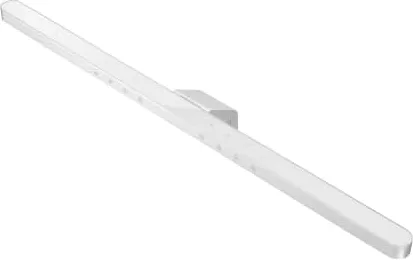
Buy this if you own an iMac and want to kill screen glare and reclaim desk space without adding a floor lamp or a second monitor stand.
The iScreenBar is a 19.7-inch-wide LED bar with a 3.04-inch aluminum shade, finished in matte silver to match Apple hardware. A touch switch handles control. The whole point is the glare-free beam: light is thrown down onto the desk, not out into your eyes or onto the panel. The feature list is where the $139 goes—a presence sensor, a video call mode, and macOS integration are all listed. The light is meant to react to your setup rather than just sit there.
Two things to weigh. That macOS integration and the presence sensor are dead weight if you don’t own an iMac. On a Windows PC, you’re paying a premium for a light bar that behaves like any other. And the unit runs 2.2 pounds—a real chunk of aluminum—with a 1-year warranty.
Buy it if you have an iMac, want the silver finish to match, and will actually use the video call mode. Skip it if you’re on Windows or non-Apple hardware. Five stars across 32 ratings is a strong signal, but it’s a signal from the crowd this bar was built for.
Verdict: The iScreenBar is a single-purpose luxury: buy it for an iMac if you’ll actually use the presence sensor and video call mode. On any other machine, you’re lugging 2.2 lb and paying $139 for a touch-switch lamp with no macOS tricks. That’s a bad trade.
In the evening, especially during long work or writing sessions, it creates a softer atmosphere behind the monitor and makes the setup feel less tiring on the eyes.
The installation was basically instant: I removed the old one, plugged the new one into USB, and it was ready.
I’ve bought one of these and really struggle to see the benefit of the light over the front of the monitor.
Best Budget: Monster Duo Monitor Light Bar
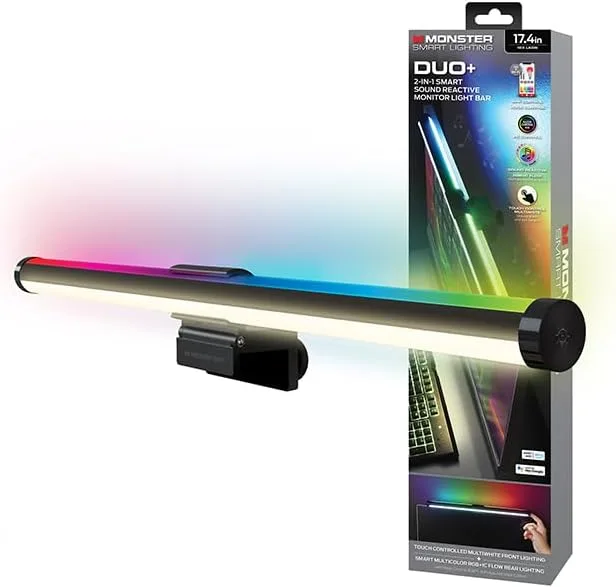
Buy this if you want colored ambient lighting over a monitor without paying the premium brands charge. Gamers and desk workers, mostly.
The price is the headline: $16.99 for a bar that does RGBIC color plus multi-white tones. Control options are unusually broad for that money—touch on the unit, an app over Wi-Fi, Alexa and Google voice, and Razer Chroma. That last one means the color can follow what’s on screen. Music sync and sound-reactive modes are listed, and the lighting is adjustable rather than locked to presets. The body mixes metal and plastic. The whole thing runs on USB and sits on a tabletop, so there’s no drilling or clamp hardware to figure out.
The catches are real. Eight reviews averaging 3.6 out of 5 is a thin sample—not enough to call the reliability settled either way. The warranty is one year. It’s not water resistant, so keep drinks and humidifiers away. It’s corded, so you’ll need a free USB port and you’re tethered to the desk. The listing’s glare-reduction claim has no supporting spec, so treat that as decoration, not an eye-strain fix.
Buy it if you want cheap Chroma-compatible ambient color and can accept a small review pool. Skip it if you need a guaranteed low-glare task light or anything wireless.
Check priceVerdict: The Monster Duo is a budget Chroma RGB bar, not a serious glare-fighting task light. Buy it for desk ambience and app/voice control; ignore the glare-reduction claim. The 8-review, 3.6-star sample is thin, and it’s not water resistant.
How These Four Light Bars Compare
| # | Product | Award | Price | Rating | |
|---|---|---|---|---|---|
| 1 | BenQ ScreenBar Halo 2 LED Monitor Light Bar - Wireless Controller, Backlight, Motion Sensor, Adjustable Brightness/Color Temperature, Eye-Care, No Screen Glare, Fits Curved Monitor, Monitor Accessory | Best overall | $139 | 4.7/5 | Check price |
| 2 | BenQ Screenbar E-Reading LED Computer Monitor Light Lamp with Auto-Dimming and Hue Adjustment Features, Matte Black USB Powered Office Lamp (ScreenBar_Black) Complements with Backlight/RGB setups | Best for auto dimming | $199 | 4.7/5 | Check price |
| 3 | BenQ iScreenBar (Silver) Monitor Light Bar for iMac with macOS, Glare-Free Lighting | Best for imac | $139 | 5/5 | Check price |
| 4 | Monster Duo Monitor Light Bar: Reduce Glare, Enhance Comfort, Boost Style, Level Up Your Gaming Atmosphere — 2-in-1 RGBIC & Multiwhite LED, App Voice Touch Control, Alexa Google Razer Chroma | Best budget | $16.99 | 3.6/5 | Check price |
Buying Guide: Choosing a Monitor Light Bar for Laptop Use
A laptop lid is a different mounting problem than a desktop monitor. The panel is thinner, the bezel is shorter, and the hinge isn’t built to carry extra load. So the specs that sell light bars for desk monitors are not the ones that matter here.
Clamp footprint comes first. A bar whose spring clamp or counterweight needs more depth than the lid offers will sit crooked or fail to grip. Buyers mention that shallow, padded clamps fit ultrabooks better than the deep jaws designed for a desktop monitor’s bezel.
Weight matters for the same reason. A heavy bar on a light lid can tilt the screen or stress the hinge over time.
Glare control beats brightness. A laptop screen sits low and close, so a bar that throws light forward rather than down puts a bright band across the display.
Control type is the last call. Owners report that a dial on the bar itself is easier to reach when the bar is clipped to a laptop than a remote or an app.
Questions before you buy
Can you use a monitor light bar on a laptop screen?
These light bars are designed to clip onto a desktop monitor or iMac, and the guide doesn't list any laptop compatibility, so a buyer should check the mounting clip's maximum thickness and clearance against their laptop lid before ordering. For example, the BenQ iScreenBar is built specifically for iMac, while the Monster Duo mounts on a tabletop with a plastic base that may not grip a thin laptop screen.
Will a monitor light bar scratch or press on a laptop lid?
None of these light bars, including the BenQ ScreenBar Halo 2 ($139) and BenQ iScreenBar ($139), is listed as laptop-compatible; all are described with desktop or tabletop mounting for monitors, so there is no information on lid scratching or pressure. Check the clamp design and weight against your laptop's lid thickness, and consider a freestanding or floor lamp instead if you want to avoid contact entirely.
How much do these monitor light bars weigh?
The BenQ ScreenBar Halo 2 and the BenQ ScreenBar E-Reading lamp each list a weight of about 1.8 pounds, while the BenQ iScreenBar lists about 2.2 pounds. The Monster Duo Monitor Light Bar has no weight listed, so a buyer would need to confirm that one directly.
Do monitor light bars cause glare on a laptop screen?
None of these bars specify glare behavior on a laptop screen, so the guide can't answer that directly. The BenQ iScreenBar ($139) does list a "Non-Glare" feature and the Monster Duo ($16.99) is marketed to "Reduce Glare," but for a laptop you should check the bar's mounting depth and owner reports about reflections on that specific screen.
Do monitor light bars need a power outlet, or do they run off USB?
The monitor light bars listed here run off USB rather than a wall outlet: the BenQ ScreenBar Halo 2 lists its power source as an electrical cable (USB) at 5 volts and 5 watts, and both the BenQ ScreenBar and the Monster Duo list USB connectivity, with the Monster Duo also described as corded electric. The BenQ iScreenBar doesn't list a power source, so check its specs with the seller before buying if that matters to you.
Can a monitor light bar sit behind a webcam on a laptop?
The BenQ ScreenBar Halo 2 ($139) lists a "Webcam Accessory" among its included components, suggesting it can accommodate a webcam sitting on the bar. However, all four bars here list desktop or tabletop mounting rather than laptop mounting, so buyers should check their laptop lid thickness and whether the webcam clip fits over the bar.
Is a monitor light bar better than a desk lamp for working on a laptop?
None of these products are compared against a desk lamp for laptop work, so nothing here establishes that a monitor light bar is better. If you're lighting a laptop setup, check whether the bar's mount fits your screen, since the BenQ ScreenBar Halo 2 ($139), the BenQ iScreenBar ($139), and the BenQ ScreenBar ($199) all list widths near 19.7 inches and are designed to clamp onto a monitor.
Related guides
- Best Monitor Light Bar for Dual Monitor Setups: 4 Options in 2026
- Best Monitor Light Bar: 5 Picks Worth Buying in 2026
- Best Monitor Light Bar for Small Desks: 4 Options in 2026
- Best Monitor Light Bar for Ultrawide Monitors: 6 Options in 2026
- Best Monitor Light Bar with Remote Control: 4 Options in 2026